
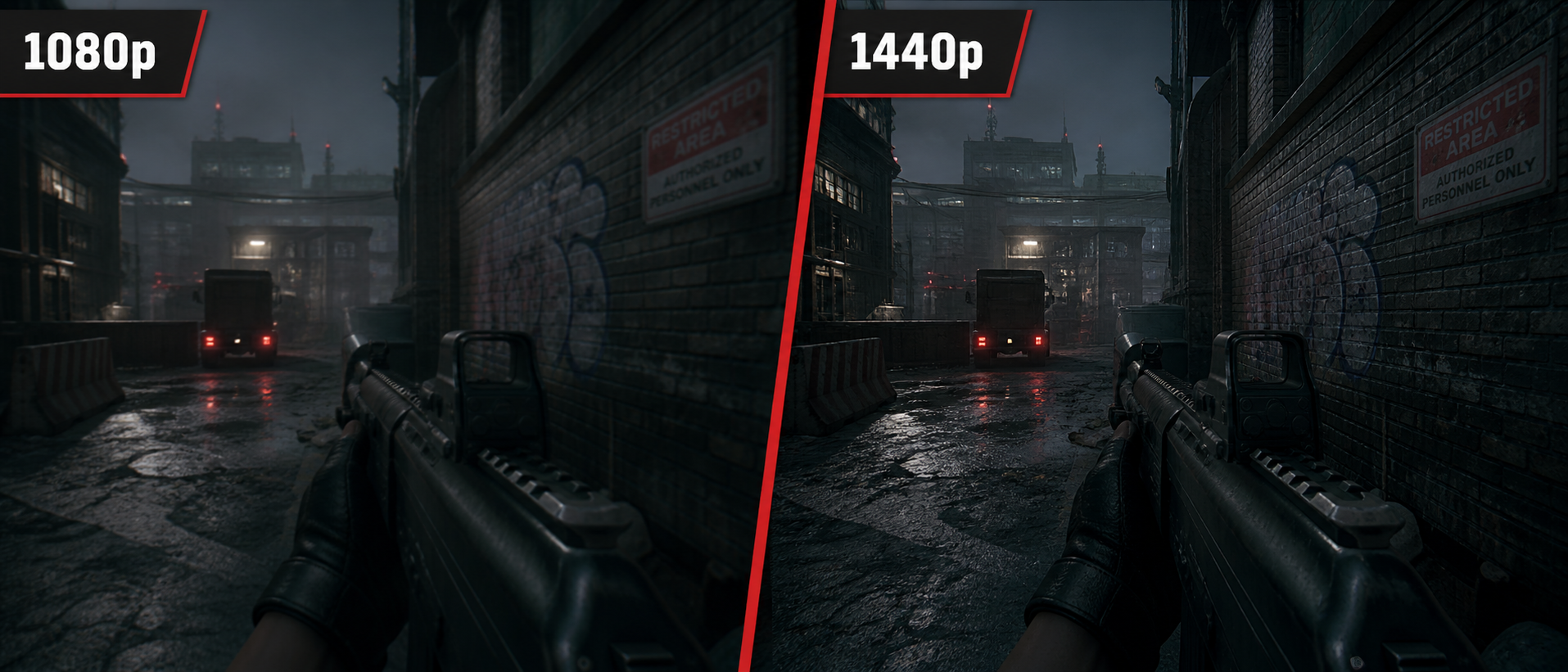
You're looking at gaming monitors on Amazon India. A 24-inch 1080p 144Hz panel is going for Rs 10,000. A 27-inch 1440p 165Hz monitor is Rs 18,000. Is the extra Rs 8,000 worth it? Will your GPU even survive? These are the questions that keep Indian gamers up at night.
The resolution debate isn't just about "more pixels = better." It's about your GPU power, monitor size, the games you play, and what you value more — buttery-smooth frame rates or crystal-clear visuals. Let's settle this once and for all.
What Do 1080p and 1440p Mean?
These numbers refer to the vertical pixel count of your display. The "p" stands for progressive scan (as opposed to interlaced). Here's what each resolution actually breaks down to:
| Spec | 1080p (Full HD) | 1440p (Quad HD) |
|---|---|---|
| Resolution | 1920 × 1080 | 2560 × 1440 |
| Total Pixels | 2,073,600 (~2.1 million) | 3,686,400 (~3.7 million) |
| Pixel Difference | Baseline | 78% more pixels than 1080p |
| Common Monitor Sizes | 24" (ideal), 27" | 27" (ideal), 32" |
| PPI at Ideal Size | ~92 PPI (24") | ~109 PPI (27") |
| Aspect Ratio | 16:9 | 16:9 |
| Also Called | Full HD, FHD | Quad HD, QHD, WQHD, 2K |
Think of it this way: 1440p has 78% more pixels than 1080p. That means your GPU has to work 78% harder to render the same scene at the same settings. This is the fundamental trade-off — more detail costs more GPU power.
Quick Note: "2K" is Technically Wrong
You'll see 1440p marketed as "2K" on Amazon listings. Technically, 2K refers to 2048 × 1080 (a cinema standard). But in common usage, people say "2K" to mean 1440p. Don't let the naming confuse you — if a monitor says "2K" or "QHD," it's 2560 × 1440.
The Visual Difference
On paper, 78% more pixels sounds impressive. But can you actually see the difference? The short answer: yes, absolutely — but how much it matters depends on what you're doing.
Text and UI Elements
The most immediately noticeable improvement. Game HUDs, subtitles, inventory text, and chat windows look significantly crisper at 1440p. If you play RPGs with lots of text, this alone might justify the upgrade.
Distant Objects and Foliage
In open-world games, 1440p resolves distant trees, buildings, and enemies more clearly. At 1080p, distant objects can appear shimmery or pixelated, especially when anti-aliasing struggles with fine detail.
Competitive Advantage
In games like Valorant or PUBG, spotting a distant enemy is easier at 1440p because they occupy more pixels on screen. A character that's 4 pixels wide at 1080p becomes 5-6 pixels at 1440p — that tiny difference matters when you're trying to land a headshot at range.
Reduced Need for Anti-Aliasing
Higher resolution means smaller pixels, which means jagged edges (aliasing) are less visible. At 1440p, you can often reduce or disable expensive AA settings like TAA or MSAA, which actually saves some GPU performance back.
The visual improvement is most dramatic when sitting close to the screen (typical desk setup at 50-70 cm). If you're gaming on a TV from across the room, the difference becomes harder to notice. But at a desk? Night and day on a 27-inch panel.
Pixel Density & Monitor Size
Resolution doesn't exist in a vacuum — it's the combination of resolution and screen size that determines image sharpness. This is measured in PPI (Pixels Per Inch). Higher PPI = sharper image.
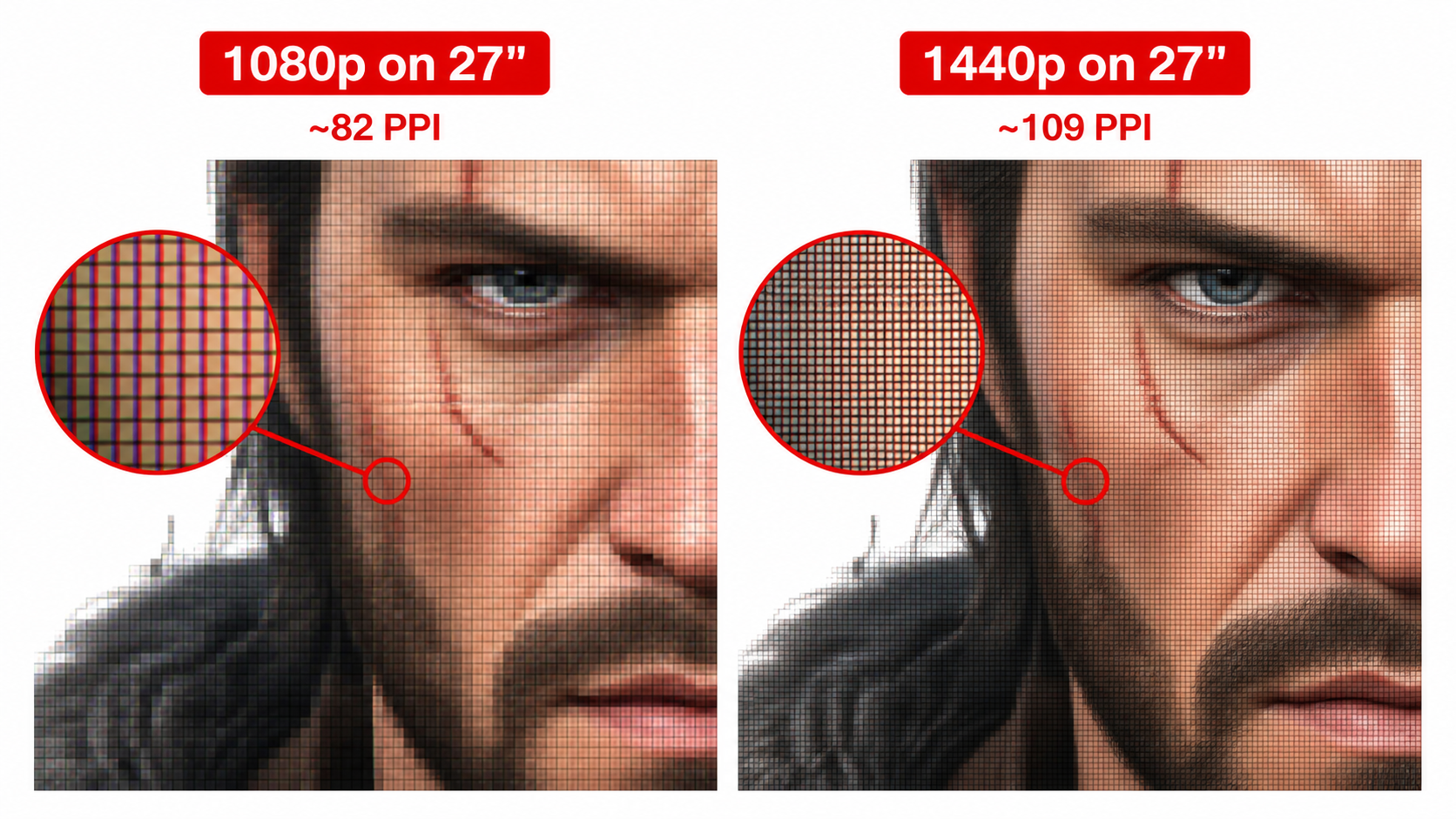
| Monitor Size | 1080p PPI | 1440p PPI | Verdict |
|---|---|---|---|
| 24 inches | 91.8 PPI | 122.4 PPI | 1080p looks great; 1440p is overkill (UI too small) |
| 27 inches | 81.6 PPI | 108.8 PPI | 1080p looks soft; 1440p is the sweet spot |
| 32 inches | 68.8 PPI | 91.8 PPI | 1080p looks bad; 1440p is acceptable |
The takeaway is simple: 1080p belongs on 24-inch monitors and 1440p belongs on 27-inch monitors. This pairing gives both resolutions their best pixel density. If you're buying a 27-inch monitor, 1440p isn't just nice to have — it's almost necessary to avoid a visibly soft, pixelated image.
The 27" 1080p Trap
A lot of budget monitors in India are 27-inch 1080p panels priced around Rs 12,000-14,000. They seem like a great deal — bigger screen for less money. But at 81.6 PPI, the image looks noticeably blurry compared to a 24-inch 1080p panel. We'd recommend either staying at 24 inches for 1080p, or stretching your budget to a 27-inch 1440p monitor.
GPU Performance Impact
This is where the rubber meets the road. More pixels means more work for your GPU. Here's what the real-world FPS impact looks like with popular GPUs available in India:
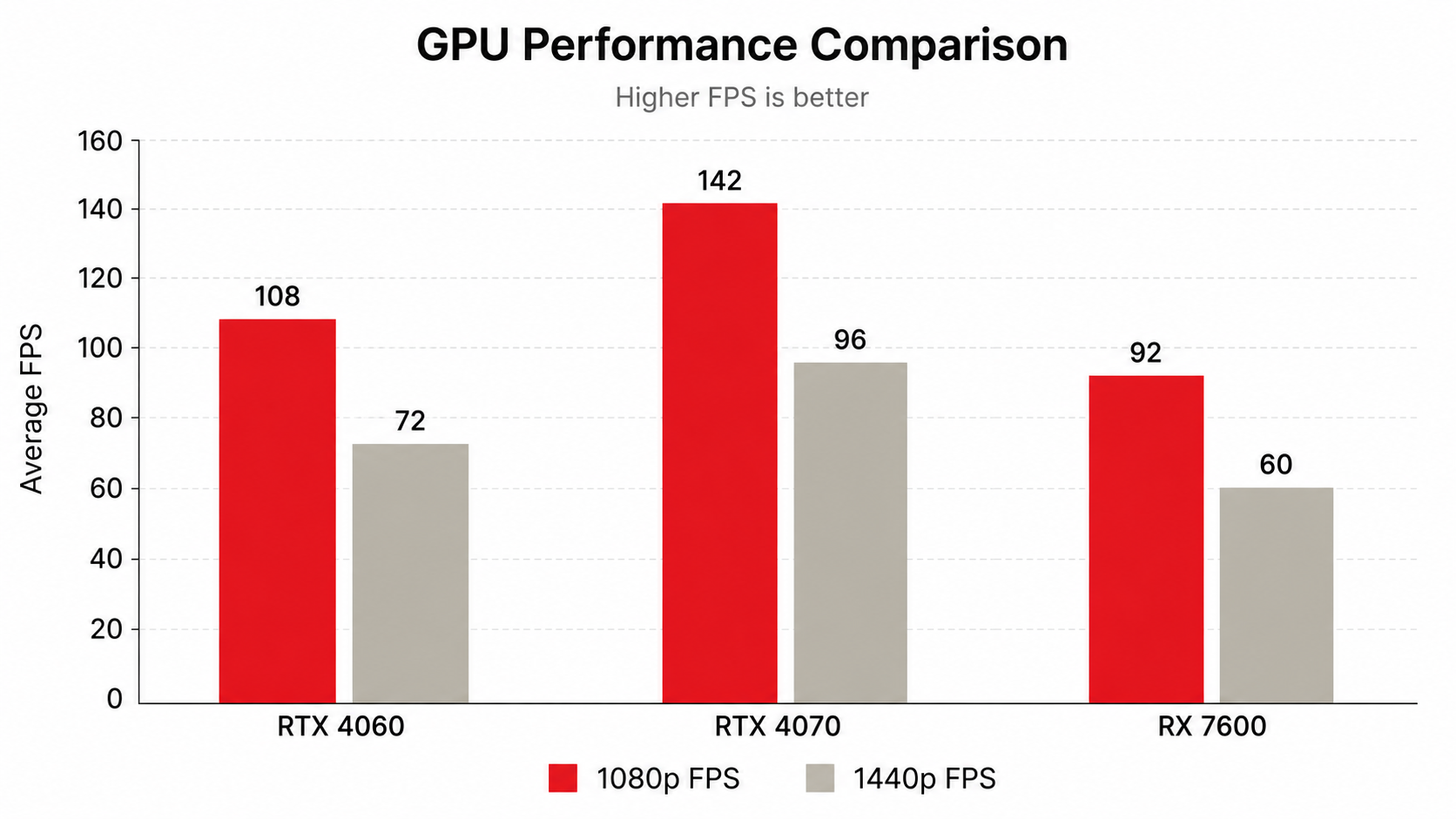
| GPU | 1080p Avg FPS | 1440p Avg FPS | FPS Drop |
|---|---|---|---|
| RX 7600 (8GB) | 95-110 FPS | 60-75 FPS | ~30-35% |
| RTX 4060 (8GB) | 100-120 FPS | 65-85 FPS | ~28-33% |
| RTX 4060 Ti (8GB) | 120-140 FPS | 85-105 FPS | ~25-30% |
| RTX 4070 (12GB) | 140-165 FPS | 105-130 FPS | ~22-28% |
| RX 7800 XT (16GB) | 135-155 FPS | 100-125 FPS | ~22-27% |
Key insight: The FPS drop isn't a flat percentage — it varies by game. CPU-bound titles (esports games like Valorant, CS2) show smaller drops because the bottleneck is the CPU, not the GPU. GPU-heavy AAA games (Cyberpunk 2077, Alan Wake 2) show the full 30-40% drop.
Also note the VRAM consideration. At 1440p, games use more VRAM for higher-resolution textures and larger frame buffers. GPUs with only 8GB VRAM (like the RTX 4060 and RX 7600) can hit VRAM limits in some modern titles at 1440p with high texture settings, causing stuttering. The 12GB RTX 4070 and 16GB RX 7800 XT handle this much better.
The DLSS / FSR Wildcard
Nvidia's DLSS and AMD's FSR can render at a lower internal resolution and upscale to 1440p, recovering much of that lost FPS. With DLSS Quality mode, you're often rendering at ~960p internally and upscaling to 1440p — getting near-native visual quality with 1080p-like performance. This makes 1440p much more viable on mid-range GPUs than raw numbers suggest.
Best GPUs for Each Resolution (India)
Here's our practical recommendation based on current Indian pricing (as of May 2026) and what delivers a smooth experience:
Best GPUs for 1080p Gaming
Targeting 144+ FPS at High settings
Budget (Rs 22,000-26,000): RX 7600 — Excellent for 1080p 144Hz. Handles nearly all games at high settings above 90 FPS. Best value 1080p card in India right now.
Mid-range (Rs 27,000-32,000): RTX 4060 — Slightly faster than RX 7600, plus DLSS 3 and frame generation. Ideal if you want future headroom.
High FPS (Rs 35,000-40,000): RTX 4060 Ti — Overkill for 1080p in most titles, but perfect for 240Hz competitive gaming where you want 200+ FPS consistently.
Best GPUs for 1440p Gaming
Targeting 100+ FPS at High settings
Entry 1440p (Rs 27,000-32,000): RTX 4060 with DLSS — It works, but you'll lean on upscaling for demanding games. Acceptable for esports + casual AAA.
Sweet Spot (Rs 42,000-48,000): RX 7800 XT — 16GB VRAM, strong native 1440p performance, great longevity. The best value 1440p GPU in India.
Premium (Rs 48,000-55,000): RTX 4070 — Slightly behind RX 7800 XT in raw raster, but DLSS 3 with frame gen makes it feel faster. 12GB VRAM is solid for 1440p.
Our honest take: If your total GPU budget is under Rs 30,000, stick with a 1080p 144Hz monitor and enjoy buttery-smooth frame rates. If you can spend Rs 42,000+ on a GPU, 1440p becomes the better long-term investment — you'll be future-proofed for the next 3-4 years.
Competitive vs Immersive Gaming
Your gaming style should heavily influence your resolution choice. Here's how the two resolutions stack up for different use cases:
| Factor | 1080p Advantage | 1440p Advantage |
|---|---|---|
| Frame rates | Higher FPS = smoother input response | Still high enough for 144Hz with good GPU |
| Input latency | Lower at 240+ FPS | Negligible difference at 144+ FPS |
| Enemy visibility | 24" monitor = closer pixel density | More pixels per target = easier spotting |
| Visual immersion | Adequate for fast-paced games | Significantly better for story-driven games |
| Desktop use / productivity | Limited screen real estate | Much more workspace; great for coding, browsing |
| Pro scene preference | Most CS2/Valorant pros use 1080p 240Hz+ | Growing adoption in 2026, especially at 240Hz |
Choose 1080p if...
You play Valorant, CS2, or Apex Legends competitively and want every possible frame. You prioritize input latency over visual fidelity. You want the cheapest path to 240Hz+ gaming.
Choose 1440p if...
You play a mix of games (competitive + single-player). You use your PC for work and study alongside gaming. You value visual quality and have a GPU that can sustain 100+ FPS at 1440p.
Here's the thing most guides won't tell you: at 144Hz, the difference in perceived smoothness between 1080p and 1440p is negligible if both are hitting 144+ FPS. The "1080p is smoother" argument only applies when you're pushing for 240+ FPS in competitive scenarios. For the vast majority of Indian gamers playing at 144Hz, 1440p gives you better visuals with no real competitive disadvantage — as long as your GPU keeps up.
Monitor Pricing in India
Let's talk real numbers. Here's what you're looking at in the Indian market as of May 2026:
| Category | 1080p Options | 1440p Options |
|---|---|---|
| Budget 144Hz | Rs 9,000-12,000 (24" IPS) | Rs 16,000-19,000 (27" IPS) |
| Mid-range 165Hz | Rs 12,000-15,000 (24" IPS) | Rs 18,000-23,000 (27" IPS) |
| High-end 240Hz | Rs 18,000-25,000 (24.5" IPS) | Rs 28,000-38,000 (27" IPS) |
| Popular brands (India) | Acer Nitro, LG UltraGear, MSI G24 | Gigabyte M27Q, LG 27GP850, MSI MAG274QRF |
The price gap between a good 1080p 144Hz monitor and a good 1440p 144Hz monitor is typically Rs 7,000-10,000. That's significant on a tight Indian budget, but remember — a monitor lasts 5-7 years easily. Spread over its lifespan, the daily cost difference is negligible.
The total cost consideration: It's not just the monitor. Going 1440p often means needing a more powerful (read: more expensive) GPU. A realistic 1440p gaming setup costs Rs 8,000-15,000 more in total compared to a comparable 1080p setup. That's the monitor premium plus the GPU upgrade cost.
Total System Cost Comparison
The gap narrows if you use the RTX 4060 + DLSS for 1440p (~Rs 46,000 total), but the experience won't be as clean as native rendering.
Which Should You Choose?
Let's make this simple. Based on your situation, here's our straightforward recommendation:
Pick 1080p If...
- Your total GPU + monitor budget is under Rs 35,000
- You play primarily competitive FPS (Valorant, CS2) and want 240Hz
- You have an RTX 4060 or below and want maxed-out settings
- You prefer a 24-inch monitor (desk space constraints)
- You're building your first gaming PC and want to keep costs low
Pick 1440p If...
- You have (or plan to buy) an RTX 4070 / RX 7800 XT or better
- You play a mix of competitive and single-player games
- You also use your PC for work, college, or content consumption
- You want a 27-inch monitor for better immersion and productivity
- You're building a system meant to last 3-5 years without a monitor upgrade
The "Middle Ground" Option
Buy a 1440p 144Hz monitor now (~Rs 18,000) and game at 1080p scaled if your current GPU can't handle 1440p. When you upgrade your GPU later, you'll already have the right monitor. 1440p monitors handle 1080p input fine — though it won't look quite as crisp as native 1080p on a 1080p panel due to non-integer scaling. Still, it's a valid strategy if you plan to upgrade within a year.
Frequently Asked Questions
Is 1440p worth it over 1080p for gaming?
How much FPS do you lose going from 1080p to 1440p?
Can RTX 4060 handle 1440p gaming?
What size monitor is best for 1080p vs 1440p?
Is 1080p still good for gaming in 2026?
Should I get a 1080p 240Hz or 1440p 144Hz monitor?
The Bottom Line
Our Verdict
In 2026, 1440p is the new sweet spot for PC gaming — but only if your GPU budget allows it. The visual improvement over 1080p is substantial, especially on a 27-inch monitor at desk distance. With DLSS and FSR maturing, even mid-range GPUs can deliver playable 1440p performance.
However, 1080p is far from dead. For budget builds under Rs 50,000 total, for competitive gamers chasing 240Hz, and for anyone who values maximum FPS over pixel count — a 24-inch 1080p 144Hz+ monitor remains the smart, practical choice in India.
The real answer: Match your resolution to your GPU. Don't buy a 1440p monitor with an RX 7600 unless you're okay with medium settings. Don't buy a 1080p monitor with an RTX 4070 — you're leaving performance on the table. Resolution and GPU power should be in balance.
If you're building fresh today with a total budget of Rs 60,000+ for GPU + monitor, go 1440p. You'll thank yourself in two years when every game looks crisp and your monitor still feels modern. Below that? 1080p 144Hz is still king for the price-conscious Indian gamer.
Related Guides