
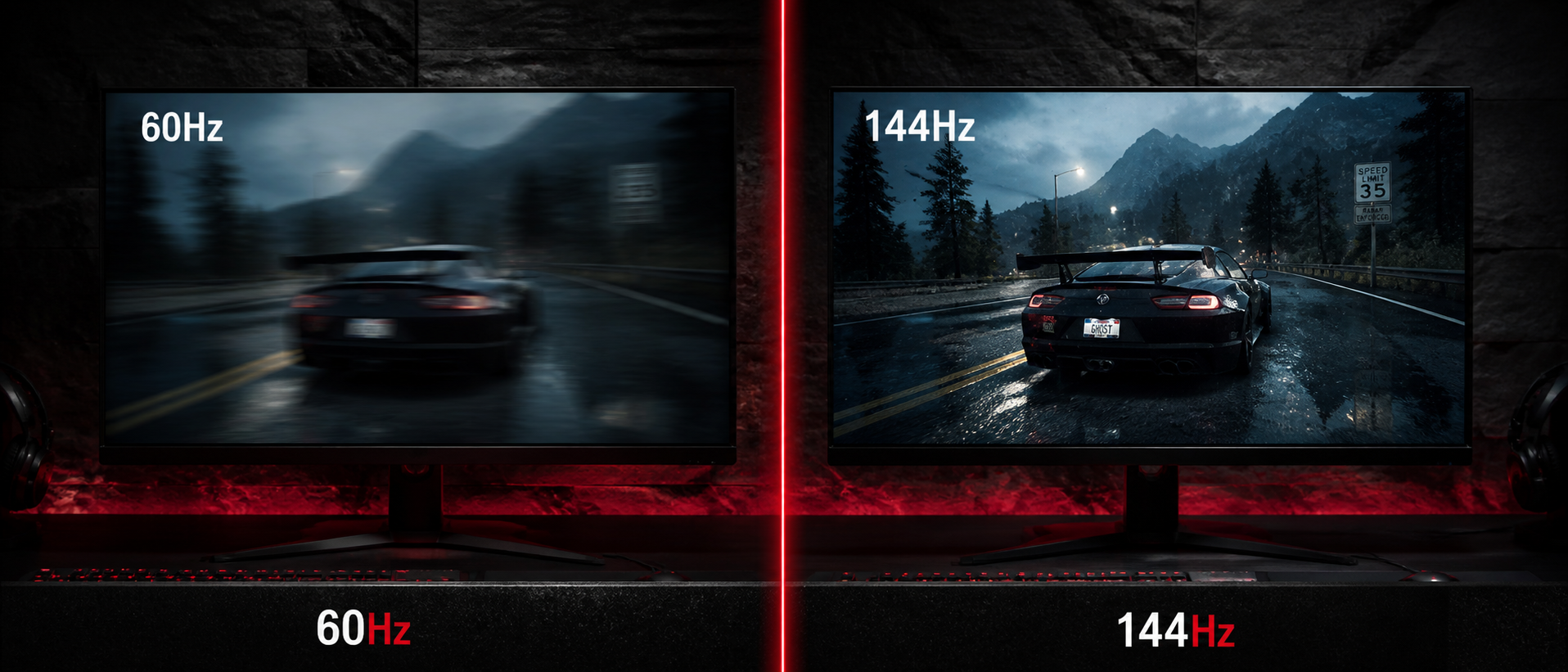
You're browsing monitors on Amazon India or Flipkart. The Rs 8,000 one says 60Hz. The Rs 12,000 one proudly claims 144Hz. The spec sheet makes it look like a huge deal — but will you actually feel the difference in your games? Or is it just another marketing gimmick to make you spend more?
Short answer: the difference is real, it's dramatic, and once you experience 144Hz, you'll never want to go back to 60Hz. But whether it's worth it for you depends on what you play, what GPU you have, and what your budget looks like. Let's break it all down.
What Is Refresh Rate?
Refresh rate is how many times per second your monitor updates the image on screen. It's measured in Hertz (Hz). A 60Hz monitor redraws the screen 60 times per second. A 144Hz monitor redraws it 144 times per second.
60Hz Monitor
Shows 60 unique frames per second. Each frame stays on screen for ~16.7 milliseconds. This has been the standard for decades — most office monitors and TVs run at 60Hz.
144Hz Monitor
Shows 144 unique frames per second. Each frame stays on screen for only ~6.9 milliseconds. That's 2.4x more visual information per second than 60Hz.
Think of it like a flipbook. A 60-page flipbook played in one second looks okay — you get the motion. But a 144-page flipbook played in the same second? The animation looks buttery smooth because there are more intermediate frames filling in the gaps between movements.
Important: Refresh Rate Is NOT the Same as FPS
Refresh rate is a monitor capability — how many frames it can display. FPS (frames per second) is what your GPU actually produces. If your GPU only outputs 60 FPS, a 144Hz monitor won't magically make games smoother. You need both high FPS and a high refresh rate monitor to see the benefit.
The Core Difference: 60Hz vs 144Hz
Let's put the two side by side with actual numbers:
| Specification | 60Hz | 144Hz |
|---|---|---|
| Frames displayed/sec | 60 | 144 |
| Frame time | 16.7ms | 6.9ms |
| Motion clarity | Noticeable blur in fast motion | Significantly sharper |
| Input-to-display latency | Higher (up to 16.7ms frame delay) | Lower (max 6.9ms frame delay) |
| Tearing (without sync) | More visible | Less noticeable (faster refresh hides it) |
| GPU requirement | Low — any modern GPU | Moderate — need 144+ FPS in games |
| Price in India (24" 1080p) | Rs 7,000 - 9,000 | Rs 9,000 - 14,000 |
| Best for | Office, movies, casual single-player | Competitive gaming, fast-paced titles |
The price gap between 60Hz and 144Hz monitors has shrunk dramatically in India over the past couple of years. You can now get a solid 24-inch 1080p 144Hz IPS panel for around Rs 10,000-12,000 — that's barely Rs 2,000-3,000 more than a comparable 60Hz monitor. The value proposition is hard to ignore.
Visual Smoothness & Motion Clarity
This is where the difference is most dramatic and immediately noticeable. At 60Hz, any fast camera movement — flicking in Valorant, turning quickly in Fortnite, or even scrolling a webpage — shows visible stutter. Your brain perceives gaps between frames because objects jump further between each refresh.
At 144Hz, those same movements look dramatically smoother. Objects move in smaller, more frequent increments. Your brain fills in less motion, and the result is an image that feels fluid and natural. It's the single biggest visual upgrade most gamers will ever experience — more impactful than going from 1080p to 1440p, in many people's opinion.
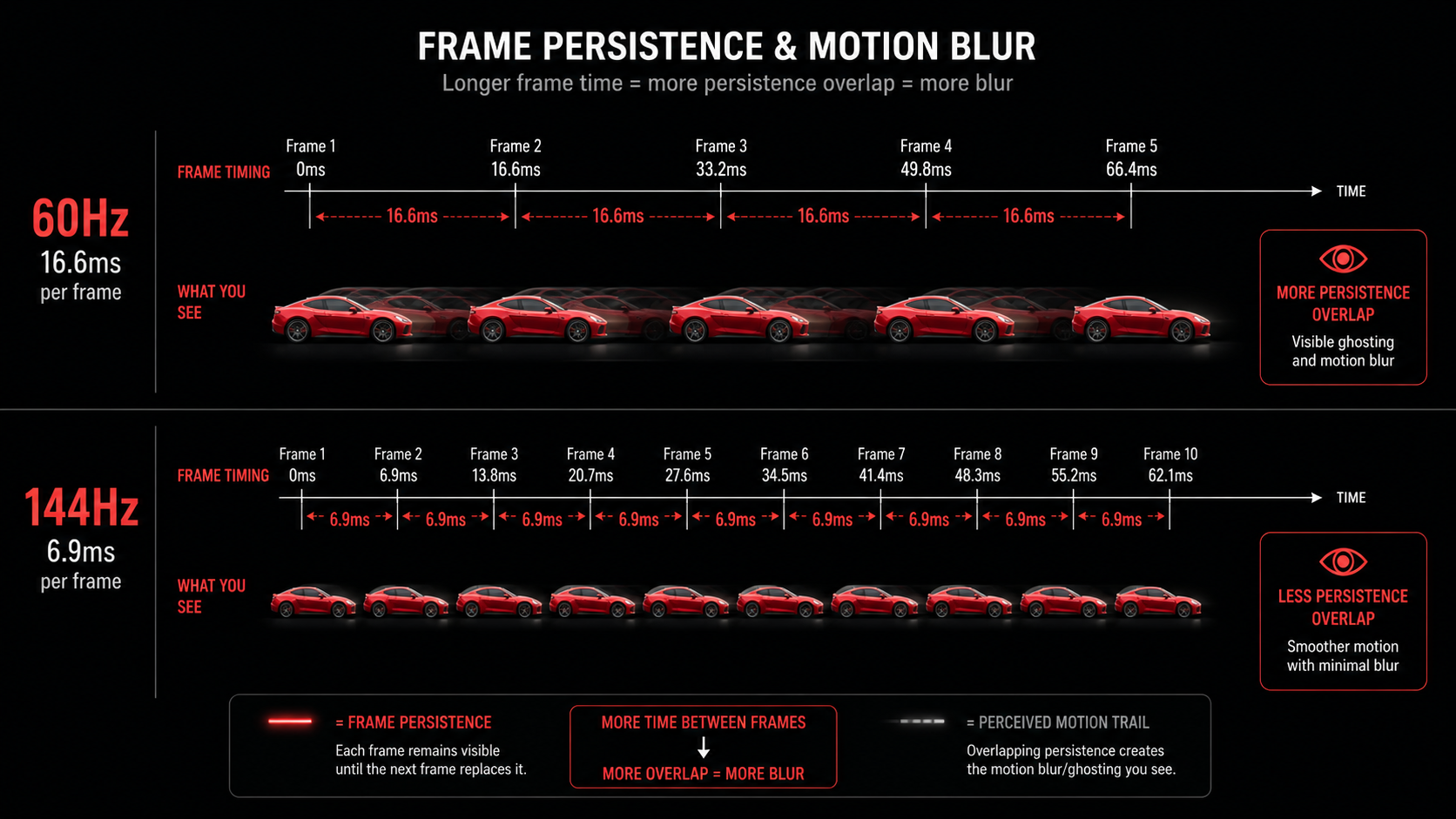
Here's what actually happens technically: at 60Hz, each frame persists on screen for 16.7ms. During fast motion, your eyes track the moving object, but the static frame creates a smearing effect on your retina — this is called persistence-based motion blur. It's not added by the game; it's a physical limitation of how sample-and-hold displays work.
At 144Hz, frame persistence drops to 6.9ms. The object positions are updated more frequently, so there's less smearing. The result? Enemies running across your screen look sharper, text during scrolling is more readable, and the overall experience feels responsive in a way that's hard to put into words until you see it.
The "Can't Go Back" Effect
Almost everyone who switches to 144Hz reports the same thing: going back to 60Hz feels painful. Things that looked "perfectly fine" before now appear choppy and sluggish. This isn't placebo — your visual system genuinely adapts to the higher refresh rate. Consider this before upgrading, because ignorance was bliss at 60Hz.
Input Lag & Competitive Advantage
Beyond just looking smoother, 144Hz provides a real competitive advantage through reduced input lag. Here's why:
When you move your mouse or press a key, that input gets processed by your GPU into a frame, which then waits for the next monitor refresh to be displayed. At 60Hz, that wait can be up to 16.7ms. At 144Hz, it's at most 6.9ms. That's roughly 10ms less latency in the worst case — and in competitive games, milliseconds matter.
The Math Behind the Advantage
In a peeking duel in Valorant where both players have equal reaction times, the one on 144Hz sees the enemy ~10ms sooner. That's the difference between winning and losing the gunfight.
But it's not just raw latency. The higher frame rate also means you see more up-to-date information. At 60Hz, the game state you're seeing could be up to 16.7ms old. At 144Hz, it's at most 6.9ms old. When an enemy peeks a corner at high speed, you literally see them earlier on a 144Hz display.
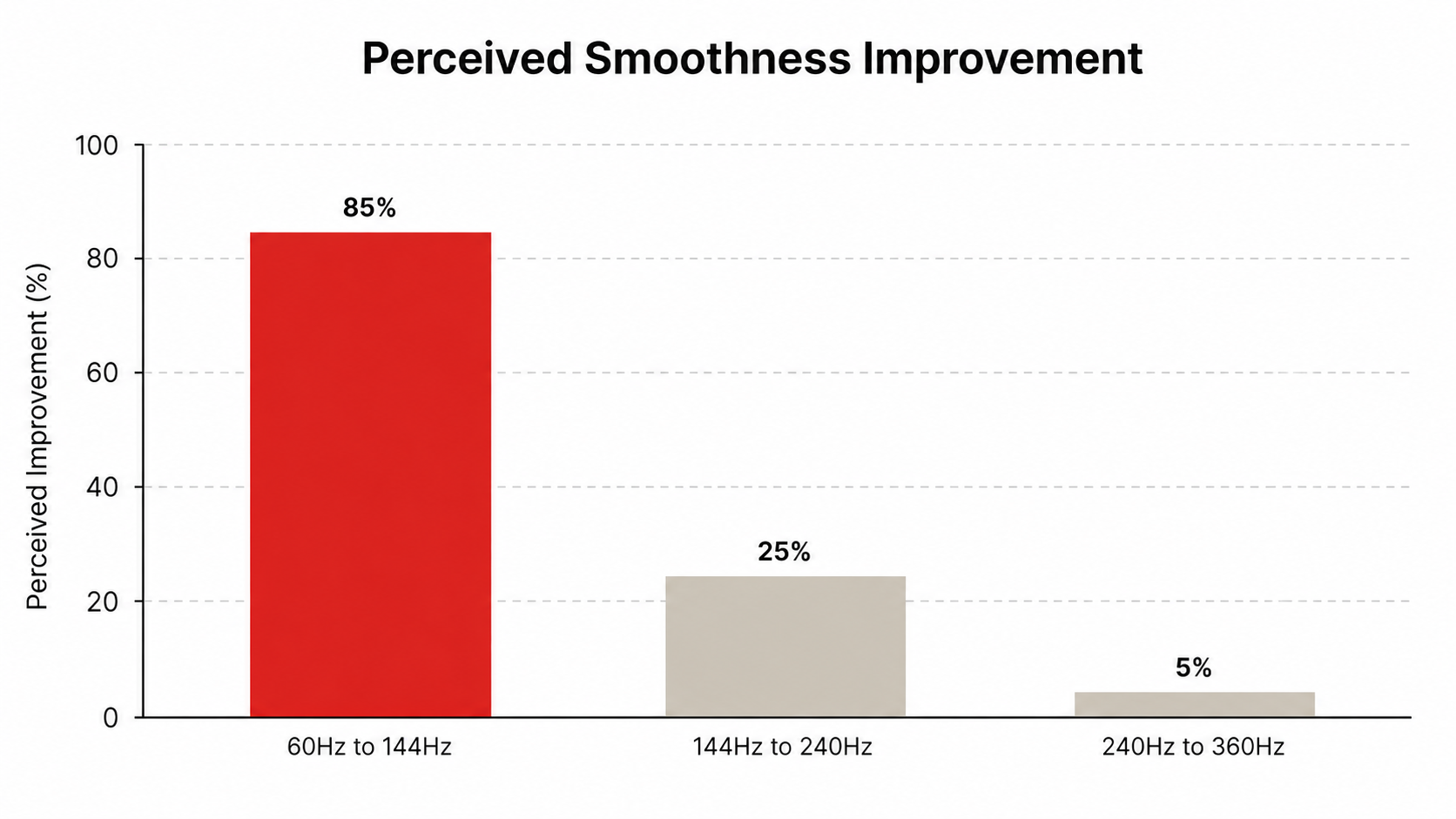
Professional esports has essentially standardized on 240Hz or higher — but the biggest jump in perceived responsiveness is from 60Hz to 144Hz. Going from 144Hz to 240Hz is nice but shows diminishing returns. The 60-to-144 upgrade is where you get the most bang for your buck.
GPU Requirements in India
Here's the practical question every Indian gamer asks: "Can my PC even run games at 144 FPS?" Because if your GPU can only produce 60-80 FPS, buying a 144Hz monitor won't give you the full benefit. Let's look at what's realistic with GPUs commonly available in the Indian market:
| GPU | Price (India) | Esports 1080p | AAA 1080p Medium |
|---|---|---|---|
| GTX 1650 | Rs 10,000-12,000 (used) | 144+ FPS | 50-70 FPS |
| RTX 3060 / RX 6600 | Rs 18,000-22,000 | 200+ FPS | 90-120 FPS |
| RTX 4060 / RX 7600 | Rs 24,000-28,000 | 300+ FPS | 120-160 FPS |
| RTX 4070 / RX 7800 XT | Rs 42,000-48,000 | 400+ FPS | 144+ FPS |
The good news for esports gamers: If you primarily play Valorant, CS2, Dota 2, Fortnite, or Apex Legends at 1080p with competitive settings (low-medium), even a budget GTX 1650 or RX 6500 XT can hit 144 FPS in most esports titles. These GPUs are available for Rs 10,000-14,000 in India.
The reality for AAA gamers: If you want 144 FPS in games like Cyberpunk 2077, Hogwarts Legacy, or Spider-Man at 1080p medium-high, you'll need at least an RTX 4060 (around Rs 25,000). For maxed-out settings, budget closer to Rs 40,000+ for the GPU alone.
Pro Tip: FreeSync/G-Sync Saves You
Even if your GPU can't consistently hit 144 FPS, a 144Hz monitor with FreeSync or G-Sync (adaptive sync) will still look better than a 60Hz panel. These technologies match your monitor's refresh rate to your GPU's output — so if you're getting 90-100 FPS, the monitor refreshes at 90-100Hz. No tearing, no stutter, and still way smoother than being locked to 60Hz. Almost all budget 144Hz monitors in India support FreeSync.
Who Actually Needs 144Hz?
Let's be honest about who benefits most from a 144Hz monitor:
Competitive FPS Players
Valorant, CS2, Apex Legends, Fortnite, PUBG
If you're trying to rank up and play competitively, 144Hz is borderline non-negotiable in 2026. The input lag reduction and motion clarity give you a real edge in gunfights. You're literally handicapping yourself at 60Hz against opponents on 144Hz+ displays.
Racing & Action Game Enthusiasts
Forza Horizon, NFS, Devil May Cry, Elden Ring
Racing games and fast-paced action titles benefit enormously from the increased fluidity. Tracks feel more immersive, fast camera pans look natural, and the overall "premium feel" of the experience goes up significantly.
Streamers & Content Creators
Streaming on Twitch/YouTube while gaming
Smoother gameplay on your end means better reactions during streams. The smoother motion also makes multitasking between OBS, chat, and the game feel less jarring on your eyes during long sessions.
When 60Hz Is Perfectly Fine
Not everyone needs 144Hz, and that's completely okay. Save your money if you fall into these categories:
Single-player story games
Games like Baldur's Gate 3, Witcher 3, God of War, or RDR2 are primarily about the narrative and visuals. These games are often locked at 30-60 FPS anyway, especially on mid-range hardware. 60Hz displays them perfectly.
Turn-based and strategy games
Civilization VI, XCOM, Chess, card games — these have zero fast motion. You won't notice or benefit from 144Hz. Spend that money on a bigger or higher-resolution panel instead.
Very budget-constrained builds
If your total PC budget is Rs 25,000-30,000 and you're gaming on integrated graphics or a GT 1030, spend on a better GPU first. A 144Hz monitor with a weak GPU is like putting racing tires on a Maruti Alto — the bottleneck isn't the tires.
Primarily a console gamer
PS5 and Xbox Series X support 120Hz in some games, but most console titles still target 30-60 FPS. If you're only using a monitor for console gaming, a good 60Hz IPS panel with low input lag might serve you better than a cheap 144Hz VA panel with ghosting issues.
The key principle: match your monitor to your actual use case. If you don't play fast-paced competitive games and your GPU can't push high frame rates anyway, there's no shame in sticking with 60Hz and spending the saved Rs 3,000-5,000 on something else — better peripherals, a bigger SSD, or a nicer mousepad.
Best Budget 144Hz Monitors in India
If you've decided that 144Hz is worth it (and for most gamers reading this, it probably is), here are some solid options available on Amazon India and Flipkart that won't destroy your wallet:
Acer Nitro VG240Y S (24" IPS, 165Hz)
Rs 9,500 - 11,000 | FreeSync | 1ms VRB | Full HD
The go-to budget recommendation. IPS panel with good colors, 165Hz (overclocked from 144Hz), and FreeSync support. Colors are accurate enough for content consumption, and the response time is adequate for competitive gaming. Probably the best value 144Hz+ monitor in India right now.
LG 24GS60F (24" IPS, 180Hz)
Rs 11,000 - 13,000 | FreeSync Premium | 1ms GtG | sRGB 99%
LG's latest budget gaming panel with an impressive 180Hz refresh rate and excellent color accuracy. The IPS panel delivers wide viewing angles and the sRGB 99% coverage means it doubles up nicely for photo/video work. Slightly more expensive but noticeably better panel quality than the cheapest options.
BenQ Mobiuz EX2510S (25" IPS, 165Hz)
Rs 16,000 - 18,000 | FreeSync Premium | HDRi | Built-in Speakers
If you can stretch your budget a bit, BenQ's Mobiuz series offers excellent build quality, surprisingly decent built-in speakers, and BenQ's HDRi technology for better contrast in dark scenes. The stand is fully adjustable (height, tilt, swivel) — something budget monitors usually lack.
MSI G2412 (24" IPS, 170Hz)
Rs 10,000 - 12,000 | FreeSync Premium | Night Vision Mode
MSI's affordable entry with 170Hz, a good IPS panel, and their Night Vision feature that brightens dark areas without overexposing bright ones — handy for spotting enemies in shadowy corners. Solid build quality for the price and good color coverage.
Buying Tip for Indian Gamers
Wait for Amazon Great Indian Festival or Flipkart Big Billion Days — 144Hz monitors regularly drop Rs 1,500-2,500 during these sales. Also check Croma and Reliance Digital for offline deals. Many monitors have different prices on Amazon vs Flipkart, so always compare. And always verify the refresh rate works over HDMI at your resolution — some budget monitors need DisplayPort for the full refresh rate.
Frequently Asked Questions
Can you really see the difference between 60Hz and 144Hz?
Do I need a powerful GPU for 144Hz?
Is 144Hz worth it for casual gaming?
Does 144Hz reduce input lag?
Should I get 144Hz or 165Hz?
Can I use a 144Hz monitor with a laptop?
The Bottom Line
TL;DR
The jump from 60Hz to 144Hz is the single biggest monitor upgrade most gamers will ever make. It's not subtle — it's immediately, obviously, dramatically smoother. If you play any competitive or fast-paced games and your GPU can push 100+ FPS, upgrading to 144Hz is absolutely worth it.
In India, the price premium for 144Hz has dropped to just Rs 2,000-3,000 over comparable 60Hz panels. For that small difference, you get 2.4x more visual information per second, noticeably lower input lag, and a smoother experience in everything from gaming to web browsing. It's arguably the best value upgrade in PC gaming today.
Our recommendation: If you're building a new gaming setup or replacing a monitor, go 144Hz by default. Pick up an Acer Nitro VG240Y S or LG 24GS60F for Rs 10,000-12,000, pair it with at least a GTX 1650 or RX 6500 XT, and enjoy the smoothest gaming experience of your life.
The only time we'd suggest sticking with 60Hz is if you exclusively play slow-paced single-player games and your GPU can barely manage 60 FPS. In that case, spend the extra money on a better GPU first — then come back for the 144Hz panel later.
SOURCES & REFERENCES
Our recommendations are based on research, comparison, and analysis — we don’t physically test products. The technical claims on this page are backed by the standards bodies and published research below.
- 1.
- 2.
Related Guides
Best Gaming Monitors Under Rs 10,000
Budget picks that don't compromise on refresh rate
Best Gaming Monitors Under Rs 20,000
Mid-range monitors with great panels and features
What Is Response Time in Monitors?
Why 1ms vs 4ms matters (and when it doesn't)
1080p vs 1440p for Gaming
Resolution vs refresh rate — what to prioritize