
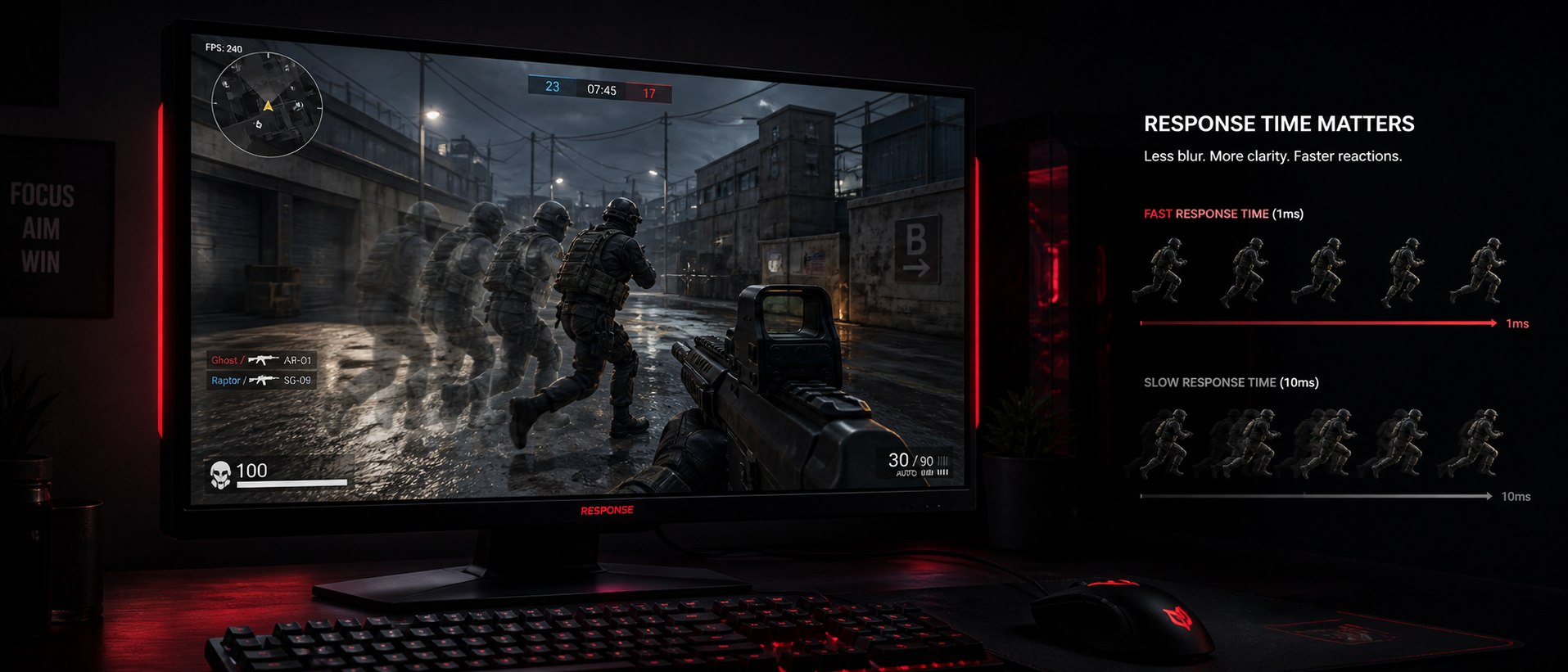
You're browsing gaming monitors on Amazon India. One says "1ms response time." Another says "0.5ms MPRT." A third claims "1ms GtG (Fast)." They all sound similar, but they're measuring completely different things. And the number on the box? It's almost never what you'll actually experience in real-world gaming.
In this guide, we'll explain what monitor response time actually is, why it matters for gaming, how to tell if your monitor is too slow, and what specs you should really look for when buying a new display in India. No jargon overload — just practical knowledge.
What Is Response Time?
Response time measures how quickly a single pixel on your monitor can change from one colour (or shade of grey) to another. It's expressed in milliseconds (ms).
Think of each pixel as a tiny light that needs to switch between states. When a game frame changes — say an enemy runs across your screen — thousands of pixels need to transition from their current colour to a new colour. Response time tells you how fast that transition happens.
At 1ms Response Time
Pixels transition almost instantly. Moving objects appear sharp. No visible trail behind fast-moving elements. Ideal for 144Hz+ competitive gaming.
At 4-5ms Response Time
Slight blur behind fast-moving objects. Fine for most gaming. You'll notice it only in fast-paced FPS games or if you're coming from a faster panel.
At 8-12ms Response Time
Visible ghosting trails, especially in dark scenes. Moving text becomes hard to read. The "smearing" you see on cheap VA panels or old office monitors.
The key point: response time is about pixel speed, not about how quickly your input reaches the screen. That's input lag — a completely different metric we'll cover later. Response time affects visual clarity of motion, not reaction time.
Important: Advertised vs Real Response Time
When a manufacturer says "1ms response time," they're usually measuring the absolute fastest single transition (like from light grey to slightly lighter grey). The average response time across all colour transitions is typically 2-4x higher. Always check hardware reviews for real measured averages — sites like RTINGS and Hardware Unboxed test this properly.
GtG vs MPRT Explained
This is where monitor marketing gets really confusing. You'll see two main response time specs: GtG and MPRT. They measure completely different things.
| Spec | GtG (Grey-to-Grey) | MPRT (Moving Picture Response Time) |
|---|---|---|
| What it measures | Time for pixel to transition between shades | How long a frame is visible to your eye |
| What it affects | Ghosting / colour trails | Overall motion clarity / persistence blur |
| Depends on | Panel technology, overdrive settings | Refresh rate, backlight strobing |
| Typical values | 1-8ms (advertised), 3-12ms (real average) | 1-6ms (with strobing), 6.9ms (at 144Hz, no strobing) |
| Industry standard? | Yes, most common | Less common, but more perceptually accurate |
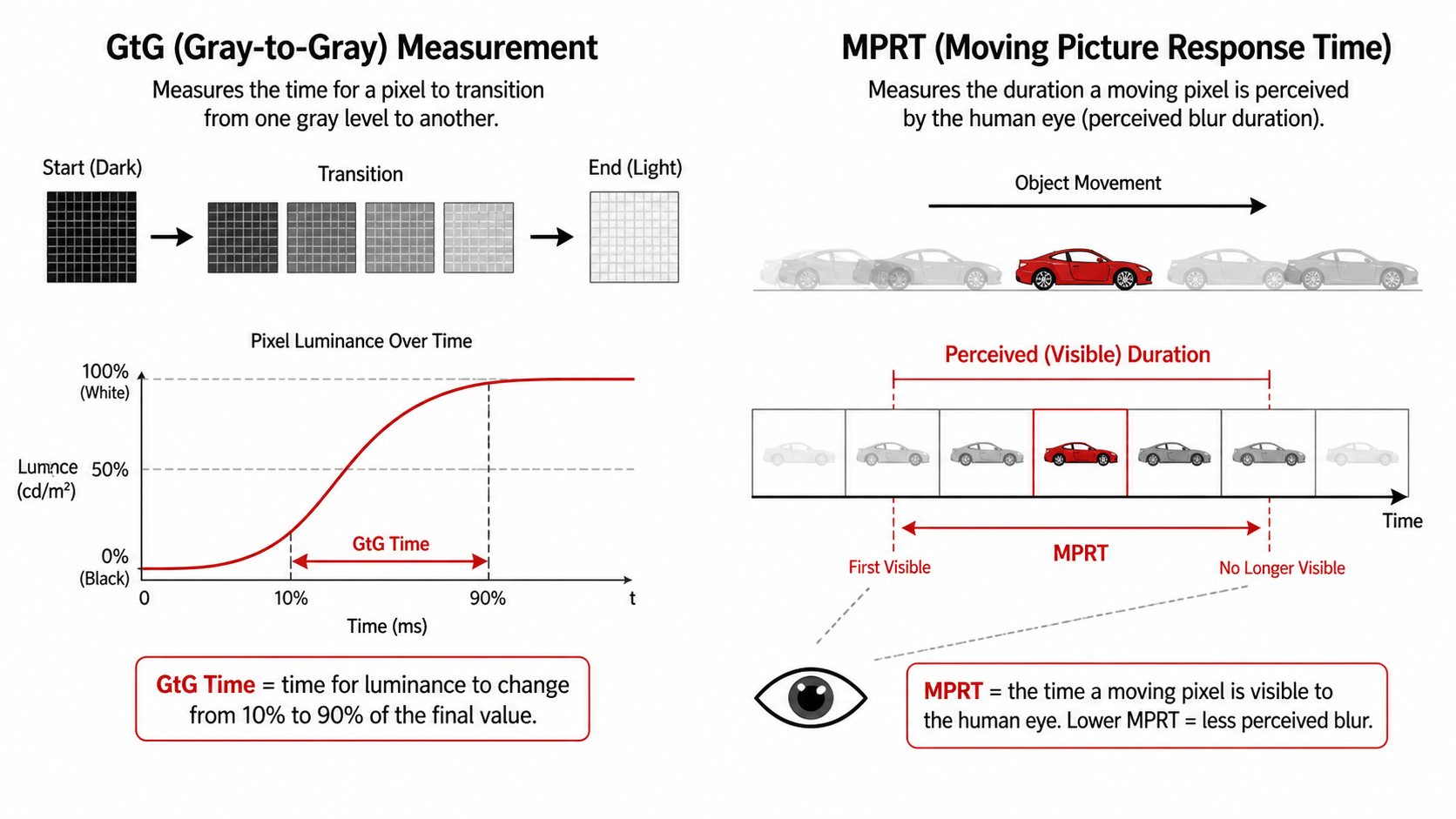
Here's the simplest way to think about it: GtG is about how fast pixels physically change. MPRT is about how long each image "sticks" on your retina. You can have fast GtG (pixels switch quickly) but slow MPRT (each frame is displayed for a long time at low refresh rates).
A 60Hz monitor shows each frame for 16.67ms regardless of pixel response time. Even if GtG is 1ms, the frame persists for 16.67ms — causing persistence blur. At 144Hz, each frame lasts only 6.94ms. At 240Hz, it's 4.17ms. This is why higher refresh rate monitors look smoother even if response time specs are identical.
MPRT Trick: Backlight Strobing
Some monitors advertise "1ms MPRT" by using backlight strobing (called ELMB, DyAc, MBR, or PureXP depending on brand). This flashes the backlight on and off between frames, reducing perceived persistence — but it also dims the screen by 30-50% and adds flicker. It's a trade-off. Most people prefer higher refresh rate over backlight strobing for everyday use.
Why Response Time Matters for Gaming
When response time is too slow relative to your refresh rate, you get ghosting — a visible trail or smear behind moving objects. Here's why this is a problem for gamers:
Competitive FPS Games
Valorant, CS2, Apex Legends, PUBG
Enemies move fast. You're flicking your crosshair constantly. Slow response time means enemy models have a blurry trail behind them, making it harder to track heads precisely. At 144Hz or higher, you need pixel response below ~7ms to avoid visible ghosting. For 240Hz gaming, you need under 4ms.
Racing & Sports Games
Forza Horizon, F1, FIFA, Rocket League
High-speed environments with lots of lateral motion. Slow response causes the trackside scenery, the ball, or other cars to smear. It doesn't affect your competitive ability as much as in FPS, but it degrades the visual experience significantly. A good 4ms panel handles these games well.
Dark & Horror Games
Resident Evil, Alan Wake, Diablo IV, Dark Souls
This is where VA panels struggle the most. Dark-to-dark transitions (like black to dark grey) are the slowest pixel transitions on any panel. If you play a lot of horror or dark-themed games, response time in dark scenes matters more than the advertised average. IPS handles this much better.
The rule of thumb: Your average pixel response time should be lower than your frame time. At 144Hz, each frame lasts 6.94ms. If your pixels take 8ms to transition, the next frame starts before the previous transition is complete — and you see a ghost of the old frame blending into the new one.
What Is Ghosting & Inverse Ghosting?
Now that you understand response time, let's talk about what happens when it's too slow — or when the monitor tries too hard to fix it.
Ghosting (Regular)
A dark, blurry trail that follows behind fast-moving objects. It happens when pixels can't change fast enough. The old colour "leaks" into the new frame. Most common with VA panels in dark scenes. You'll see it clearly in UFO Test moving object tests. It looks like a faded shadow trailing behind characters, text, or UI elements during camera movement.
Inverse Ghosting (Overshoot / Corona)
A bright trail or halo that appears around moving objects — the opposite of regular ghosting. This happens when overdrive is set too aggressively. The monitor pushes so much voltage to speed up pixel transitions that pixels overshoot their target colour, briefly becoming brighter than intended before settling. It looks like a glowing outline or bright artifact. Often worse than regular ghosting.
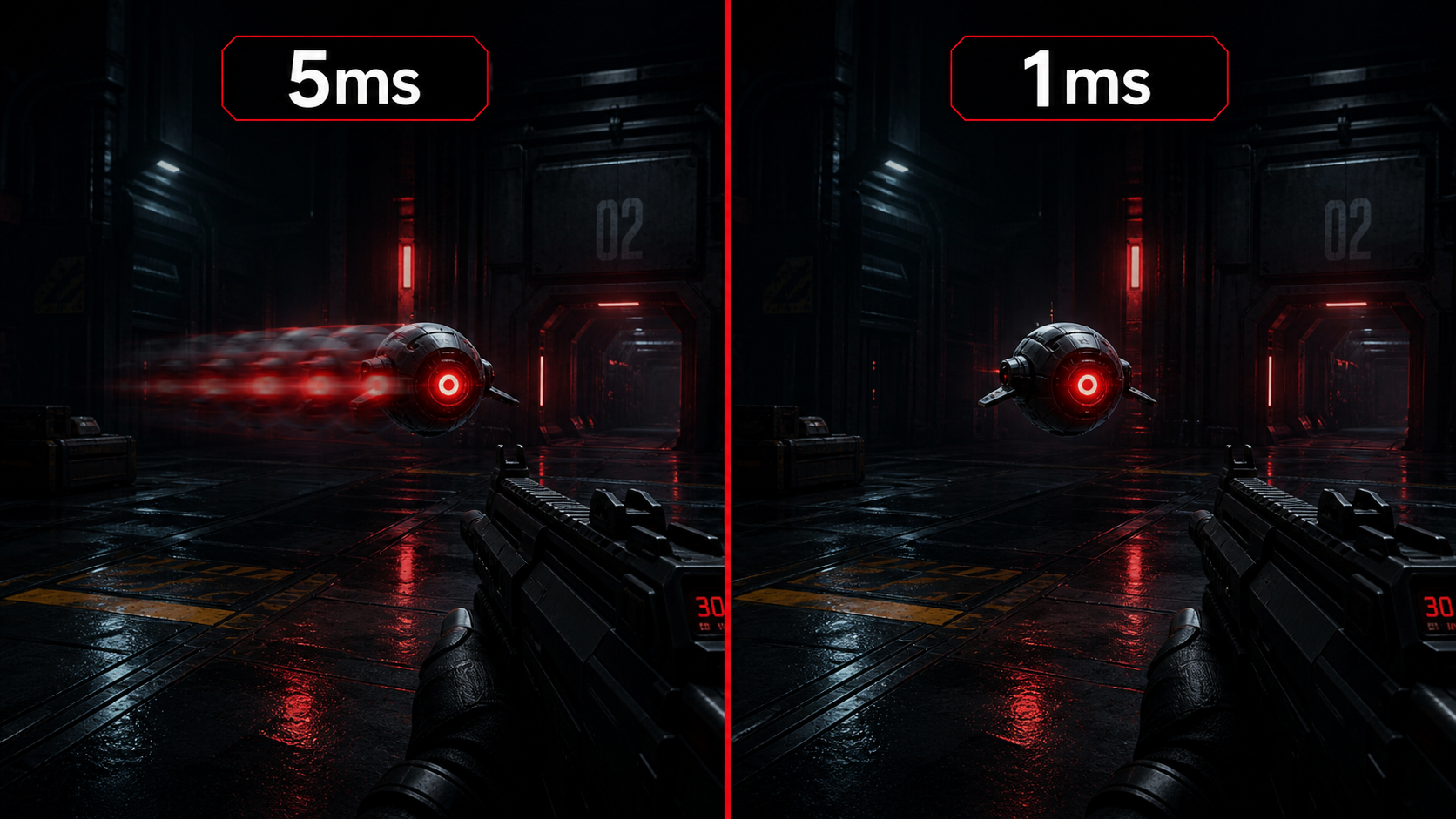
How to check for ghosting: Visit testufo.com/ghosting and run the UFO test at your monitor's native refresh rate. Look at the trail behind the moving UFO. If you see a dark smear — that's ghosting. If you see a bright/white halo — that's inverse ghosting from overdrive being too high.
Every gamer in India shopping for monitors should run this test in a store if possible (or check YouTube reviews that show it). It's the simplest real-world check for response time quality.
Response Time vs Input Lag — They're NOT the Same Thing
This is the single most common misconception about monitors. Let's clear it up once and for all:
| Factor | Response Time | Input Lag |
|---|---|---|
| What it measures | How fast pixels change colour | Total delay from input to on-screen result |
| Measured in | Milliseconds (1-12ms typical) | Milliseconds (5-50ms typical) |
| What you notice | Ghosting, smearing, motion blur | Delay between clicking and seeing the action |
| Affected by | Panel type, overdrive settings | Scaler, signal processing, frame buffering |
| Can you feel it? | You see it (blurry motion) | You feel it (sluggish controls) |
A real-world example: A cheap office monitor might have 14ms response time AND 30ms input lag — it looks blurry AND feels sluggish. A good gaming monitor like the LG 27GP850-B has ~3ms average response time AND ~4ms input lag — sharp motion AND instant-feeling controls. Both specs matter, but they're independent.
When you're buying a gaming monitor in India, check both. Most good gaming monitors today (even budget ones like the Acer Nitro XV240Y or LG UltraGear 24GS60F) have input lag under 10ms in "Game Mode" — which is excellent. The bigger differentiator at this point is usually response time and ghosting behaviour.
Response Time by Panel Type (IPS, VA, TN)
The panel technology fundamentally determines response time characteristics. Here's how they compare:
| Panel Type | Advertised GtG | Real Average GtG | Dark Scene Performance | Best For |
|---|---|---|---|---|
| IPS (Fast IPS) | 1-4ms | 3-6ms | Good | All-round gaming, colour accuracy |
| VA | 4-8ms | 6-15ms | Slow (smearing) | Contrast, movies, single-player |
| TN | 1ms | 2-4ms | Fast | Competitive esports (outdated tech) |
The 2026 verdict on panel types: Fast IPS has basically won. TN panels are dead — no new high-end gaming monitor uses TN anymore because Fast IPS matches its speed while offering vastly better colours and viewing angles. VA still has a place for movie-watching and single-player gaming thanks to its 3000:1+ contrast ratio, but the dark-scene smearing remains a real issue for fast-paced games.
In India, popular Fast IPS monitors like the LG 27GP850-B (Rs 25,000-28,000), Acer Nitro XV272U (Rs 22,000-25,000), and Gigabyte M27Q (Rs 20,000-23,000) all offer excellent real-world response times under 5ms average. Budget options like the Acer Nitro VG240YS (Rs 10,000-12,000) use standard IPS with slightly slower response but still no visible ghosting at 165Hz.
About VA Panels and "Black Smearing"
VA panels have a unique problem called black smearing. Transitions involving very dark shades (near-black to dark grey) can take 15-30ms — way slower than the advertised response time. This means dark games like PUBG (night maps), horror titles, or even dark UI elements in Windows leave ugly trails. If you play a lot of dark-scene games, avoid VA panels for your primary gaming monitor.
What Response Time Do You Actually Need?
The response time you need depends on two factors: your refresh rate and what games you play. Here's a practical guide:
60Hz Monitors
Frame time: 16.67ms
At 60Hz, even budget IPS and VA panels usually keep up. You won't see ghosting unless the panel is truly terrible. This is why 60Hz monitors rarely advertise response time as a selling point.
144Hz Monitors
Frame time: 6.94ms
This is where response time starts to matter. VA panels will show some ghosting here. Fast IPS panels handle this well. This is the sweet spot for most Indian gamers — 144Hz IPS monitors are available from Rs 10,000 onwards and offer excellent motion clarity.
240Hz / 360Hz Monitors
Frame time: 4.17ms / 2.78ms
At these refresh rates, only the fastest Fast IPS and TN panels keep up. VA panels are essentially unusable at 240Hz+ due to dark transition ghosting. If you're buying a 240Hz monitor for competitive Valorant or CS2, Fast IPS is the only sensible choice. In India, the ASUS VG259QM and BenQ ZOWIE XL2546K are popular esports picks.
For most gamers in India: A 144Hz or 165Hz Fast IPS monitor with 1ms GtG (advertised) — which means ~4-5ms real average — is the sweet spot. You get clean motion, good colours, wide viewing angles, and no ghosting in any game. Monitors like the Acer Nitro VG240YS, LG 24GS60F, and MSI G2412 all fit this description and cost between Rs 9,000-13,000.
Overdrive Settings Explained
Every gaming monitor has an overdrive setting (sometimes called "Response Time" in the OSD menu — confusingly). This controls how aggressively the monitor pushes voltage to speed up pixel transitions. Here's how the different levels work:
Off / Low
No extra voltage applied. Pixels transition at their natural speed. You'll see the most ghosting here, but zero inverse ghosting. Some people prefer this for movies or slow-paced games where ghosting doesn't matter but colour accuracy does.
Medium / Normal (Recommended)
A balanced amount of overdrive that significantly reduces ghosting without introducing noticeable overshoot. This is the sweet spot for almost every gaming monitor. If you're unsure, always use this setting. It's what reviewers like Hardware Unboxed test at when they say a monitor has "good" response times.
High / Extreme / Fastest
Maximum overdrive. Ghosting disappears, but you get inverse ghosting (bright halos around moving objects). Usually looks worse than medium overdrive because the overshoot artifacts are distracting and ugly. Never use this setting unless your specific monitor has been reviewed and confirmed to handle it well (very few do).
How different brands label overdrive:
| Brand | Setting Name | Recommended Level |
|---|---|---|
| LG | Response Time | Fast (not Faster) |
| ASUS | Trace Free / OD | 60-80 (out of 100) |
| Acer | Over Drive | Normal |
| MSI | Response Time | Normal or Fast |
| Gigabyte | Over Drive | Balance or Speed |
| BenQ | AMA (Advanced Motion Accelerator) | High (not Premium) |
VRR + Overdrive: A Hidden Problem
When using FreeSync or G-Sync (VRR), your refresh rate changes dynamically. The ideal overdrive level changes with refresh rate — what works perfectly at 144Hz might cause overshoot at 80Hz. Some premium monitors have variable overdrive that adjusts automatically (like Gigabyte's "Smart OD" or ASUS monitors with nvidia G-Sync module). Budget monitors don't — so if your FPS drops a lot, you might see inverse ghosting at lower framerates. Something to keep in mind.
Frequently Asked Questions
Is 1ms response time really necessary for gaming?
What is the difference between GtG and MPRT response time?
Does response time affect input lag?
Which panel type has the fastest response time?
What is overdrive on a monitor and should I use it?
Can I test my monitor's response time at home?
The Bottom Line
TL;DR
Response time is how fast your monitor's pixels can change colour. Slow pixels = ghosting (blurry trails behind moving objects). Fast pixels = clean, sharp motion. It's NOT the same as input lag — response time affects what you see, input lag affects what you feel.
For most gamers in India: get a 144Hz or 165Hz Fast IPS monitor with 1ms GtG (advertised). Set overdrive to Medium/Normal. Don't chase the "Fastest" overdrive mode — it causes inverse ghosting which looks worse. Run the UFO Test to check for ghosting and you're golden.
If you play competitive FPS at 240Hz, response time becomes critical — only Fast IPS panels keep up. If you're a casual gamer at 60-144Hz playing single-player RPGs, don't stress about 1ms vs 4ms — you genuinely won't notice the difference.
And remember: the "1ms" on the box is marketing. Real-world average response is always higher. Check hardware reviews, not spec sheets.
SOURCES & REFERENCES
Our recommendations are based on research, comparison, and analysis — we don’t physically test products. The technical claims on this page are backed by the standards bodies and published research below.
- 1.
Related Guides