
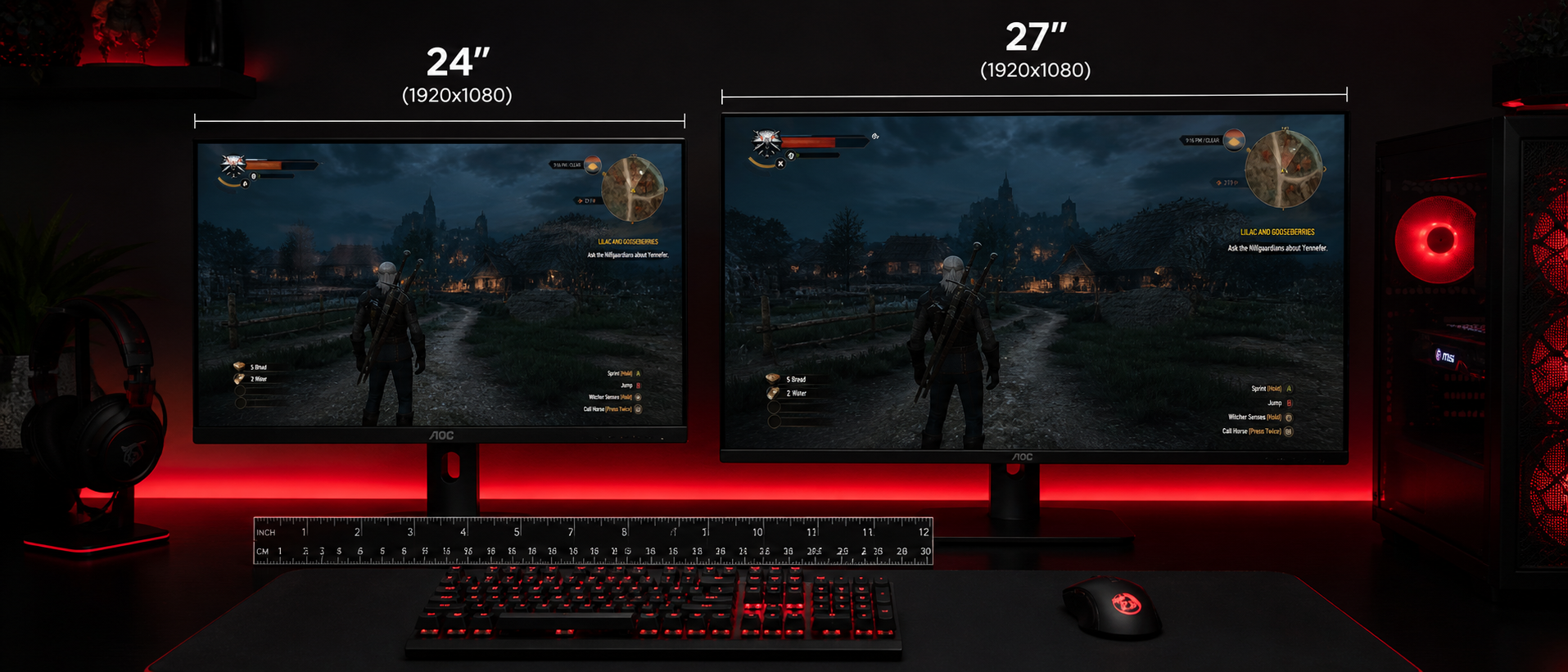
You're on Amazon India, comparing two monitors. One is 24 inches at Rs 12,000. The other is 27 inches at Rs 19,000. The spec sheets look similar — same panel type, same refresh rate. So the bigger one must be better, right? Not necessarily.
Monitor size affects everything from pixel density and text clarity to how much you move your eyes during a firefight, and even how well the display fits on typical Indian study tables and computer desks. Let's break it all down so you can make a decision you won't regret.
Why Monitor Size Matters for Gaming
Monitor size isn't just about "bigger = more immersive." It fundamentally changes your gaming experience in ways most buyers don't consider:
Pixel Density Changes
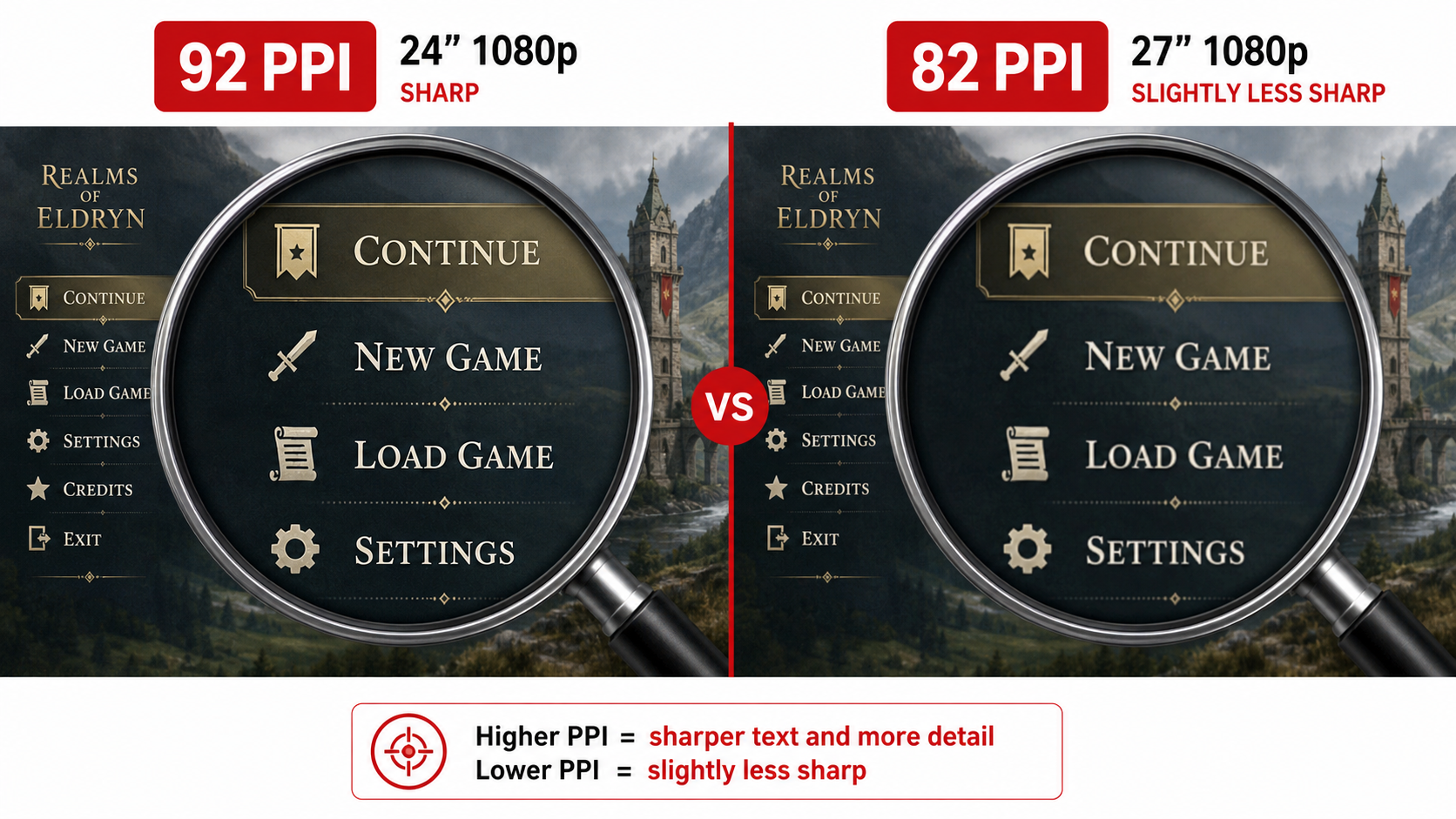
Same resolution on a bigger screen = lower pixel density = less sharp text and UI elements. This is the #1 thing people overlook.
Eye Movement Increases
A larger screen means more physical eye/head movement to check minimap, health bar, and ammo count. In competitive FPS, milliseconds matter.
Desk Depth Requirements Change
A 27-inch display needs more viewing distance to be comfortable. If your desk is shallow (under 60 cm), it'll feel like sitting in the front row of a cinema.
GPU Requirements Shift
27-inch monitors pair best with 1440p, which demands a significantly more powerful (and expensive) graphics card than 1080p.
So it's not just about screen real estate. The "right" size depends on what you play, how you sit, what desk you have, and what GPU is in your rig. Let's look at each factor.
Pixel Density (PPI) Comparison
PPI (Pixels Per Inch) is the single most important metric when comparing monitor sizes. It determines how sharp everything looks on screen — text, game UI, distant enemies, texture details.
Here's the math: PPI = diagonal resolution in pixels ÷ diagonal screen size in inches. Let's compare the common combinations:
| Resolution | 24" PPI | 27" PPI | Verdict |
|---|---|---|---|
| 1920×1080 (FHD) | 92 PPI | 82 PPI | 24" is noticeably sharper |
| 2560×1440 (QHD) | 122 PPI | 109 PPI | Both excellent; 27" is the sweet spot |
| 3840×2160 (4K) | 184 PPI | 163 PPI | Both overkill sharp; scaling needed |
The Key Takeaway
1080p on 27 inches looks blurry. If you're going 27-inch, budget for a 1440p panel — and the GPU to drive it. If you're sticking with 1080p (because of budget or GPU limitations), 24-inch gives you a much sharper image with zero compromise.
Optimal Viewing Distance
How far you sit from your monitor dramatically affects comfort, eye strain, and whether you can take in the full screen without moving your head. Here's what ergonomics research suggests:
Optimal distance: 50–70 cm (20–28 inches)
Most standard Indian computer desks (50–60 cm deep) put you right in this sweet spot. Your eyes can take in the full screen without excessive movement. Comfortable for 8+ hour sessions.
Optimal distance: 65–90 cm (26–35 inches)
You need at least 65 cm between your eyes and the screen. On a shallow desk, you might need a monitor arm to push the display back, or wall-mounting. If you're sitting at 50 cm from a 27-inch screen, you'll experience eye strain and neck fatigue within an hour.
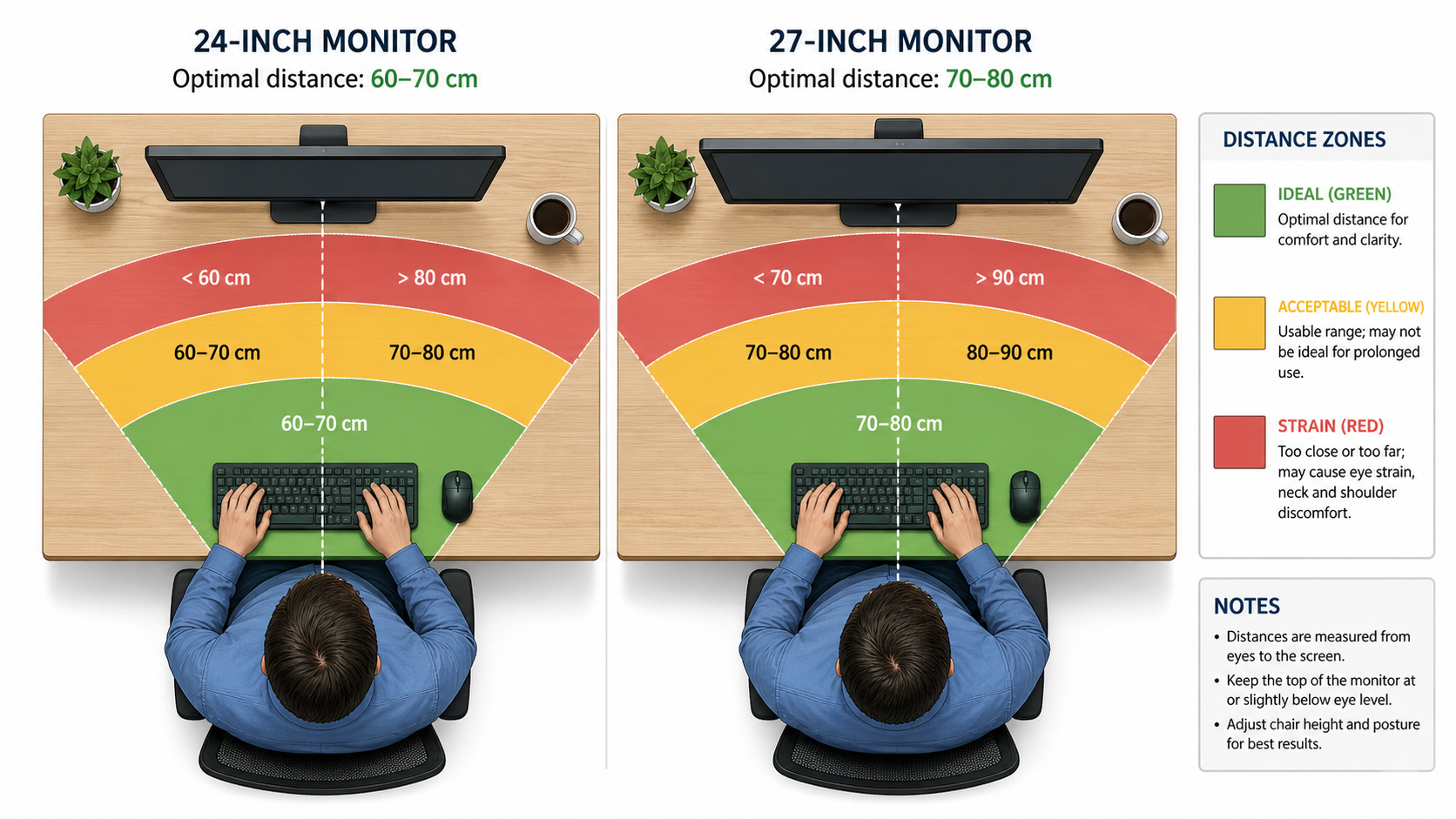
The Indian desk problem: Many gamers in India use standard study tables or computer tables from local furniture shops. These are typically 45–55 cm deep. That's fine for 24 inches, but too shallow for 27 inches. If you're in a hostel room, PG, or compact apartment setup, measure your desk before buying.
For Competitive/Esports Gaming
If you play Valorant, CS2, Apex Legends, or any fast-paced competitive FPS, monitor size has a direct impact on your performance. Here's why the esports world standardized on 24–25 inches:
Less Eye Movement = Faster Reactions
On a 24-inch screen at normal distance, the entire display falls within your central vision cone (~30 degrees). You can see minimap, crosshair, and health bar without moving your eyes much. On 27 inches at the same distance, peripheral elements require deliberate eye movements, costing you 100–200ms per glance.
Tournament Standard: 24.5" 1080p 240Hz
ESL, BLAST, VCT, and virtually every major tournament uses 24.5-inch monitors. The Zowie XL2546K and BenQ XL2566K are the most common. Players practice on the same size they compete on. If you're serious about ranked play, matching the tournament standard eliminates one variable.
1080p = Easier to Hit High FPS
In competitive gaming, frame rate is king. A 24-inch 1080p monitor paired with even a mid-range GPU (RTX 4060, RX 7600) can comfortably push 240+ fps in Valorant and 200+ in CS2. That same GPU would struggle to maintain 144 fps at 1440p in the same titles. More frames = smoother gameplay = competitive advantage.
Esports Monitor Examples (Available in India)
For Immersive/Story-Driven Gaming
If competitive rank isn't your primary concern and you play games like Elden Ring, Cyberpunk 2077, Baldur's Gate 3, Hogwarts Legacy, or Red Dead Redemption 2, the calculus flips:
27" Fills More of Your Field of View
For single-player, cinematic games, you want the game world to fill your vision. A 27-inch panel at 65–70 cm creates a more immersive experience — landscapes look grander, character details are easier to appreciate, and UI elements don't eat into gameplay space as much.
1440p at 27" Is the Visual Sweet Spot
2560×1440 on a 27-inch panel (109 PPI) delivers sharp, detailed visuals without needing display scaling. You get 78% more pixels than 1080p, meaning textures look noticeably better, text is crisp, and you can spot enemies at distance more easily in games like PUBG or Warzone.
Better for Multi-Purpose Use
If your monitor doubles as a work/study display, 27-inch 1440p is excellent for coding (more lines visible), editing photos/videos (more workspace), and general browsing. The extra screen real estate is productivity gold. With 24-inch 1080p, you'll constantly feel cramped for workspace.
27" 1440p Monitor Examples (Available in India)
Desk Space Considerations
This is where Indian gamers face a unique challenge. Let's talk actual dimensions:
| Factor | 24" Monitor | 27" Monitor |
|---|---|---|
| Actual width | ~53 cm (21") | ~61 cm (24") |
| Actual height | ~30 cm (12") | ~36 cm (14") |
| Min. desk depth needed | 50 cm | 65 cm |
| Min. desk width needed | 70 cm | 80 cm |
| Fits typical Indian study table? | Yes | Tight fit |
| Room for keyboard + mousepad | Plenty | May need compact setup |
Common Indian desk scenarios:
- Hostel room table (45×60 cm): 24-inch is the only sensible option. A 27-inch monitor would literally overhang the edges.
- Standard computer table from Urban Ladder/Flipkart (60×75 cm): 24-inch fits perfectly with room for a large mousepad. 27-inch works but leaves little depth margin.
- L-shaped or gaming desk (75×120+ cm): Either size works comfortably. 27-inch recommended for the extra immersion.
Pro tip: If you want 27 inches but have a shallow desk, invest in a monitor arm (Rs 1,500–3,000 on Amazon). It clamps to the desk edge and lets you push the monitor 10–15 cm further back than a standard stand allows. Bonus: frees up desk space underneath.
Best Resolution for Each Size
This is the golden rule that too many buyers ignore:
24" + 1080p (FHD) = Perfect Match
92 PPI looks crisp. Any modern GPU handles it easily. You'll hit high frame rates without spending a fortune. This is the setup for: budget builds, competitive FPS players, students who want good gaming without huge investment.
27" + 1440p (QHD) = Perfect Match
109 PPI is the sweet spot for sharpness without scaling. More screen real estate for immersive gaming and multitasking. This is the setup for: mid-to-high-end builds, single-player/story game enthusiasts, gamers who also work/study on the same PC.
27" + 1080p = Acceptable But Not Ideal
82 PPI means visible pixels at normal viewing distance. Text looks fuzzy, UI elements lose crispness. If budget forces this combo, sit slightly further back (70+ cm). It's playable for gaming but not great for text-heavy work. Avoid if you'll also use it for studying or coding.
GPU requirements by resolution:
- 1080p 144Hz: RTX 4060 / RX 7600 handles most games comfortably (~Rs 25,000–28,000)
- 1440p 144Hz: RTX 4070 / RX 7800 XT recommended (~Rs 45,000–50,000)
- 1440p 60Hz (story games): RTX 4060 Ti / RX 7700 XT is sufficient (~Rs 32,000–38,000)
Factor in the GPU cost when choosing your monitor size. A 27-inch 1440p monitor at Rs 20,000 is a bad deal if your GPU can only push 45 fps at that resolution.
Pricing in India (2026)
Let's look at what each size costs across different tiers. All prices are approximate and based on Amazon India / Flipkart listings as of early 2026:
| Tier | 24" 1080p | 27" 1440p |
|---|---|---|
| Budget (75Hz, VA/IPS) | Rs 7,000–9,000 | Rs 15,000–18,000 |
| Mid-range (144–165Hz, IPS) | Rs 10,000–14,000 | Rs 18,000–25,000 |
| High-end (240Hz+, fast IPS) | Rs 18,000–30,000 | Rs 28,000–45,000 |
| Esports/Premium (360Hz, DyAc+) | Rs 35,000–55,000 | Rs 50,000–70,000 |
The value analysis: In the Rs 10,000–15,000 budget, you get genuinely great 24-inch 1080p 144Hz monitors (ASUS VG249Q1A, Acer Nitro VG240Y, LG 24GN60R). At 27-inch 1440p, you need to spend Rs 18,000+ to get similar panel quality and refresh rates. That's nearly double the investment — before accounting for the GPU upgrade needed.
Budget Rule of Thumb
Total gaming setup under Rs 60,000? Go 24-inch 1080p. Your money is better spent on a better GPU, a good mousepad, and a 144Hz panel than on a larger, more expensive monitor your GPU can't properly drive.
Total setup Rs 80,000+? You can afford a 27-inch 1440p monitor and the GPU to match. This is where the size upgrade makes financial sense.
Sale timing tip: Amazon Great Indian Festival (October) and Flipkart Big Billion Days typically offer 15–25% discounts on monitors. A Rs 22,000 27-inch 1440p monitor often drops to Rs 17,000–18,000 during these sales. If you're patient, waiting for a sale can let you afford the next tier up.
Frequently Asked Questions
Is 24 or 27 inch better for competitive gaming?
Can I use a 27-inch monitor at 1080p?
What resolution should I pair with a 24-inch monitor?
Is a 27-inch monitor too big for a small desk?
Do I need a better GPU for a 27-inch monitor?
Which monitor size is better value for money in India?
The Bottom Line
TL;DR
There is no universal "better" size. The right choice depends on what you play, what GPU you have, and how deep your desk is.
Choose 24-inch if: you play competitive FPS (Valorant, CS2, Apex), have a budget GPU (RTX 4060 or below), want the best value under Rs 15,000, have a standard Indian desk (under 60 cm deep), or want the esports tournament experience.
Choose 27-inch if: you primarily play single-player/story-driven games, have a mid-to-high-end GPU (RTX 4070+), want 1440p sharpness for mixed gaming + productivity use, have a deep desk (65+ cm), and your total setup budget is Rs 80,000+.
And whatever you do, don't buy a 27-inch 1080p monitor unless you absolutely have no other option. That's the worst of both worlds: too big for competitive, too blurry for immersion. If 27 inches is calling your name, budget for 1440p — your eyes will thank you every single day.
Related Guides