
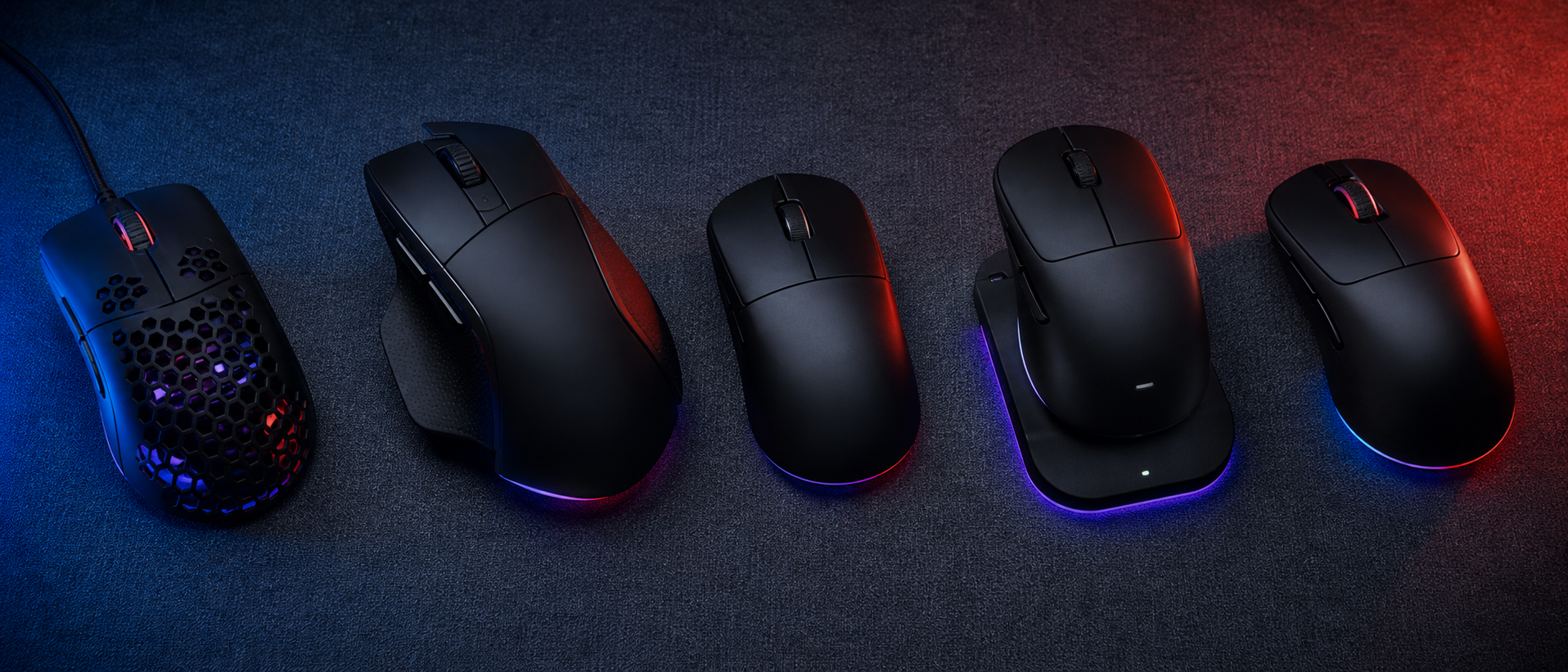
You've got a 144Hz monitor, a mechanical keyboard that sounds like a typewriter on steroids, and a chair that cost more than your first phone. But your mouse? It's the same Rs 300 office mouse you've been using since college. And honestly? That's probably the single biggest upgrade you're ignoring.
Your mouse is the most direct connection between your brain and the game. Every flick shot, every pixel-perfect crosshair placement, every clutch spray transfer — it all goes through that little piece of plastic in your hand. Yet most people pick one based on RGB lighting or how many buttons it has.
We've researched and ranked over 50 gaming mice across every price range available in India. Here's everything we've learned about what actually matters — and what's just marketing noise.
Why Your Mouse Actually Matters
Let's get this out of the way: no mouse will turn you into s1mple. But the wrong mouse will actively hold you back. Here's why:
- Sensor accuracy — A bad sensor skips, drifts, or spins out during fast swipes. Your crosshair doesn't go where your hand says it should.
- Shape mismatch — A mouse that doesn't fit your hand size and grip style causes wrist pain, inconsistent aim, and fatigue in long sessions.
- Weight — Too heavy and you can't flick. Too light and you overshoot. The right weight depends on your sensitivity and play style.
- Cable or wireless quality — A stiff cable drags and creates resistance. Cheap wireless adds input lag. Either one messes with micro-adjustments.
The good news? You don't need to spend Rs 10,000 to get a genuinely excellent gaming mouse in 2026. You just need to know what to look for.
Sensor Types — Optical vs Laser
The sensor is the brain of your mouse. It reads the surface below and translates your hand movements into cursor movements. There are two main types, and the difference matters less than it used to — but it's worth understanding.
Optical vs Laser Sensors
Optical (LED)
Uses an LED light to illuminate the surface. Reads surface texture for tracking.
- + No acceleration or smoothing issues
- + Consistent 1:1 tracking
- + Works best on cloth pads
- - Struggles on glass/reflective surfaces
Laser
Uses an infrared laser for deeper surface penetration. Higher sensitivity capable.
- + Works on almost any surface
- + Can achieve very high DPI natively
- - Prone to acceleration at low speeds
- - Can cause cursor jitter on textured pads
The verdict: Optical sensors dominate gaming in 2026, and for good reason. The PixArt PAW3395, PAW3950, and the Razer Focus Pro 30K are all optical sensors used in the best mice on the market. Unless you absolutely need to track on glass, go optical.
Sensor names to look for in 2026
Top tier: PixArt PAW3950, PAW3395, Razer Focus Pro 30K
Great mid-range: PixArt PAW3335, PAW3311
Avoid: Unnamed "gaming sensors" in ultra-cheap mice. If the listing doesn't name the sensor, be cautious.
DPI Explained — The Most Misunderstood Spec
DPI (Dots Per Inch) is the single most mismarketed spec in gaming. Companies plaster "25,600 DPI!" on the box like it's a selling point. It's not. Let us explain.
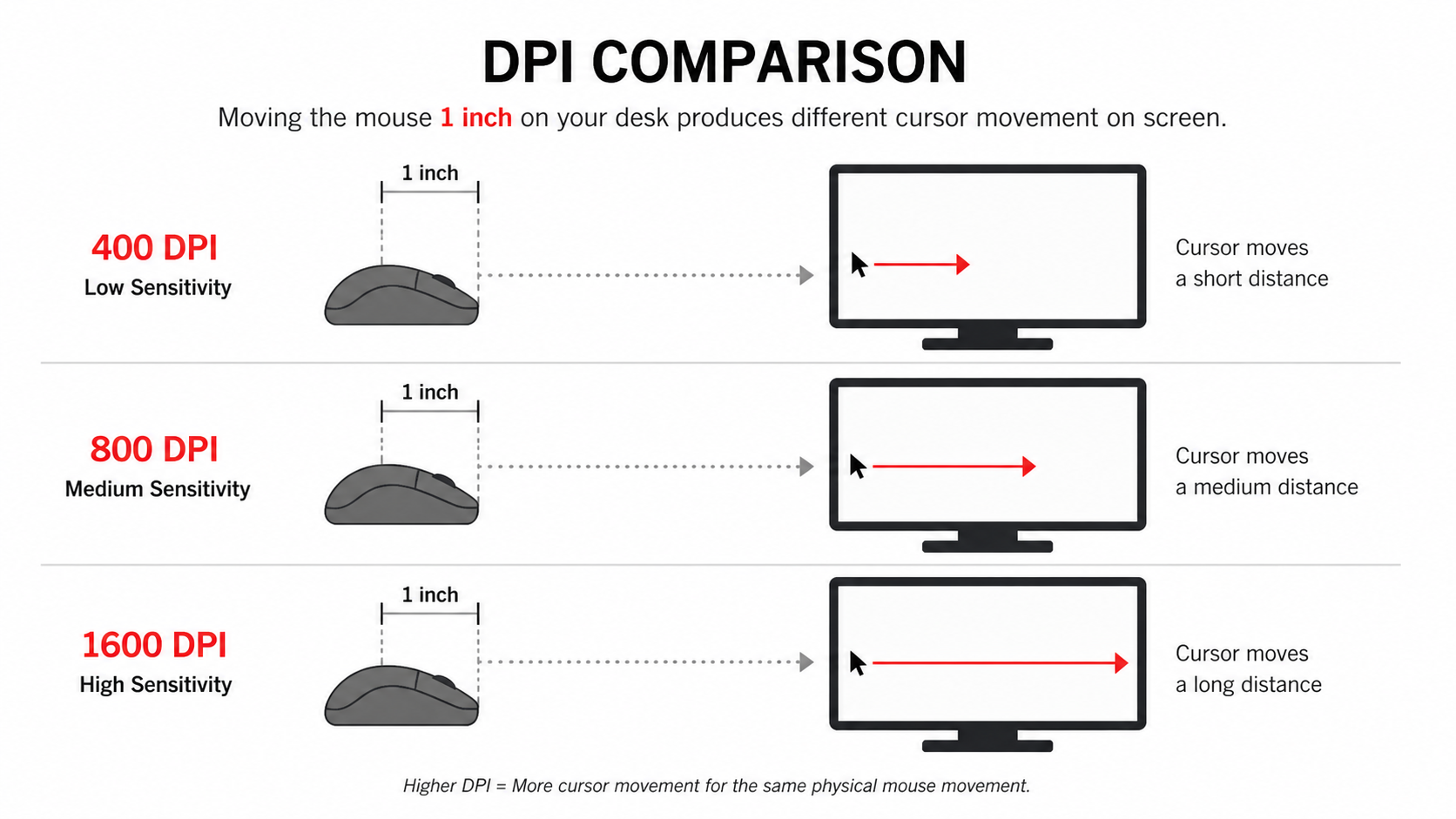
DPI tells you how many pixels the cursor moves for every inch you move the mouse physically. At 400 DPI, moving the mouse one inch moves the cursor 400 pixels. At 1600 DPI, the same movement covers 1600 pixels.
Higher DPI ≠ better. It just means the cursor moves faster for the same physical movement. What matters is finding a DPI that gives you the right balance of speed and precision for your setup.
What DPI Should You Use?
This depends on your game genre and monitor resolution.
| Use Case | Recommended DPI | Why |
|---|---|---|
| FPS (Valorant, CS2) | 400–800 | Precision crosshair placement, large arm movements |
| Battle Royale (BGMI, Fortnite) | 800–1200 | Balance of speed for looting and precision for fights |
| MOBA (Dota 2, LoL) | 800–1600 | Quick cursor movement across the map, less precision-critical |
| RPG / MMO | 1200–2400 | Navigating menus and UI-heavy interfaces comfortably |
| 4K Monitor (any game) | 1200–1600 | More pixels to cover; lower DPI feels sluggish at 4K |
Pro tip: eDPI is what actually matters
eDPI = DPI × in-game sensitivity. A player using 800 DPI at 0.5 sens has the same eDPI (400) as someone using 400 DPI at 1.0 sens. Compare eDPI, not raw DPI, when copying pro settings.
Polling Rate — How Fast Your Mouse Talks to Your PC
Polling rate measures how many times per second your mouse reports its position to the computer over its USB HID connection. It's measured in Hz.
- 125 Hz — reports every 8ms. Office mice territory. Noticeably laggy for gaming.
- 500 Hz — reports every 2ms. Decent, but you can feel the difference vs 1000Hz in fast-paced games.
- 1000 Hz — reports every 1ms. The sweet spot for 99% of gamers. This is what you want.
- 4000–8000 Hz — sub-millisecond reporting. Exists on premium mice from Razer, Logitech, and others. Marginally smoother on 240Hz+ monitors, but most people can't tell the difference.
Our take: If a mouse has 1000Hz polling, you're set. Don't pay a premium for 4000Hz unless you're already on a 360Hz monitor and play at a competitive level. It's the last 1% of performance.
Weight — The Ultralight Revolution
This is where gaming mice have changed the most in the last few years. The industry has gone from "heavier = premium" to a full-on weight-cutting arms race. Mice under 60g exist now. But lighter isn't automatically better.
Weight Categories
Ultralight
Under 65g
Lightning-fast flicks. Best for low-sens FPS players who make large arm movements. Can feel "too fast" if you're not used to it.
Medium
65–85g
The sweet spot for most gamers. Quick enough for flicks, stable enough for tracking. Where most top-selling mice land.
Heavy
85g+
More controlled, planted feel. Suits high-sens players and MMO/productivity mice with extra buttons. Fatiguing in long FPS sessions.
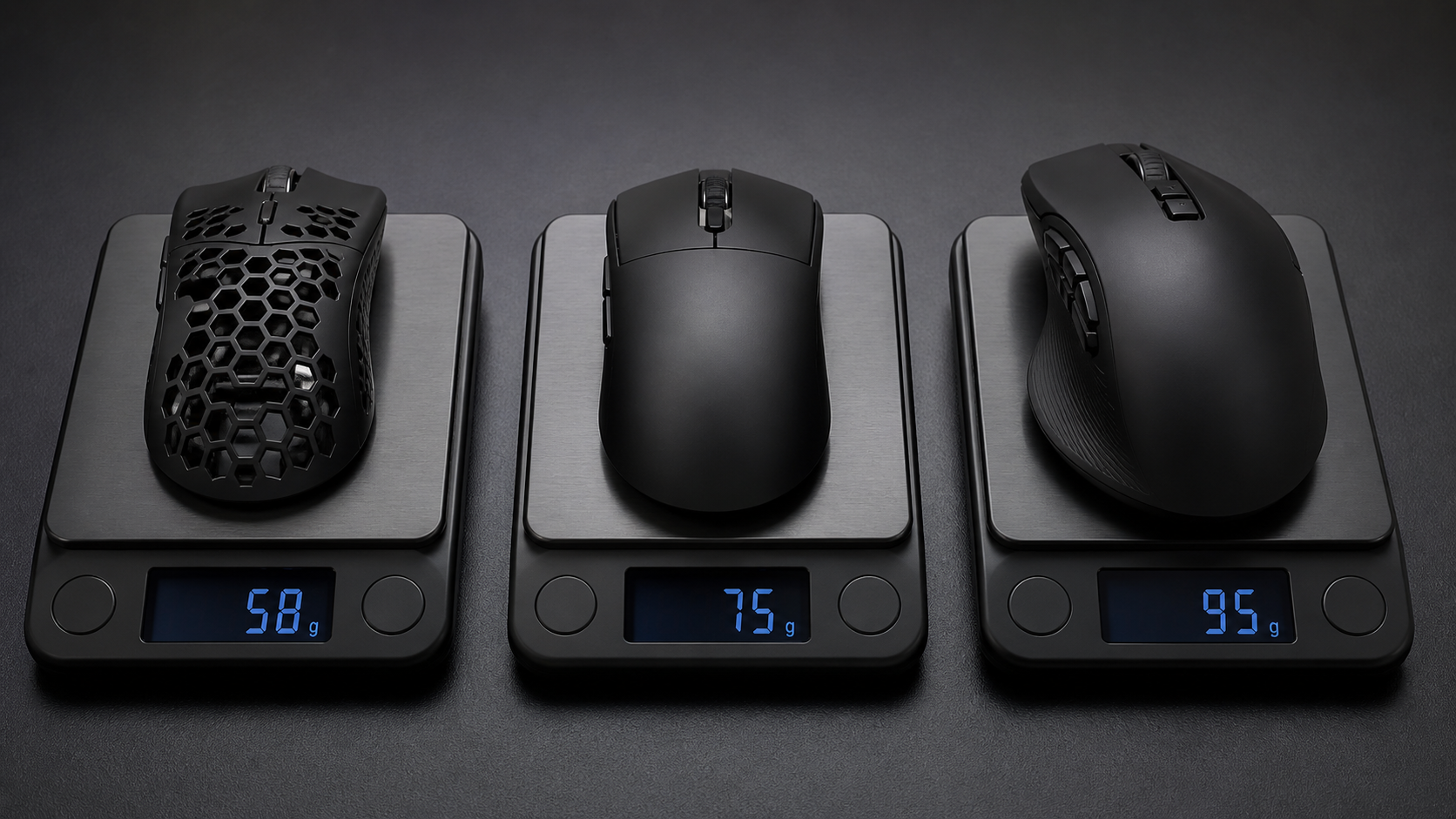
Our recommendation: If you play FPS games and use low sensitivity, go for 60–75g. If you play a mix of genres or prefer higher sensitivity, 75–85g is the comfortable middle ground. Don't obsess over saving 3 grams — shape and sensor matter more.
Grip Styles — This Changes Everything
This is the single most important factor most people ignore. Your grip style determines which mouse shape works for you. Using a mouse designed for the wrong grip is like wearing shoes two sizes too small — you'll manage, but you'll suffer.
The 3 Grip Styles
Palm Grip
Your entire palm rests on the mouse. Fingers lay flat on the buttons. Most relaxed grip.
Best with: Large, ergonomic mice with a pronounced hump (e.g., Razer DeathAdder, Logitech G502)
Good for: Long sessions, arm aimers, tracking-heavy games
Claw Grip
Palm touches the back of the mouse, but fingers are arched/clawed over the buttons. Hybrid control.
Best with: Medium mice with a moderate hump (e.g., Zowie EC2, Pulsar X2)
Good for: Flick shots + tracking, most FPS players
Fingertip Grip
Only your fingertips touch the mouse. Palm doesn't contact the body at all. Maximum micro-adjustment control.
Best with: Small, low-profile, lightweight mice (e.g., Razer Viper Mini, Zowie FK2)
Good for: Flick-heavy games, wrist aimers, high-sens players
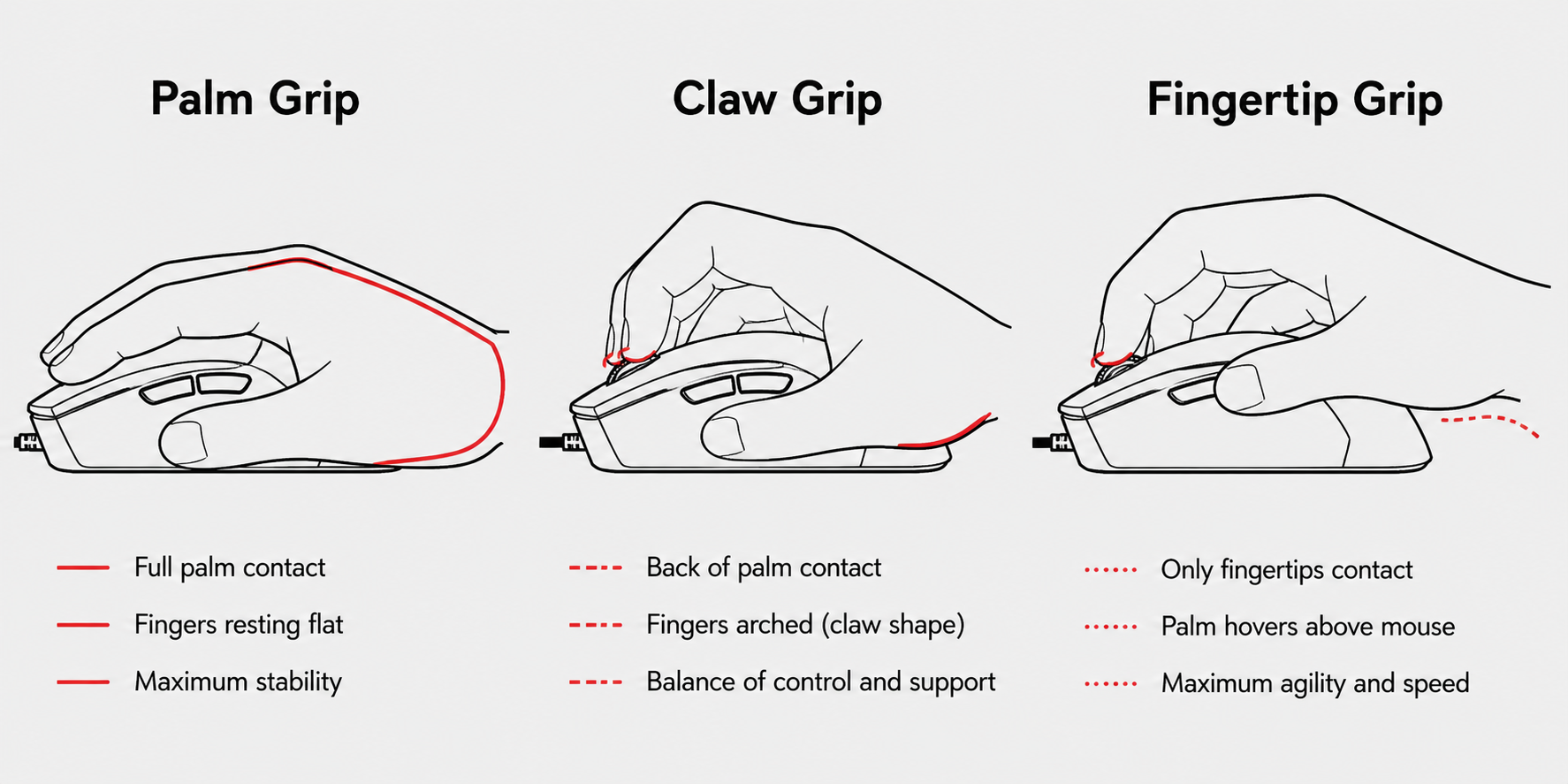
How to find your grip: Just use your current mouse naturally for 5 minutes without thinking about it. Then freeze and look at your hand. Where does your palm sit? Are your fingers flat or arched? That's your natural grip.
Wired vs Wireless — The Debate Is Over
Let's kill this myth right now: wireless gaming mice in 2026 have zero meaningful latency disadvantage. The top wireless protocols (Logitech Lightspeed, Razer HyperSpeed, SteelSeries Quantum 2.0) actually measure faster than many wired mice in click latency tests.
Professional CS2 and Valorant players — people whose livelihoods depend on millisecond reactions — use wireless mice in tournaments. The debate is over.
Wired vs Wireless — Quick Comparison
| Factor | Wired | Wireless |
|---|---|---|
| Latency | ~1ms | ~1ms (top brands) |
| Weight | Lighter (no battery) | Slightly heavier (+5-15g) |
| Cable drag | Yes (unless paracord/bungee) | None — total freedom |
| Battery anxiety | Never | 60-100+ hours (modern mice) |
| Price | Cheaper at every tier | Rs 1,000–3,000 premium |
| Desk cleanliness | Cable management needed | Clean setup |
Our recommendation: If budget allows, go wireless. The freedom of no cable drag is genuinely nice, and modern battery life (60–100+ hours) means you'll charge once a week. If you're on a tight budget, wired is perfectly fine — just get a mouse with a soft, flexible paracord-style cable.
Mouse Feet & Cable Quality — The Underrated Specs
Nobody talks about these, but they massively affect how a mouse feels to use.
Mouse Feet (Skates)
The PTFE pads on the bottom of your mouse determine glide quality. Thin, scratchy stock feet make even the best sensor feel sluggish. Good PTFE feet (often called "virgin PTFE" or "100% PTFE") glide smoothly with minimal friction.
- Stock feet on budget mice — often thin, small, and high-friction. Usable but not great.
- Stock feet on premium mice — usually good 100% PTFE. Smooth out of the box.
- Aftermarket feet — Brands like Corepad, Tiger Arc, and Lethal Gaming Gear make replacement feet for most popular mice. A Rs 300–500 upgrade that transforms the feel.
Cable Quality
If you're going wired, cable quality matters more than you think:
- Rubber cables — stiff, heavy, and create noticeable drag. Found on cheap mice. Consider a mouse bungee if stuck with one.
- Braided cables — slightly better but still stiff. The "premium" cable of 2020 that's now outdated.
- Paracord-style cables — ultralight, flexible, zero drag. Feels almost wireless. This is the standard to aim for in 2026.
Shape & Size — The Most Personal Choice
Here's the uncomfortable truth: the "best" mouse shape is entirely personal. What feels perfect for a reviewer might cramp your hand in 30 minutes. But there are some guidelines:
Shape Guide by Hand Size
Measure your hand from the base of your palm to the tip of your middle finger.
Small Hands (under 17cm)
Go for small or mini mice. Length under 120mm. Examples: Razer Viper Mini, Pulsar X2 Mini, Zowie FK2.
Medium Hands (17–19cm)
Most mice work for you. Length 118–125mm. The widest selection. Examples: Logitech G Pro X Superlight 2, Zowie EC2, Pulsar X2.
Large Hands (19cm+)
Need full-size ergonomic mice. Length 125mm+. Examples: Razer DeathAdder V3, Zowie EC1, Logitech G502 X.
Ergonomic vs Ambidextrous
Ergonomic mice are sculpted for right-handed use (tilted, contoured). More comfortable for palm and claw grip. Ambidextrous mice are symmetrical — usable for both hands and preferred by many fingertip/claw players for their predictable shape. Neither is objectively better.
Software & Extra Buttons
Most gaming mice come with companion software (Razer Synapse, Logitech G Hub, SteelSeries GG, etc.) for DPI tuning, button remapping, macro creation, and RGB control. Here's what to know:
- On-board memory — The best mice let you save DPI profiles and button mappings directly to the mouse. This means your settings work on any PC without installing software. Look for this feature if you game at cafes or tournaments.
- Side buttons — Two thumb buttons (forward/back) is the minimum for gaming. Essential for abilities in MOBAs, grenades in FPS games, or push-to-talk. More than 3 side buttons usually means an MMO mouse — great for WoW, overkill for Valorant.
- DPI switch — A dedicated button to toggle between DPI presets. Useful if you switch between gaming and desktop use, or between games with different sensitivity needs.
- Software bloat — Some software (looking at you, Razer Synapse) is resource-heavy and runs background processes. If this bothers you, prioritize mice with on-board memory so you can configure once and uninstall.
Budget Guide — What to Expect at Every Price (India)
The gaming mouse market in India has exploded. Here's what your money gets you at each tier:
| Price Range | What You Get | Best For |
|---|---|---|
| Under Rs 1,000 | Basic optical sensors, wired, decent for casual gaming. Brands: Logitech G102, Redragon, Ant Esports. | First gaming mouse, casual gamers, tight budget |
| Rs 1,000–2,000 | Good sensors (PAW3325/3327), lighter builds, paracord cables starting to appear. Brands: HyperX Pulsefire, Razer DeathAdder Essential. | Serious casual gamers, best value tier |
| Rs 2,000–5,000 | Top-tier sensors (PAW3395), sub-70g weight, wireless options. Real competitive performance. Brands: Logitech G304, Razer Viper Mini, Pulsar X2. | Competitive gamers, best performance-per-rupee |
| Rs 5,000–10,000 | Premium wireless, flagship sensors, best-in-class weight and build quality. Brands: Logitech G Pro X Superlight 2, Razer DeathAdder V3, Zowie EC2-CW. | Enthusiasts, competitive players wanting the best |
| Above Rs 10,000 | 4000Hz+ polling, cutting-edge materials, limited editions. Brands: Razer Viper V3 Pro, Finalmouse, Lamzu. | Enthusiasts and collectors, diminishing returns territory |
The sweet spot? Rs 2,000–5,000. This is where the Indian market offers genuinely competitive mice with flagship sensors and lightweight builds. You're paying for the brand and premium wireless above this.
Check our top picks
We've reviewed mice at every price point with Indian pricing. See our guides: Under Rs 1,000 · Under Rs 2,000 · Under Rs 5,000 · Under Rs 10,000
Frequently Asked Questions
What DPI should I use for gaming?
Does a lighter mouse improve aim?
Is a wireless gaming mouse good enough for competitive play?
What is polling rate and does it matter?
What is the best gaming mouse under Rs 2,000 in India?
The Bottom Line
Choosing a gaming mouse isn't about finding the highest DPI or the lightest weight. It's about finding the right combination of shape, weight, and sensor that matches your hand, your grip, and your games.
Quick Decision Guide
Identify your grip style — Palm, claw, or fingertip. This narrows your shape options immediately.
Measure your hand — Small, medium, or large. This determines mouse size.
Set your budget — Rs 2,000–5,000 gets you genuinely competitive performance in India.
Pick a sensor tier — PAW3395 or equivalent. Anything above PAW3335 is fine for competitive play.
Decide wired vs wireless — Wireless if budget allows, wired with paracord cable if not.
Stop chasing specs. A Rs 3,000 mouse with the right shape for your hand will outperform a Rs 12,000 mouse that cramps your fingers after an hour. Try before you buy if possible, and remember — the best mouse is the one you forget you're holding mid-clutch.
SOURCES & REFERENCES
Our recommendations are based on research, comparison, and analysis — we don’t physically test products. The technical claims on this page are backed by the standards bodies and published research below.
- 1.