
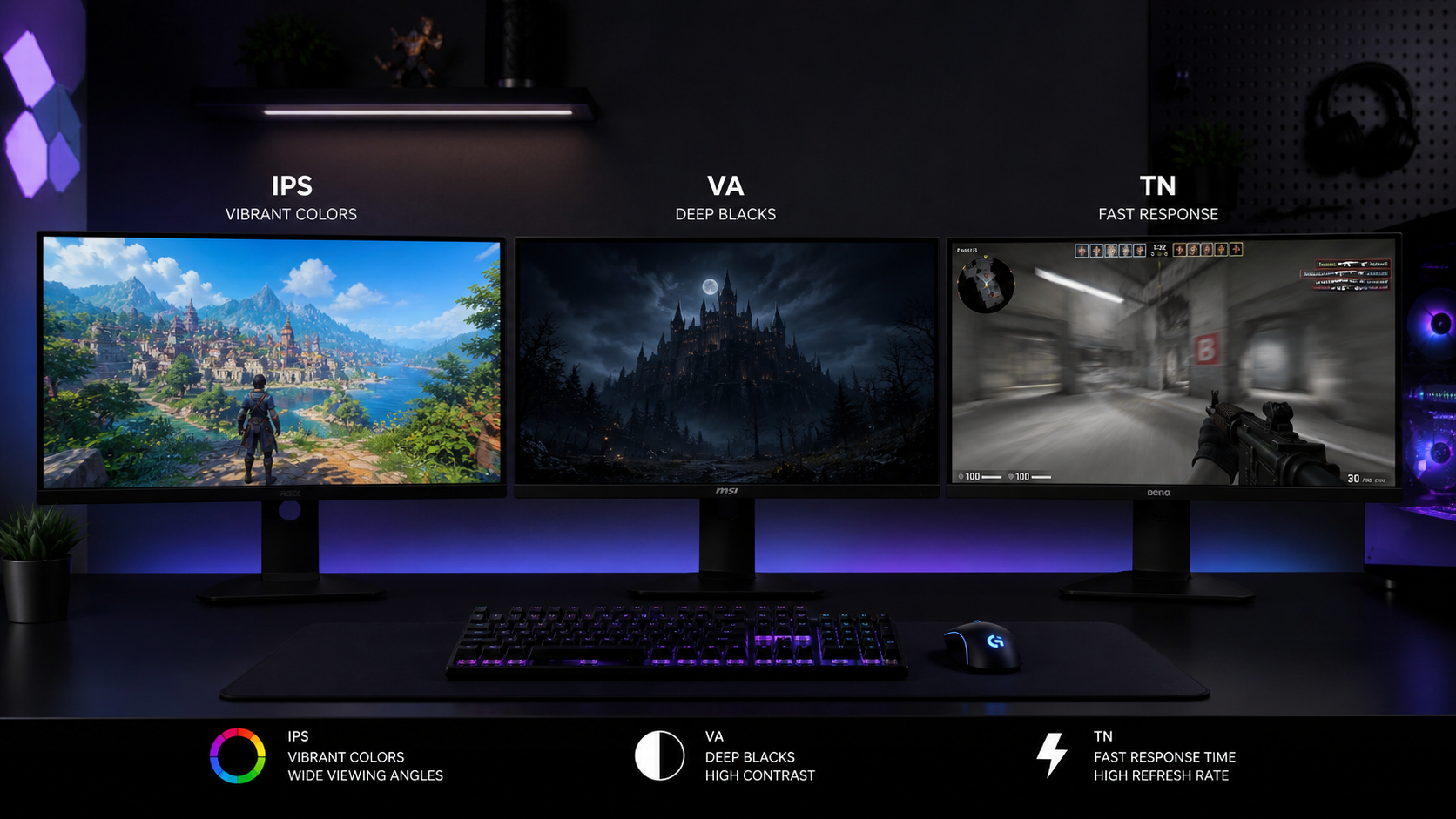
You're shopping for a gaming monitor. You've narrowed it down to size, refresh rate, maybe resolution. Then you hit the spec that nobody explains properly: panel type. IPS, VA, TN — three letters that determine how your games actually look on screen. And the internet is full of contradictory advice.
We've researched and ranked monitors across all three panel technologies at every price range available in India — from Rs 8,000 budget panels to Rs 80,000 flagships. Here's what actually matters, explained without the jargon.
Quick Answer — Which Panel Should You Pick?
IPS
Best all-rounder. Great colors, wide viewing angles, fast enough for competitive gaming. Pick this if you're unsure.
VA
Best contrast and deepest blacks. Ideal for dark-room gaming, horror games, and cinematic single-player titles. Watch out for ghosting.
TN
Fastest response times, cheapest price. Only for hardcore competitive FPS players who prioritize speed above everything else.
That's the 10-second version. Now let's break down why, so you can make a decision you won't regret after unboxing.
What Is an IPS Panel?
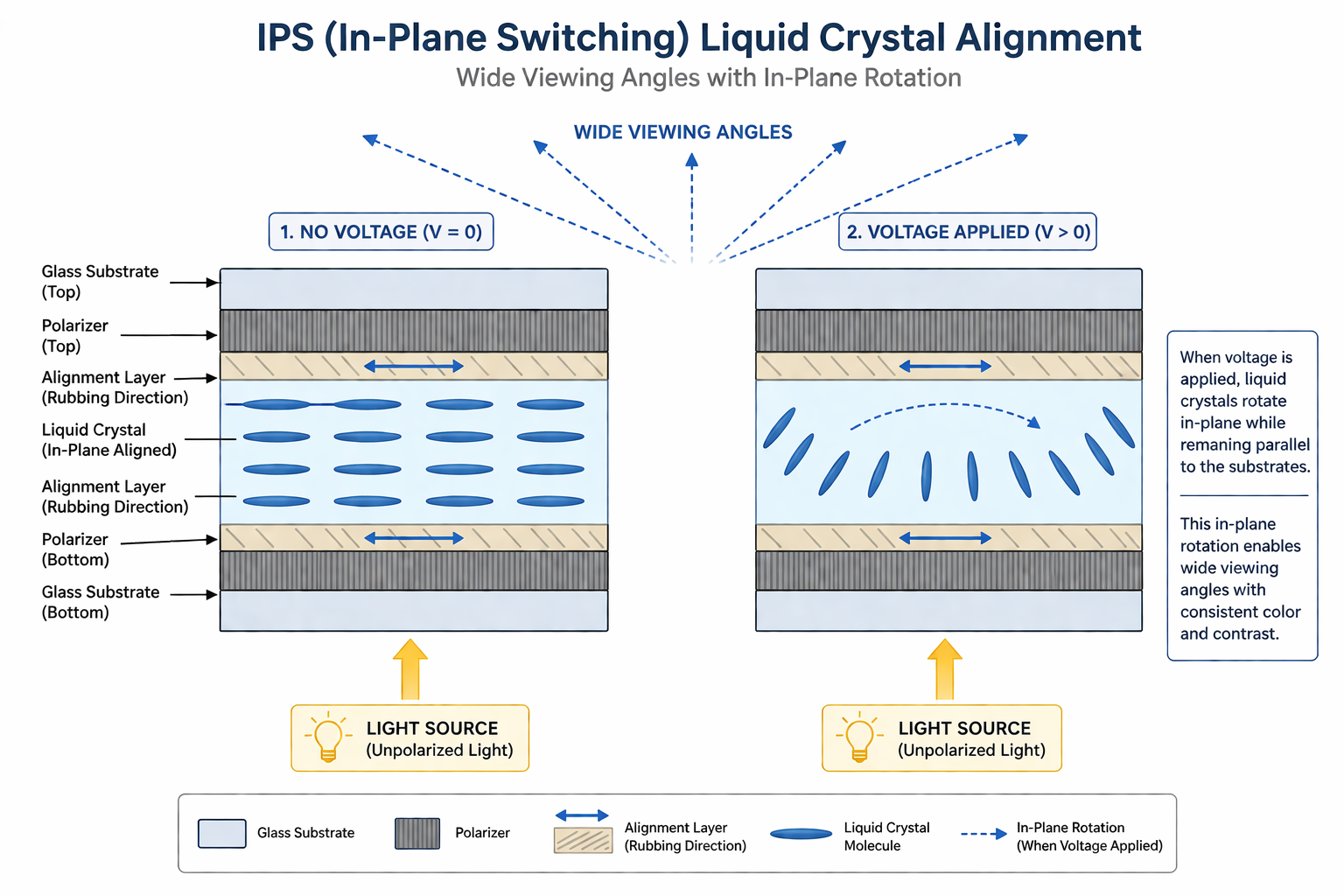
IPS (In-Plane Switching) aligns liquid crystals horizontally, parallel to the glass substrate. When voltage is applied, the crystals rotate in-plane (hence the name) to control light passing through. This horizontal alignment is what gives IPS its signature wide viewing angles — the light doesn't shift dramatically when you look from the side.
IPS was originally developed to fix TN's terrible color and angle problems. It succeeded. Modern IPS panels offer excellent color accuracy (often covering 95–100% sRGB out of the box), consistent colors across the entire screen, and viewing angles of 178 degrees in both directions.
The tradeoff? IPS panels have always struggled with contrast. Because of how the crystals are aligned, some backlight always leaks through — even when displaying black. This is why IPS panels have that characteristic "IPS glow" in dark corners, and why black scenes never look truly black. Typical IPS contrast ratios hover around 1000:1, compared to 3000–5000:1 on VA.
IPS Strengths & Weaknesses
Strengths
- + Excellent color accuracy
- + 178-degree viewing angles
- + Fast enough for esports (1ms GTG)
- + Best for dual-use (work + gaming)
Weaknesses
- - Lower contrast (~1000:1)
- - IPS glow in dark scenes
- - Slightly more expensive
- - Blacks look grayish in dark rooms
What Is a VA Panel?
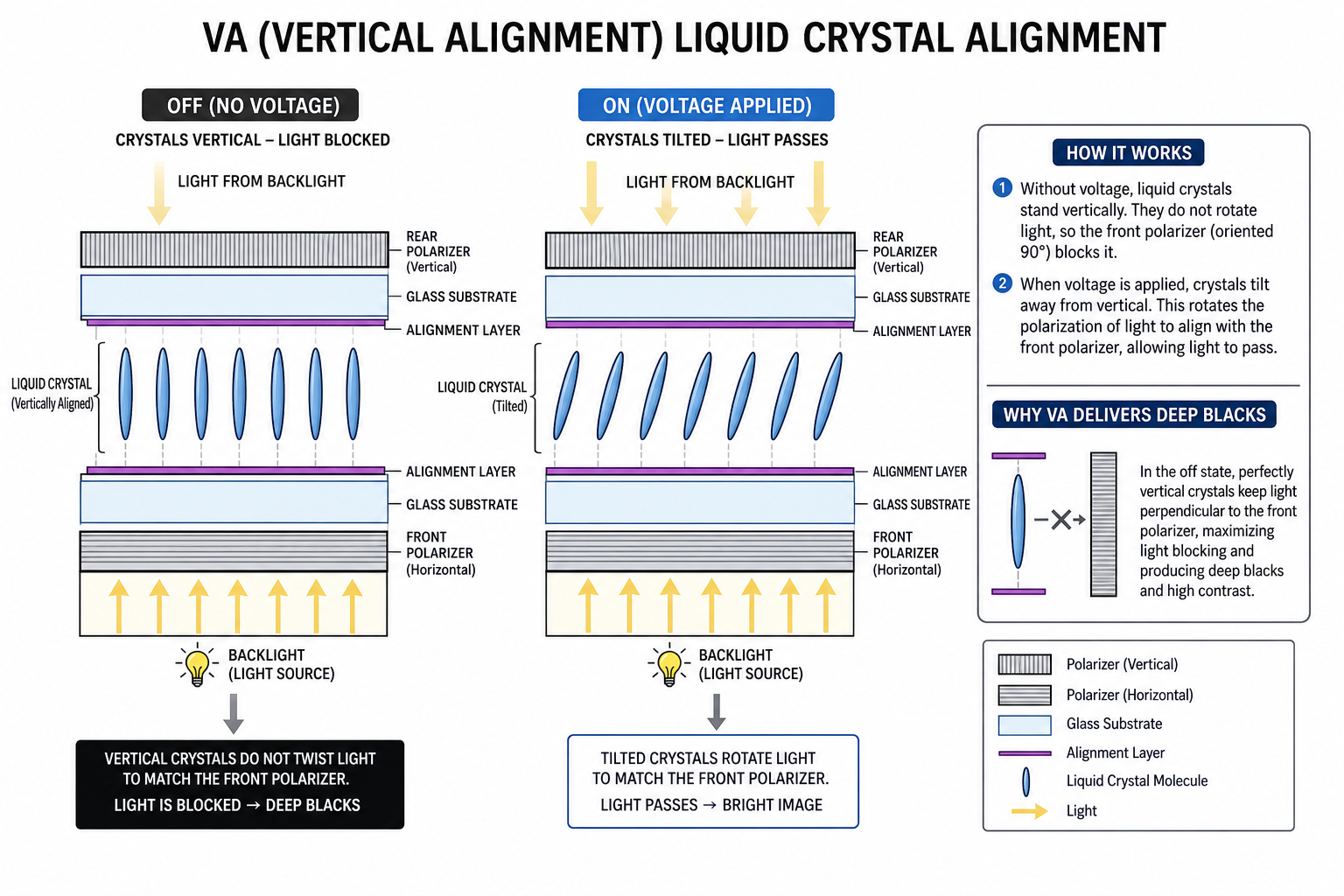
VA (Vertical Alignment) orients liquid crystals vertically — perpendicular to the glass substrate. When no voltage is applied, the crystals block light almost completely, producing genuinely deep blacks. When voltage is applied, the crystals tilt to let light through.
This vertical alignment is why VA panels crush IPS and TN in contrast ratio. A typical VA panel delivers 3000:1 to 5000:1 contrast, and some premium panels hit 7000:1. In practical terms, this means dark scenes in games like Resident Evil Village, Alan Wake 2, or Elden Ring look dramatically better on VA — you see actual detail in shadows instead of a grayish haze.
The catch? VA crystals take longer to change orientation, especially transitioning from dark to light. This causes black smearing — a ghosting trail behind moving objects in dark scenes. It's the single biggest complaint about VA gaming monitors, and it's noticeable if you know what to look for.
VA Strengths & Weaknesses
Strengths
- + Superior contrast (3000–5000:1)
- + Deep, true blacks
- + Great for dark-room gaming
- + Popular in curved monitors
Weaknesses
- - Black smearing/ghosting
- - Slower pixel transitions
- - Narrower viewing angles than IPS
- - Color shift at extreme angles
What Is a TN Panel?
TN (Twisted Nematic) is the oldest LCD panel technology. Liquid crystals are twisted 90 degrees between the glass layers. When voltage is applied, they untwist to control light transmission. This twisting/untwisting action is mechanically simple and fast — which is why TN panels have always been the speed champions.
TN panels can achieve genuine 0.5ms response times and were the first to hit 240Hz and 360Hz refresh rates. For competitive CS2, Valorant, or Apex Legends players chasing every possible advantage, TN delivers the clearest motion at the highest speeds.
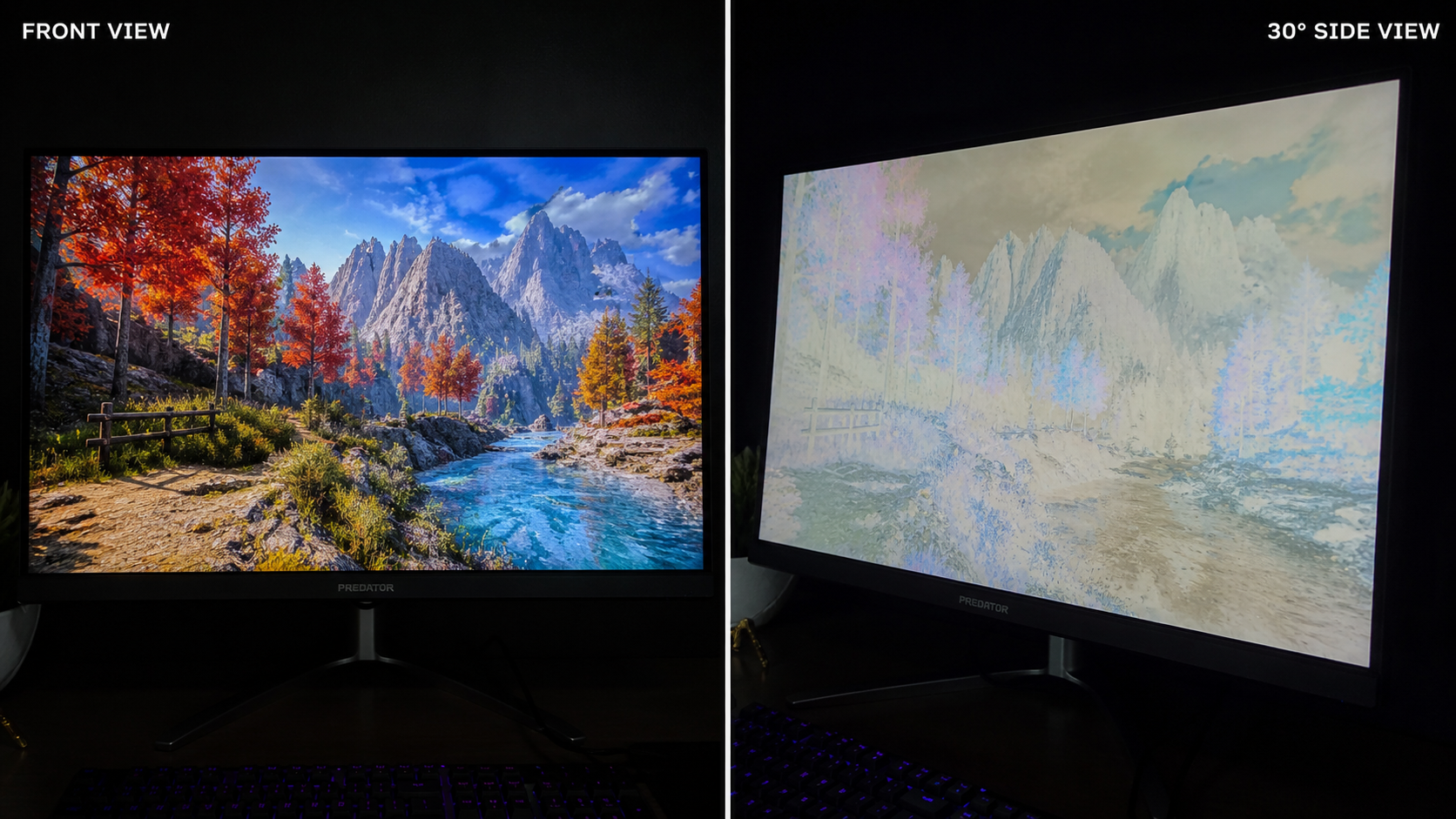
The problem? TN panels look noticeably worse than IPS and VA in almost every other way. Colors are washed out. Viewing angles are terrible — tilt your head slightly and the image shifts dramatically. If you're sitting dead-center with perfect posture, it's fine. Any other angle? The bottom of the screen looks darker, the top looks lighter, and colors lose saturation.
TN Strengths & Weaknesses
Strengths
- + Fastest response times (0.5ms)
- + Cheapest at high refresh rates
- + Zero ghosting/smearing
- + Low input lag
Weaknesses
- - Poor viewing angles (~170 degrees)
- - Washed-out, inaccurate colors
- - Low contrast (~800–1000:1)
- - Looks bad from any off-angle
Head-to-Head Comparison
Here's every spec that matters, side by side.
| Factor | IPS | VA | TN |
|---|---|---|---|
| Response Time | 1–4ms | 4–8ms | 0.5–2ms |
| Contrast Ratio | 800–1200:1 | 3000–5000:1 | 800–1000:1 |
| Color Accuracy | 95–100% sRGB | 90–100% sRGB | 85–95% sRGB |
| Viewing Angles | 178/178 degrees | 178/178 (with color shift) | 170/160 (heavy shift) |
| Black Levels | Grayish (IPS glow) | Deep, true blacks | Grayish |
| Ghosting | Minimal | Noticeable (dark scenes) | Almost none |
| Price (India, 24" 144Hz) | Rs 10,000 – 18,000 | Rs 9,000 – 16,000 | Rs 7,000 – 12,000 |
| Best For | All-round gaming + work | Immersive, cinematic games | Pure competitive esports |
Response Time & Ghosting
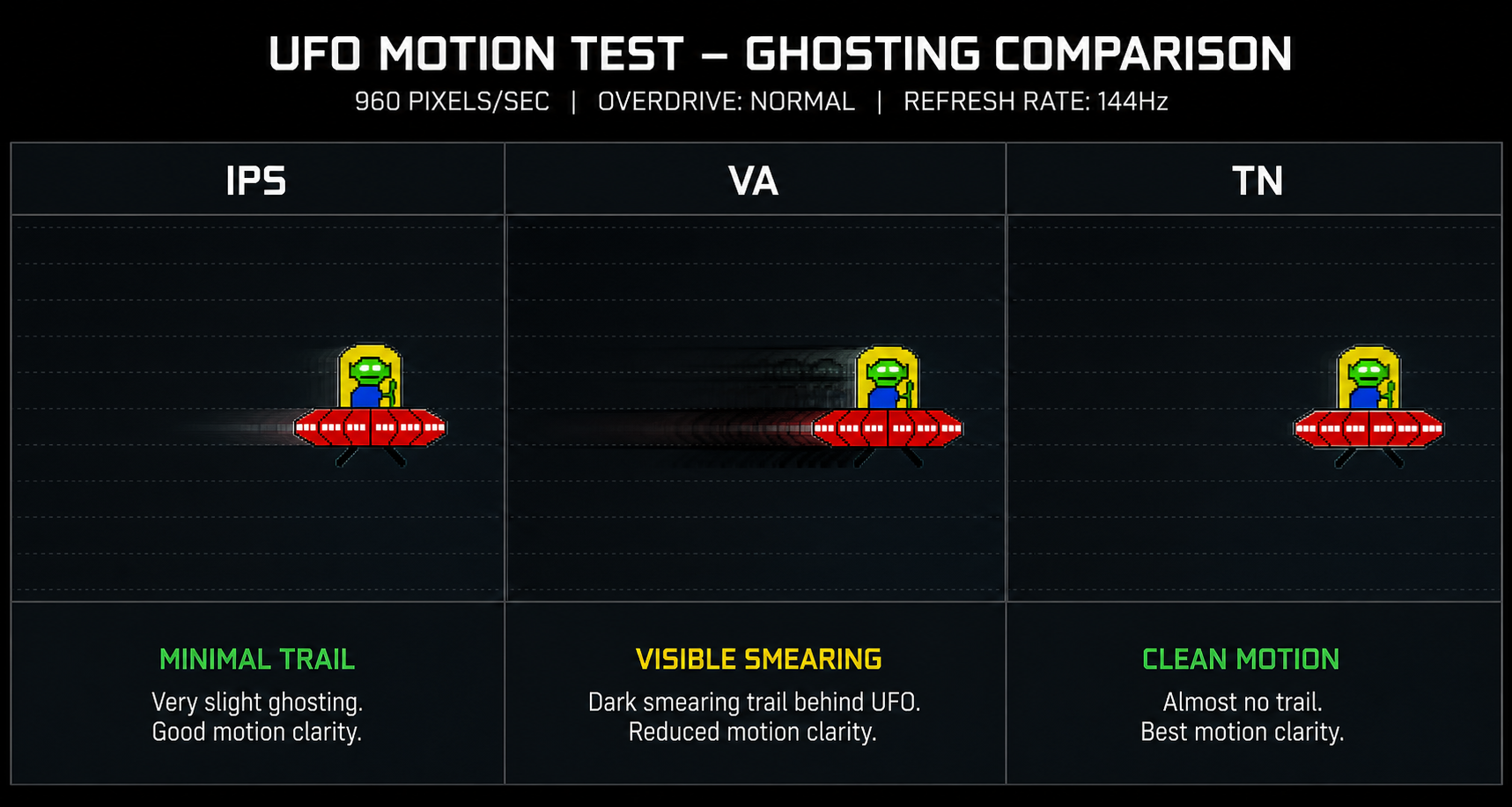
Response time measures how fast a pixel can change from one color to another, usually quoted as GTG (gray-to-gray). Lower is better — slow pixels leave visible trails behind moving objects, which gamers call ghosting.
Fastest — 0.5 to 2ms GTG
TN transitions are mechanically simple. Pixels untwist fast and cleanly. Even in the worst case, ghosting is negligible. This is why pro esports players still use TN panels at tournaments.
Fast — 1 to 4ms GTG
Modern Fast IPS panels have nearly closed the gap with TN. At 240Hz and above, the difference is barely perceptible. The only time you'll notice IPS ghosting is during rapid camera panning in very dark scenes.
Slowest — 4 to 8ms GTG (dark transitions worse)
VA's Achilles heel. GTG numbers look acceptable on paper, but dark-to-light transitions can hit 15–25ms on some panels. This causes "black smearing" — dark trails following bright objects moving across dark backgrounds. It's most visible in horror games, night maps, and dark UI elements.
Real Talk: Does Response Time Matter for You?
If you play competitive shooters at 144Hz+, response time matters — go IPS or TN. If you play story-driven games at 60–100fps, VA's ghosting is rarely a deal-breaker and its contrast advantage is massive. Don't let spec-sheet anxiety override what actually looks better to your eyes.
Color Accuracy
Color accuracy is measured by sRGB coverage (the standard color space for web and gaming content) and Delta E (how much displayed colors deviate from the target — lower is better, under 3 is good, under 1 is excellent).
IPS wins here — clearly. Out of every IPS gaming monitor we've researched, even budget ones under Rs 12,000 hit 95%+ sRGB with Delta E under 3. Many deliver 99% sRGB or better without calibration. This matters not just for gaming but for everything else you do on screen — photo editing, YouTube, Netflix, even just reading text.
VA panels have caught up significantly. Premium VA monitors from Samsung and MSI cover 95–100% sRGB with good factory calibration. Budget VA panels can be hit-or-miss — some oversaturate reds, others lean blue-ish.
TN panels are the weakest. Even good TN panels top out at 90–95% sRGB, and colors look noticeably washed out compared to IPS at the same price. If you've only ever used TN, switching to IPS for the first time is a "wow" moment.
Contrast & Black Levels
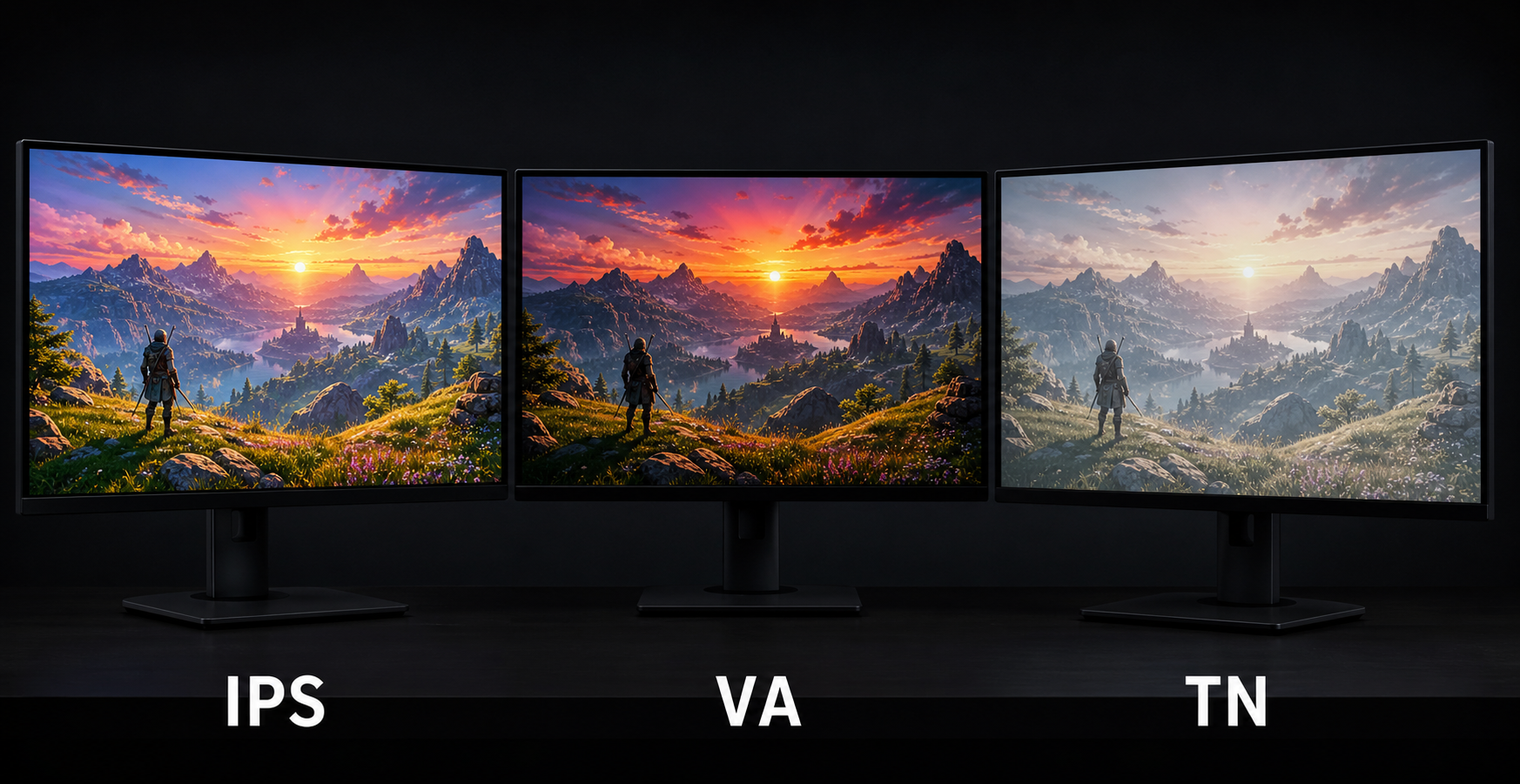
Contrast ratio is the difference between the brightest white and the darkest black a panel can produce. It's arguably the single most impactful visual spec — more than resolution, more than refresh rate, more than color gamut. High contrast makes images look "3D" and alive. Low contrast makes everything look flat and washed out.
VA demolishes IPS and TN here. With 3000–5000:1 native contrast, VA panels display blacks that actually look black. IPS and TN hover around 1000:1, meaning their "black" is really a dark gray — very obvious when you're gaming in a dark room or watching a movie with letterbox bars.
IPS
~1000:1
Blacks look grayish
VA
~4000:1
True, deep blacks
TN
~900:1
Worst black levels
When does this actually matter? If you game in a well-lit room, contrast differences are less noticeable — ambient light washes out the blacks anyway. But if you game at night with the lights off (which, let's be honest, most Indian gamers do), VA's contrast advantage is impossible to unsee once you've experienced it.
Viewing Angles
If you only ever sit directly in front of your monitor, perfectly centered, viewing angles barely matter. But in reality: you lean back, shift in your chair, a friend watches from the side, or you have a multi-monitor setup where side panels are viewed at angles.
IPS is the clear winner. Colors stay consistent up to 178 degrees in every direction. What you see dead-center is what you see from the side. This makes IPS ideal for multi-monitor setups and for anyone who doesn't sit rigidly in one position.
VA panels claim 178-degree angles on paper, but in practice, colors shift noticeably beyond 30 degrees — particularly brightness and saturation drop off. On large VA panels (32"+), even the corners of the screen can look different from the center when sitting at normal distance.
TN panels are terrible here. Tilt your head slightly upward and colors invert. Look from 30 degrees to the side and you can barely read text. On a 27" TN panel, even the top and bottom of the screen look different from the middle. It's TN's worst trait and the main reason the panel type is dying in 2026.
Price Comparison (India)
Prices have converged significantly in 2026. The IPS tax that used to add Rs 3,000–5,000 over TN has shrunk to Rs 1,000–2,000 at most price points. Here's what each budget range looks like on Amazon.in and Flipkart.
| Budget | IPS Options | VA Options | TN Options |
|---|---|---|---|
| Under Rs 10,000 | 24" 1080p 75–100Hz (Acer, LG) | 24" 1080p 165Hz curved (limited) | 24" 1080p 144Hz (Acer KG241Q) |
| Rs 10,000 – 15,000 | 24" 1080p 144–165Hz (LG 24GS60F, Acer VG240Y) | 24–27" 1080p 165Hz curved (Samsung, MSI) | Rare — being phased out |
| Rs 15,000 – 25,000 | 27" 1080p 240Hz or 1440p 144–165Hz (LG, Gigabyte) | 27" 1440p 165Hz curved (Samsung G5, MSI G273CQ) | Very few options |
| Rs 25,000+ | 27" 1440p 240Hz+ (LG 27GR83Q, ASUS VG27AQ1A) | 32" 1440p 165–240Hz curved (Samsung Odyssey, MSI Artymis) | Essentially dead at this price |
Our take: TN is only worth considering under Rs 10,000 if you need 144Hz on the absolute cheapest budget. Above Rs 12,000, IPS and VA offer so much more for a tiny premium that TN doesn't make sense anymore. Between IPS and VA, choose based on your use case — not price.
Looking for Specific Monitor Picks?
We've researched and ranked the best gaming monitors at every budget in India.
Best Panel by Game Genre
Instead of overthinking specs, just match the panel to what you actually play.
Competitive FPS (Valorant, CS2, Apex Legends)
Best: IPS or TN at 240Hz+
Speed is king. You need the fastest pixel response and highest refresh rate you can afford. IPS gives you speed and good visuals. TN is cheaper but looks worse. Avoid VA — black smearing in dark corners can cost you kills.
Story-Driven / Single-Player (Elden Ring, RDR2, Cyberpunk, God of War)
Best: VA (for dark room) or IPS (for all conditions)
Immersion matters more than raw speed here. VA's deep blacks and high contrast make cinematic games look stunning — especially games with heavy atmosphere and dark environments. IPS is the safer pick if you also use your monitor for work or play in a bright room.
Open World / RPG (Genshin Impact, Zelda, Witcher 3)
Best: IPS — best color for vibrant worlds
Colorful open worlds benefit most from IPS's accurate, vibrant color reproduction. The wide viewing angles also help on larger screens (27"+) where you sit close and the edges matter. VA is a strong second choice for nighttime gameplay sequences.
Racing / Sports (Forza, F1 24, EA FC)
Best: VA curved (immersion) or IPS (clarity)
Racing games look incredible on large curved VA panels — the wrap-around effect adds genuine immersion. VA's contrast also shines in night races. For sports games where you need to track fast-moving players, IPS's motion clarity gives a slight edge.
MOBA / Strategy (Dota 2, LoL, Age of Empires, Civ 6)
Best: IPS — any panel works, but IPS is ideal
MOBAs and strategy games aren't demanding on response time. What matters is color clarity for reading the UI, minimap, and ability cooldowns at a glance. IPS's consistent colors and wide angles make it the natural pick. Save your money — you don't need 240Hz for Dota.
Frequently Asked Questions
Is IPS better than VA for gaming?
Why are TN panels still sold if IPS is better?
Do VA panels have bad ghosting?
Which panel type is best for a monitor under Rs 15,000 in India?
Is IPS glow the same as backlight bleed?
Our Verdict
The Bottom Line
For most gamers in India, IPS is the best default choice in 2026. It does everything well — fast response times, accurate colors, wide viewing angles — and the price gap over VA and TN has shrunk to near-nothing. If you're buying one monitor for gaming, work, and entertainment, IPS covers all three.
Choose VA if you game primarily in a dark room, play atmospheric single-player games, or want a large curved monitor for immersive racing/cinematic experiences. The contrast advantage is real and meaningful — just accept the minor ghosting tradeoff.
Choose TN only if you're a hardcore competitive FPS player on a strict budget and you genuinely don't care about visual quality — or if you're buying a secondary monitor purely for esports practice.
Whatever you pick, prioritize refresh rate (at least 144Hz) and resolution (1080p minimum, 1440p if budget allows) over panel type. A 1440p 165Hz IPS monitor will give 95% of gamers a better experience than agonizing over the last 2ms of response time.
SOURCES & REFERENCES
Our recommendations are based on research, comparison, and analysis — we don’t physically test products. The technical claims on this page are backed by the standards bodies and published research below.
- 1.
Buying guide hub
Best Gaming Monitors in India — by budget
See the picks by budget
Best Gaming MonitorsUnder ₹10,000
Top picks and full comparison for this budget
Best Gaming MonitorsUnder ₹20,000
Top picks and full comparison for this budget
Best Gaming MonitorsUnder ₹50,000
Top picks and full comparison for this budget
Best Gaming MonitorsUnder ₹1,00,000
Top picks and full comparison for this budget
Related reading
60Hz vs 144Hz Monitor: Is the Upgrade Worth It for Gaming?
11 min read
1080p vs 1440p for Gaming: Which Resolution to Pick
11 min read
24 vs 27 Inch Monitor: Best Size for Gaming?
10 min read
What is Refresh Rate? Complete Guide for Gamers
11 min read
What is Response Time in a Monitor? (And Why It Matters)
10 min read