
The mistake almost everyone makes with a gaming monitor is buying the biggest, sharpest, fastest number they can afford — a 4K 240Hz panel wired to a GPU that can push neither 4K nor 240 frames. A monitor only shows what the graphics card sends it, so the first decision is not resolution or refresh rate. It is: what can my GPU actually drive?
This page covers the decisions that apply to every gaming monitor whatever you spend — how much you need to spend, which panel your GPU should be paired with, the six specs that decide it, and the quality checks to make on a new panel. The four reviews it links to handle the specific products in each price band.
The Short Answer
Three monitors across the range, each the top pick from its own review — so the price and score below are the same ones those pages carry, and they update the day a price changes.

Kreo Obsidian 27I200Q
8.8A 27-inch QHD 1440p panel at 180–240Hz with HDMI 2.1 — sharp enough for desktop work, fast enough for competitive play, and exactly what a mid-range GPU is built to drive. Spend more and you are buying image quality, not more usable frames.
₹15,799
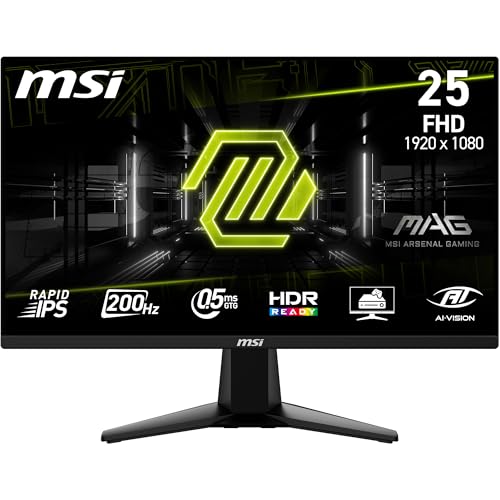
MSI MAG 255F E20
8.7A 24-inch 1080p Fast IPS at 165–200Hz. Every rupee goes into the panel and the refresh rate instead of size or HDR you can't use yet — the right first monitor for an RTX 3050/4060-class build.
₹9,499

Alienware AW2726DM 26.5" QHD QD-OLED 240Hz
9.0A true QD-OLED — perfect blacks, near-instant pixel response and colour that no IPS at this price touches. The upgrade you feel in every frame, if your GPU and budget can reach it.
₹39,799
The one-line version: a 27-inch 1440p panel at 165Hz or more is the right monitor for most Indian gamers. Go smaller and cheaper for pure competitive FPS; go OLED only once your GPU and budget can both reach it.
We earn a commission on qualifying purchases made through links on this page, at no extra cost to you. It does not affect which monitors we recommend.
How Much Should You Actually Spend?
Monitor pricing in India ladders cleanly — each band adds a specific, checkable upgrade rather than a vague "premium feel". Here is what your money buys, and where the returns start to flatten.
24–24.5-inch 1080p Fast IPS at 165–200Hz. This is where the money goes into the panel and the refresh rate rather than size, resolution or HDR. Ideal for a first build and for competitive shooters where high, stable frames beat everything else.
See the best gaming monitors under ₹10,00027-inch QHD 1440p at 180–240Hz, and HDMI 2.1 arrives so a PS5 or Series X runs at 120Hz. The single biggest jump in perceived sharpness happens here, and a mid-range GPU can actually feed it. If you buy one monitor for both games and work, buy it in this band.
See the best gaming monitors under ₹20,000True QD-OLED, 4K Mini-LED with real HDR, and 240–300Hz QHD. Blacks go genuinely black, HDR stops being a checkbox, and response times fall off a cliff. Worth it only if your GPU can drive the resolution you're paying for.
See the best gaming monitors under ₹50,00027" and 32" 4K OLED, ultrawide QD-OLED, and 4K 240Hz. This is the ceiling that still buys panel, not badge — you need an RTX 4080/4090-class GPU to do it justice, and below that GPU the money is wasted.
See the best gaming monitors under ₹1,00,000Mostly larger OLEDs, dual-mode panels and colour-critical pro displays. Little of the extra spend improves gaming specifically over a good ₹80,000 monitor — you are buying size, a colour workflow, or bragging rights.
The jump that matters most is from roughly ₹9,000 to ₹16,000. That is where the screen grows from 24 to 27 inches, the resolution steps from 1080p to 1440p, and HDMI 2.1 appears for consoles. Below it you are buying frame rate; above it, up to about ₹30,000, you are mostly buying image quality rather than more usable performance.
Match the Monitor to Your GPU
This is the table to read before any other. A monitor cannot invent frames the graphics card doesn't produce, so the resolution and refresh rate you buy should be the ones your GPU can comfortably drive at high settings. Buy above your GPU and you pay for pixels and Hertz you'll never see; buy below it and you leave performance on the table.
| Your GPU | Comfortable target | Buy this panel | Usual band |
|---|---|---|---|
| RTX 3050 / RX 6600 / older | 1080p, high frame rate | 24" 1080p 165–200Hz | Under ₹10,000 |
| RTX 4060 / 5060 / RX 7600 | 1080p maxed, or 1440p high | 24" 1080p 240Hz or 27" 1440p 165–180Hz | Under ₹20,000 |
| RTX 4070 / 5070 / RX 9070 | 1440p, high frame rate | 27" 1440p 180–240Hz | Under ₹50,000 |
| RTX 4080 / 4090 / 5080 / 5090 | 4K high-fps, or 1440p OLED | 1440p 240Hz OLED or 4K 144–240Hz | ₹50,000+ |
| PS5 / Xbox Series X | 4K 120 or 1440p 120 | HDMI 2.1, 1440p or 4K 120Hz | ₹20,000+ |
Two rules do most of the work. Resolution is the GPU-heavy choice, refresh rate is the cheaper one — pushing 1440p costs far more GPU power than pushing more frames at 1080p, so if your card is the limit, drop resolution before you drop Hertz. And a locked frame rate beats a higher ceiling: a 165Hz panel holding a steady 144fps feels smoother than a 240Hz panel bouncing between 90 and 160 — the same reason the jump from 60Hz to 144Hz is the one every gamer notices first.
The Six Specs That Actually Decide It
You can't sit in front of a monitor before buying it online, so the next best thing is knowing which words in a listing are real and which are marketing. Each of these is a concrete, checkable difference — and each is one that manufacturers routinely overstate. The most gamed of them is the "1ms" figure, which we take apart in what response time actually means.
Resolution and size
Look for: "QHD 1440p" · "≈109 PPI"
Pixel density, not raw resolution, decides how sharp a monitor looks. 1080p is crisp on a 24-inch panel (~92 PPI) and soft on a 27-inch one (~81 PPI); 1440p on 27 inches (~109 PPI) is the sharpness sweet spot; 4K only earns its keep at 32 inches and above, or up close. Match the size to the resolution before anything else — a 27-inch 1080p monitor is the most common mistake in this category.
Refresh rate
Look for: "165Hz" or "180Hz"
How many frames per second the panel can show. The jump from 60Hz to 144/165Hz is transformative and the one everyone feels. 165Hz to 240Hz is a real but much smaller step; above 240Hz is a competitive-esports concern only, and only if your GPU can sustain those frames. Refresh rate is worthless if the GPU can't feed it — which is why the GPU table above comes first.
Panel type
Look for: "Fast IPS", "VA" or "QD-OLED"
IPS gives the best colour and viewing angles and is the safe default for gaming. VA has deeper contrast and better blacks but slower pixels, so it can smear in dark scenes. OLED beats both on contrast and response but costs more and carries a small burn-in risk. TN is effectively dead — if a listing still leads with TN, skip it.
Response time
Look for: "1ms GtG" — not "1ms MPRT"
The single most gamed spec on the box. GtG (grey-to-grey) is the real pixel-transition number; MPRT is a motion-blur figure that needs backlight strobing and often a lower brightness to hit. A "1ms MPRT" VA panel can smear far more than a "3ms GtG" IPS. Read the GtG number, and treat any "1ms" with no suffix as marketing.
Adaptive sync
Look for: "FreeSync Premium" / "G-Sync Compatible"
Variable refresh rate matches the panel to your GPU's output so you get no tearing and no stutter. It works across brands now — an AMD FreeSync monitor runs adaptive sync on an NVIDIA card and vice versa, per the VESA Adaptive-Sync standard. You do not need an expensive hardware G-Sync module; FreeSync Premium or G-Sync Compatible is all a gamer needs.
Connectivity
Look for: "HDMI 2.1" and "DisplayPort 1.4"
DisplayPort carries the highest refresh rates on PC and should be your desktop connection. HDMI 2.1 is what a PS5 or Xbox Series X needs for 4K 120Hz or 1440p 120Hz — older HDMI 2.0 caps consoles at 60Hz. If you game on console at all, HDMI 2.1 is non-negotiable, and it only becomes common from the ₹15,000 band upward.
HDR sits slightly outside this list because below ₹30,000 it is almost always a checkbox rather than a feature — a "HDR10 supported" panel with 250–300 nits and no local dimming cannot actually show HDR. Real HDR needs a high peak brightness and dimming zones (or OLED), which is a higher-band concern covered on the best gaming monitors under ₹50,000 review, where it starts to mean something. VESA's DisplayHDR tiers are the honest way to read a brightness claim.
IPS, VA or OLED — and the Indian Room Problem
Panel type is the decision that shapes how a monitor looks in your actual room, and the "best" one depends on what you play and how bright the room is. Our IPS vs VA vs TN guide goes deeper on each panel technology; the short version is below.
IPS is the safe default for gaming. It has the best colour accuracy and the widest viewing angles, and modern "Fast IPS" panels are quick enough for competitive play. The trade-off is contrast: blacks look grey, and in a dark room you'll see some backlight glow. This is the panel most sub-₹30,000 gaming monitors use, and for good reason.
VA flips the trade. Contrast is far better — blacks are genuinely dark, which suits cinematic single-player games — but pixels are slower, so fast dark-scene motion can smear. Curved gaming monitors are usually VA. Good for atmosphere, weaker for twitch shooters.
OLED (QD-OLED or WOLED) beats both: perfect per-pixel blacks, effectively instant response, and the best HDR you can buy. The catches are price, a small risk of burn-in from static elements over years of use, and — for the glossy QD-OLED type — that it needs a room without a bright window behind you to look its best.
That last point matters more in India than most guides admit. Many desks sit next to a sunlit window, and a lot of budget panels are only 250–300 nits. In a bright room, panel brightness and an anti-glare (matte) coating do more for everyday usability than an extra 60Hz of refresh. If your room is bright, prioritise a 350-nit-plus matte panel; save the glossy OLED for a room you can control the light in.
Brands You'll Actually See in India
The Indian monitor market is dominated by a handful of names, and knowing what each is good at saves a lot of comparison shopping.
Acer & AOC
The volume players under ₹20,000. Acer's Nitro and AOC's G-series cover almost every budget FHD and entry-QHD slot, usually with the highest refresh rate for the money. Colour calibration out of the box is average, but the panels are honest for the price.
MSI
Consistently strong value across FHD and QHD, with genuinely good factory colour and a clean OSD. The MAG and G-series turn up as top picks from ₹9,000 to ₹40,000 more often than any other brand.
Dell & Alienware
Dell owns the mainstream 1440p office-plus-gaming slot; Alienware owns QD-OLED value, repeatedly undercutting rivals on the same panel. Both carry Dell's 3-year warranty — including a rare OLED burn-in warranty — which is the strongest after-sales story in the category.
LG & Samsung
The two panel makers themselves, so they lead on OLED. LG's WOLED (matte, glare-friendly) and Samsung's QD-OLED (glossy, more saturated) are the flagship choices above ₹40,000. You pay a brand premium, but the panels are the real thing.
ASUS & BenQ
ASUS ROG and TUF sit at the premium end with strong HDR and firmware; BenQ MOBIUZ and its ZOWIE line are esports-focused. Both are priced above the value brands for broadly the same panel — you're paying for tuning and features.
Kreo, Ant Esports, Zebronics
The India-first budget brands. They punch above their price on paper specs — high refresh, wide gamut — and the Kreo Obsidian is a genuine value standout. Warranty networks are thinner than the majors, so weigh that against the saving.
Warranty is the tie-breaker once panels are close. Dell and its Alienware line carry a 3-year warranty and, on the OLED models, a burn-in warranty — the strongest safety net in the category, and the reason Alienware shows up so often in the OLED picks. The India-first budget brands win on specs-per-rupee but have thinner service networks, so weigh the saving against how easily you could get a panel replaced.
The Panel Lottery, and What to Check on Day One
Every LCD has some unit-to-unit variation — a little corner backlight bleed, the odd stuck sub-pixel, slightly uneven brightness. None of that is a defect on its own; it is the nature of mass-produced panels. What separates a good buy from a bad one is the return policy and a five-minute check the day the monitor arrives.
Before you buy, find the brand's dead-pixel policy — how many dead or stuck pixels it takes to qualify for a replacement. Some brands replace on a single bright dead pixel; others require several. This is the number that actually protects you, not the warranty length.
The day it arrives, and inside the return window, run the panel on a full-black screen (look for stuck pixels and bad bleed) and a full-white screen (look for dead pixels and dirty-screen effect), and test it at the refresh rate you bought it for. A pushed-back return window is not the time to discover a fault. OLED panels sidestep the bleed and dead-pixel worries entirely — every pixel makes its own light — but bring their own long-term burn-in consideration instead.
How We Choose
Our monitor recommendations are research-based. We compare published panel specifications, product listings on Amazon India, warranty and dead-pixel policies, and the patterns across the verified customer reviews we analyse — particularly recurring complaints about panel uniformity, coating quality and firmware, which is where this category varies most. We do not physically test these monitors, and we do not present opinions as measurements.
Prices and scores shown above are pulled directly from the four reviews this page links to, so they cannot drift out of sync. More on our approach in how we evaluate products.
Frequently Asked Questions
These cover gaming monitors in general. Questions specific to a budget — which panel wins under ₹10,000, whether QD-OLED beats 4K IPS at ₹45,000 — are answered on the four reviews below.
How much should I spend on a gaming monitor in India?
FreeSync or G-Sync — which do I need?
HDMI or DisplayPort — and do I need HDMI 2.1?
Why does a '1ms' monitor sometimes look slower than another '1ms' monitor?
Do gaming monitors work with a PS5 or Xbox Series X?
How much refresh rate do I actually need?
How worried should I be about dead pixels and backlight bleed?
Why is the price sometimes higher — or the monitor unavailable — when I'm logged in?
A monitor has thousands of ratings — why isn't it ranked higher?
Go Deeper: The Concepts Behind the Picks
This page keeps each spec to the short version. When you want the full explanation — the why behind the number, and how it changes what you should buy — these guides go one level down on the decisions above.
Which resolution to buy for your GPU — and why 1440p is the sweet spot.
24 vs 27 Inch for GamingHow size and pixel density decide whether a panel actually looks sharp.
What Is Refresh Rate?Hz explained from scratch, and how much you genuinely need.
60Hz vs 144HzThe single upgrade every gamer feels first — and when it's worth it.
IPS vs VA vs TN PanelsThe panel-type trade-off, and which one suits your room and games.
What Is Response Time?The 1ms GtG-vs-MPRT trap, and the number that actually matters.
Where to Go Next
Pick your band and the review takes it from there — full write-ups, comparison tables and the trade-offs specific to that price.
24–24.5-inch 1080p IPS panels running 165–200Hz. All the frame rate a budget or mid-range GPU can use, with none of the money going where you can't see it.
Best for: First builds, college setups, competitive FHD esports
Top pick: MSI MAG 255F E20 ₹9,499
The 27-inch 1440p sweet spot. Sharp QHD, 180–240Hz refresh and HDMI 2.1 for 120Hz consoles — the band most people should buy in.
Best for: Do-everything gaming + work, 1440p on a mid-range GPU, console gamers
Top pick: Kreo Obsidian 27I200Q ₹15,799
Where image quality stops compromising — true QD-OLED, 4K Mini-LED HDR and 240–300Hz QHD. The band where 'good enough' becomes 'genuinely great'.
Best for: High-end builds, work + play, buyers who want OLED or real HDR
Top pick: Alienware AW2726DM 26.5" QHD QD-OLED 240Hz ₹39,799
Flagship OLED and 4K — 27" and 32" QD-OLED / WOLED, ultrawides, and 4K 240Hz. The ceiling before you're paying for a badge, not a better panel.
Best for: Enthusiasts, 4K gaming on an RTX 4080/4090-class GPU, ultrawide immersion
Top pick: Alienware AW2725D 27" QD-OLED 280Hz ₹57,129
Complete the setup
Gaming Laptops
The GPU inside decides which monitor you can actually feed
Gaming Keyboards
A fast panel deserves an input device that keeps up
Gaming Mouse
High polling rate pairs with high refresh — match the two
SOURCES & REFERENCES
Our recommendations are based on research, comparison, and analysis — we don’t physically test products. The technical claims on this page are backed by the standards bodies and published research below.
- 1.
- 2.
- 3.