
India's power grid doesn't play fair. Voltage swings, load-shedding and monsoon outages can corrupt drives, stress a PSU and cost you hours of unsaved work — and a UPS is the cheapest insurance you can buy for any desktop. But the mistake most buyers make is shopping by the VA number on the box, which tells you far less than the two things that actually decide it: the real wattage the unit delivers, and how wide its AVR range is.
This page covers the decisions that apply to buying any UPS on India's grid — how much to spend and on what, how to size it to your PC, why AVR matters here more than anywhere, and where a UPS actually fails. The two reviews it links to handle the specific units: a full desktop UPS by tier, and a mini UPS for a WiFi router.
The Short Answer
Two picks for two jobs, each the top pick from its own review — so the price and score below are the same ones those pages carry, and they update the day a price changes.
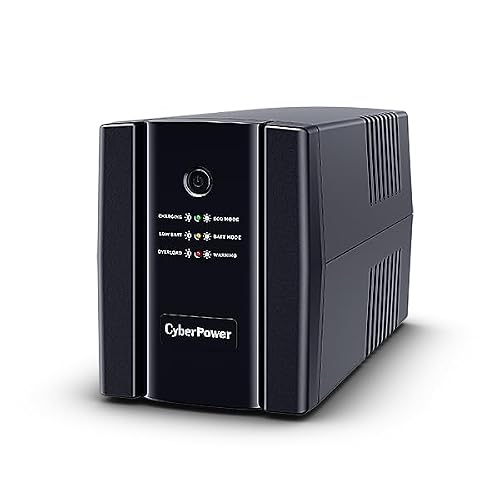
CyberPower UT2200E
9.4A line-interactive UPS with wide-range AVR, enough VA/Watt headroom for your PSU, and quiet operation with shutdown software — everything that protects a desktop from India's grid. Size it to your PC (keep the load under 60% of the watt rating) and a power cut becomes a non-event instead of a corrupted drive.
₹10,490

Cuzor Mini UPS PRO (12V/3A)
9.2A palm-sized DC mini UPS that keeps just your router and modem online through a cut, with instant zero-reboot switchover. The cheapest way to keep WiFi, work calls and streaming alive when the mains drops — the companion buy to a desktop UPS, not a replacement for one.
₹1,829
The one-line version: buy a line-interactive UPS sized to your PSU wattage (load it under 60%) with the widest AVR range you can afford — and add a cheap DC mini UPS to keep the router online too.
We earn a commission on qualifying purchases made through links on this page, at no extra cost to you. It does not affect which UPS units we recommend.
What to Spend, and On What
UPS pricing tracks capacity almost linearly — you pay for VA/Watt headroom and backup time, not for badges. The trick is to buy enough capacity for your PC without massively overpaying for runtime you'll never use. Here is what each band gets you.
A compact DC mini UPS for just your router and modem, with 3–6 hours of real backup and zero-reboot switchover. The cheapest insurance for staying online through a cut — but it powers network gear only, never a PC.
See the best mini UPS for a WiFi router600–650VA / ~360W line-interactive units with 15–20 minutes of backup — enough to save your work and shut down cleanly on a basic PC or work-from-home setup. Value leaders here often pair a rare 2-year battery warranty with proper AVR.
See the best desktop UPS by tier1000–1200VA / 600–660W with 25–33 minutes of backup — the band for a mid-range gaming desktop or home office. This is where surge protection, a solid service network and wider AVR ranges become the deciding factors.
See the best desktop UPS by tier1500–2200VA / 900–1320W with 45–75 minutes of backup for high-end gaming rigs, workstations and homelabs with RTX-class GPUs. Look for quiet operation, shutdown software and the widest AVR range at this tier.
See the best desktop UPS by tierThe one rule that saves money and grief: size for your PC, then stop. A high-end rig genuinely needs a 2000VA+ unit, but a basic PC on a 2000VA UPS is just paying for runtime it will never use. Get the wattage right first — the next section is the table to do it.
How to Size a UPS to Your PC
This is the table to read before any other. The number on the box is VA; the number that matters is Watts, and it should comfortably exceed your PC's real draw. Find your PSU wattage (or your build type below), then pick a UPS whose watt rating leaves your load under about 60% — that headroom is what gives you usable backup time and a longer battery life.
| Your setup | Typical draw | UPS to buy |
|---|---|---|
| WiFi router only | 12–36W (DC) | DC mini UPS (not a VA-rated unit) |
| Basic PC / office / WFH | 150–300W | 600–650VA (≈360W) |
| Mid-range gaming desktop | 600–900W | 1000–1500VA (600–900W) |
| High-end RTX 50-series rig | 1200W+ | 2000–2200VA (1200–1320W) |
Two rules do most of the work. Match Watts, not VA — a "1500VA" unit may only deliver 900W, so always check the watt rating against your PSU. And leave headroom: keeping the load under 60% of the watt rating is what turns a UPS that trips instantly into one that gives you real minutes to save and shut down. Undersizing is the single most common — and most expensive — mistake buyers make.
Why AVR Matters More in India
If sizing decides whether a UPS works at all, Automatic Voltage Regulation decides how often it has to. AVR corrects brownouts and over-voltage without touching the battery, so the unit only switches to backup in a true outage rather than every time the mains dips — which, on India's grid, can be many times an hour.
The spec to read is the input voltage range: the widest units hold a steady output from about 140V to 300V. A UPS with a narrow AVR window will drop to battery on every fluctuation, draining and ageing the battery far faster and leaving you with nothing when a real cut comes. In areas with severe voltage swings, AVR range is more important than brand, backup time or price. The behaviour a good line-interactive UPS is expected to deliver — clean switchover and voltage correction — is exactly what the IEC 62040 UPS standard classifies, and it's why a properly-specced unit is worth more than a cheaper one with a bigger VA number.
The Six Specs That Actually Decide It
You're buying protection you hope never to need, so the specs that matter are the ones that decide whether it works when it finally has to. Each of these is a concrete, checkable difference — and the most gamed of them is the VA number, which tells you less than the Watts behind it.
VA vs Watt rating
Look for: match Watts to your PSU, not the VA number
The number the box shouts is VA; the number that matters is Watts. A '1500VA' UPS might only deliver 900W, so match the watt rating to your PSU and keep the actual load under about 60% of it for usable backup time and battery life. Undersizing is the most common mistake — a UPS that trips the instant the power cuts is worse than none.
AVR range
Look for: "140–300V" input range — wider is better
Automatic Voltage Regulation corrects brownouts and surges without draining the battery, and on India's grid it matters more than the brand name. The widest-range units hold output steady from about 140V to 300V, so they only fall back to battery in a true outage rather than every minor dip. In areas with severe fluctuation, AVR range is the single most important spec.
Backup runtime
Look for: minutes at your real load, not the headline figure
Runtime is what you're actually buying. Expect roughly 10–20 minutes from a 600VA unit, 20–45 from 1000–1500VA, and 45+ from 2000VA+ — all at a sensible load. It is enough to ride out short cuts and shut down cleanly, not to keep gaming for an hour. The lighter you load the UPS relative to its rating, the longer it lasts.
Surge protection
Look for: a published Joule rating (e.g. 255J)
A genuine surge-protection spec — a Joule rating you can point to — means the UPS actually clamps spikes, not just markets the idea. In an environment with frequent switching surges and lightning-season spikes, this is what protects the PSU and board behind it. No published rating usually means no meaningful protection.
Battery serviceability
Look for: standard 12V/7Ah cell, not proprietary
The battery is a consumable that will need replacing, so how it's replaced decides the long-term cost. Units that use a standard 12V/7Ah cell take a cheap, widely-available Exide or Amaron swap; proprietary battery packs lock you into expensive replacements or a dead unit. Prefer standard cells — this is where the real cost of ownership hides.
Warranty and service
Look for: 2-year unit + battery, walk-in or carry-in
A UPS lives or dies on service, because it is the component most likely to need a warranty claim as the battery ages. A 2-year warranty covering both the unit and the battery is the gold standard, and a nearby service centre matters as much as the terms. Check whether service is walk-in or carry-in before you buy — a UPS is heavy to ship.
Battery replacement is a when, not an if — so of all these, serviceability quietly decides the real cost of ownership. A unit with a standard 12V cell stays cheap to keep alive for years; a proprietary pack turns a tired battery into a dead UPS.
Brands You'll Actually See in India
The Indian UPS market splits between the feature-led and service-led global names, the value brands, the mass-market shelf-fillers, and the router mini-UPS specialists. Knowing what each is good at — and where the spec risk sits — saves a lot of comparison shopping.
CyberPower
The capable, quiet, feature-led choice at the top of the desktop range. Its high-capacity units pair wide AVR with shutdown software and near-silent operation, which is why the flagship desktop pick sits here rather than with the value brands.
APC
The service-and-surge benchmark. APC units publish real Joule ratings and are backed by the widest, most reliable service network in India — the safe choice when a warranty claim's ease matters as much as the specs. You pay a small premium for the name and the network.
Artis
The value leader at the entry end. Artis punches above its price with proper AVR and, on some models, a rare 2-year battery warranty — the pick when you want dependable basic-PC protection without overpaying for a badge.
Microtek, Zebronics, Intex
The mass-market India brands that dominate the shelves. Wide availability and low prices, with AVR and surge specs that vary by model — read the watt rating and the AVR range carefully, because this is where undersized and thin-on-protection units hide.
Cuzor, Oakter
The router mini-UPS specialists. These DC units keep a router and modem alive through a cut with instant switchover; Cuzor leads for high-draw Jio Fiber/Airtel routers, and Oakter covers the sub-₹1,000 end. Different product from a desktop UPS — buy one as a companion, not a substitute.
Others / grey-market imports
Cheap imports with eye-catching VA numbers and no published AVR or Joule rating turn up constantly. The catch is India service and honest specs — which is exactly why our reviews rank on the pattern in verified Indian reviews and real backup figures rather than the number on the box.
Service is the tie-breaker once units are close on capacity and AVR, because a UPS is the component most likely to need a warranty claim as its battery ages — and it's heavy to ship. The established names carry proper local service and honest specs; the grey-market imports often don't, which is exactly why our reviews rank on real backup figures and the pattern in verified Indian reviews rather than the VA number on the box.
Where a UPS Actually Fails — and What to Check
A UPS rarely fails on its electronics. It fails on the battery, on being undersized for the load, and on a proprietary cell that can't be cheaply replaced. Knowing the real failure points tells you what to prioritise and what to check before and after buying.
The battery ages — that's normal. Lead-acid batteries lose capacity over 2–3 years, faster in India's heat, so a UPS that gives 20 minutes new may give 8 after two summers. This is wear, not a defect. The fix is cheap only if the unit takes a standard 12V/7Ah cell, so check that before you buy — it's the difference between a ₹800 swap and a dead unit.
Undersizing, and the load creep that follows. A UPS sized right for a PC can become undersized when you add a second monitor, a GPU upgrade or an external drive. Buy with headroom, keep the load under about 60% of the watt rating, and re-check after any upgrade — an overloaded UPS trips instantly and protects nothing.
What to check the day it arrives. Inside the return window, confirm the unit actually holds your PC on battery for a sensible time by pulling the plug once with everything running, listen for excessive fan or transformer noise, and verify the AVR clicks in on a dip rather than dropping straight to battery. A UPS that can't ride out a test cut on day one won't save you on a real one.
How We Choose
Our UPS recommendations are research-based. We compare published specifications — VA and Watt ratings, AVR range, backup runtime, surge Joule ratings and battery type — product listings on Amazon India, warranty and India service, and the patterns across the verified customer reviews we analyse, particularly recurring complaints about real backup times, battery life and undersized units, which is where this category varies most. We do not physically test these units, and we do not present opinions as measurements.
Prices and scores shown above are pulled directly from the two reviews this page links to, so they cannot drift out of sync. More on our approach in how we evaluate products.
Frequently Asked Questions
These cover buying a UPS in general. Questions specific to a unit — which desktop UPS wins in a given tier, or which mini UPS suits a high-draw router — are answered on the two reviews below.
What size UPS do I need for a gaming PC in India?
Is AVR really important for a UPS in India?
How long will a UPS actually run my PC?
How long does a UPS battery last before it needs replacing?
Do I need a separate mini UPS for my WiFi router?
Can a UPS protect my PS5 or Xbox?
Why is the price sometimes higher — or the UPS unavailable — when I'm logged in?
A UPS has thousands of ratings — why isn't it ranked higher?
Where to Go Next
Pick your job and the review takes it from there — full write-ups, tier-by-tier comparisons and the trade-offs specific to each unit.
Full line-interactive UPS with AVR for a desktop — from 600VA units for basic PCs to 2000VA+ for high-end RTX rigs. The main event, sized to your PSU so a power cut never corrupts a drive or ends a ranked match.
Best for: Desktops, gaming rigs, workstations and homelabs on India's grid
Top pick: CyberPower UT2200E ₹10,490
A compact DC mini UPS that keeps just your router and modem online through a cut, with zero-reboot switchover — for when the PC is on a laptop battery but the internet dies with the mains.
Best for: Keeping WiFi, work calls and streaming alive during short outages
Top pick: Cuzor Mini UPS PRO (12V/3A) ₹1,829
Complete the setup
Gaming Monitors
Protect the display too — a voltage spike kills a panel as fast as a PSU
Gaming Keyboards
Complete the desktop setup the UPS is protecting
Gaming Mouse
No ranked match should end because of a power cut
SOURCES & REFERENCES
Our recommendations are based on research, comparison, and analysis — we don’t physically test products. The technical claims on this page are backed by the standards bodies and published research below.
- 1.