
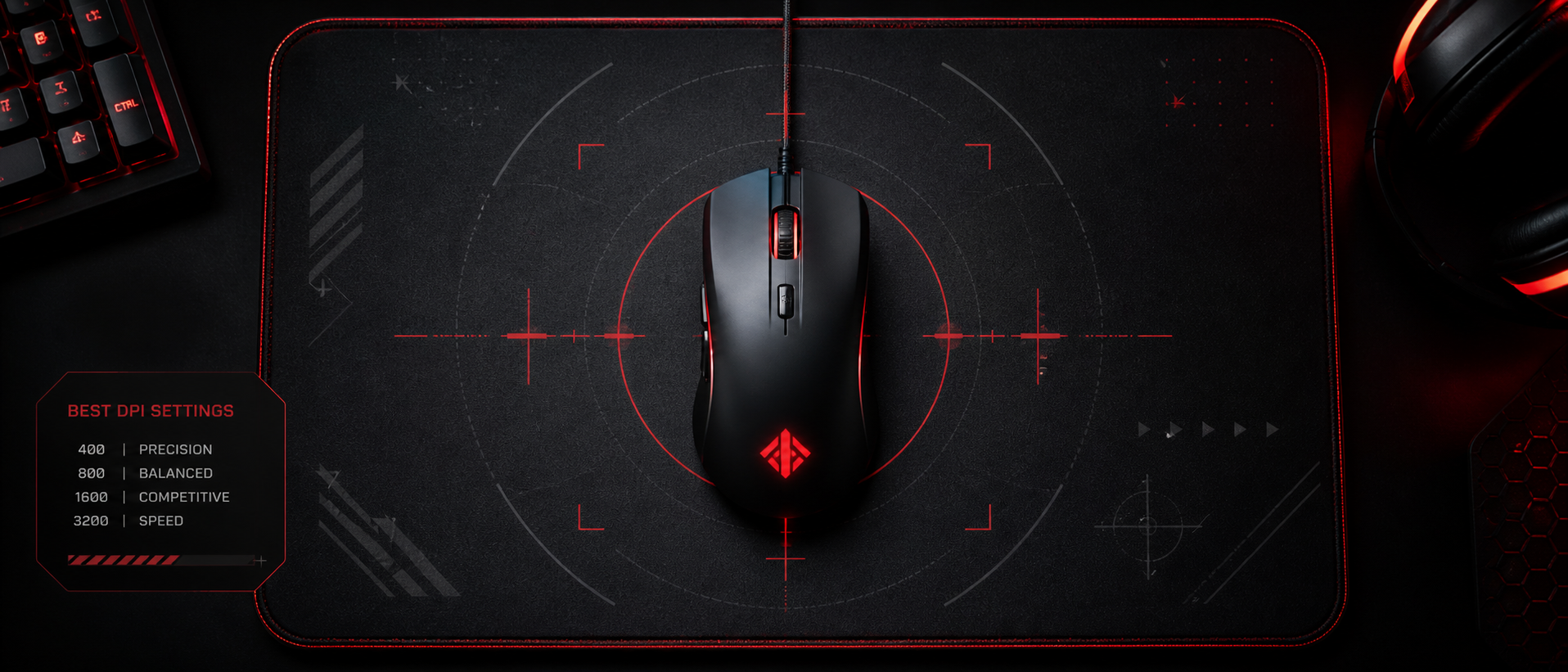
Your DPI and sensitivity settings are arguably the single most impactful configuration choice in any FPS game. Get them right, and your crosshair feels like an extension of your hand. Get them wrong, and you'll forever feel like you're fighting your own mouse instead of the enemy team.
We've compiled the exact settings used by top pros in Valorant, CS2, and Apex Legends, broken down the math behind eDPI and cm/360, and created a step-by-step method to find YOUR ideal sensitivity — whether you're playing on a compact Indian gaming desk or a full-size setup.
Why DPI Settings Matter in FPS Games
In an FPS, every pixel of crosshair movement matters. The difference between a headshot and a body shot in Valorant can be just 3-5 pixels of crosshair adjustment. Your DPI and sensitivity determine how much physical hand movement translates to that tiny correction.
Precision
Lower effective sensitivity gives you finer control over micro-adjustments. When an enemy peeks and you need to flick 2cm to their head, your settings determine whether that's a comfortable motion or an impossible twitch.
Consistency
Your muscle memory is built on a specific relationship between hand movement and crosshair distance. Changing settings constantly means you never build reliable aim. Pick settings and commit.
Game-Specific Needs
Valorant rewards precise, small adjustments (low sens). Apex Legends needs faster 180-degree turns and tracking (slightly higher sens). CS2 sits somewhere in between. One size does not fit all.
The good news: there's a proven range of settings that works for 95% of competitive players. The pros have already done the testing for us — we just need to understand the framework.
Understanding eDPI (Effective DPI)
Before we dive into game-specific settings, you need to understand eDPI — the only number that truly represents your in-game sensitivity. Raw DPI alone is meaningless without knowing the in-game sensitivity multiplier.
eDPI = DPI × In-Game Sensitivity
All three examples produce identical crosshair speed in-game. The DPI number alone tells you nothing.
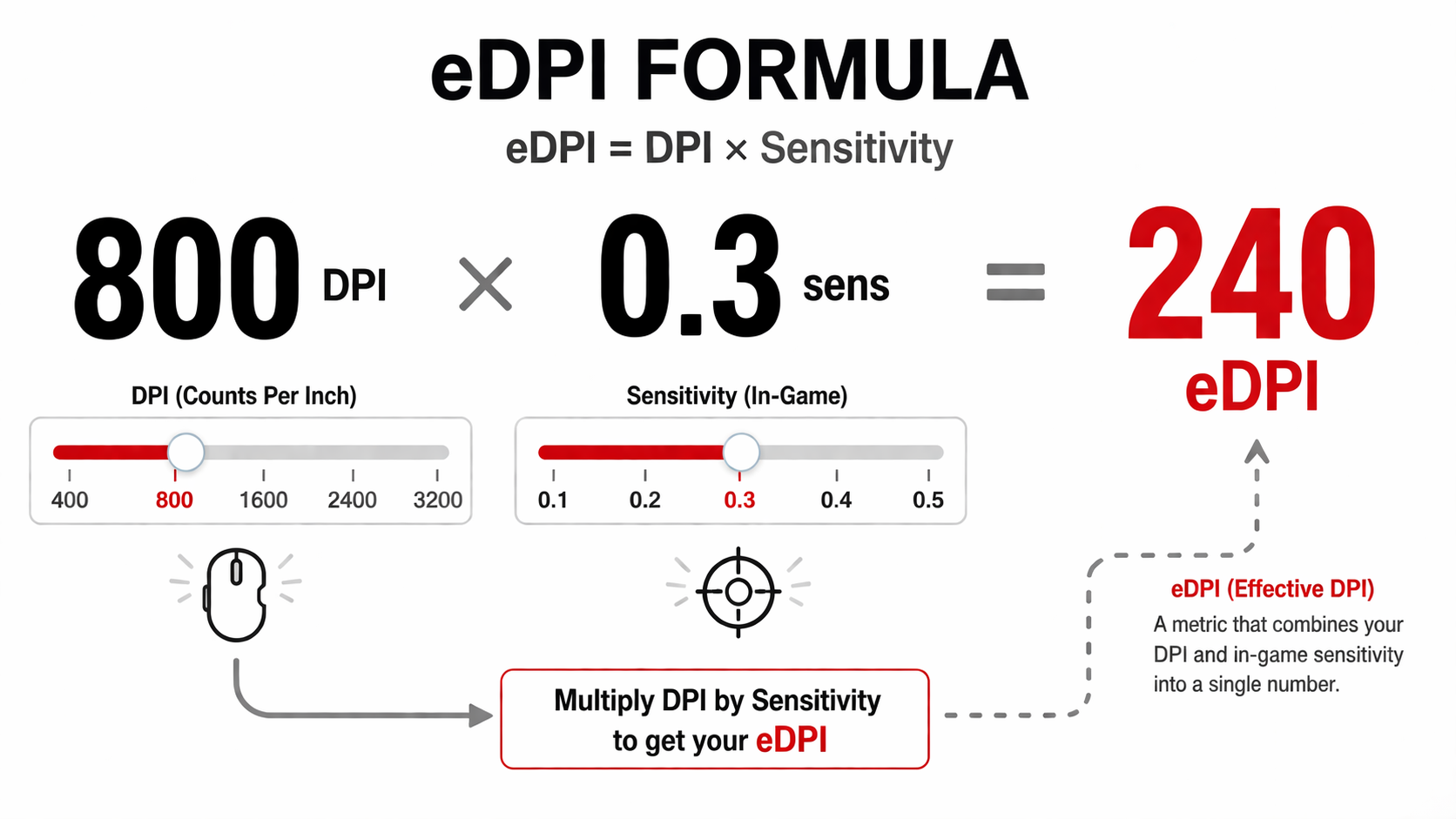
Why does this matter? Because when someone says "I play on 800 DPI," that tells you almost nothing. A player on 800 DPI with 0.2 sens (eDPI 160) is playing at a completely different speed than someone on 800 DPI with 0.8 sens (eDPI 640). Always compare eDPI, not raw DPI.
Quick Note: eDPI Varies By Game
Each game has its own sensitivity scale. An eDPI of 280 in Valorant is NOT the same speed as 280 in CS2 or Apex. You cannot directly compare eDPI numbers across different games. Within the same game, though, eDPI is the perfect comparison tool.
Best DPI Settings for Valorant
Valorant is a precision-first tactical shooter. Gunfights are often decided by who can place their crosshair on a pixel-perfect headshot angle first. This means lower sensitivity is king — you want maximum control for those tiny adjustments.
| Player | Team | DPI | Sens | eDPI | cm/360 |
|---|---|---|---|---|---|
| TenZ | Sentinels | 800 | 0.4 | 320 | 47.8 |
| Aspas | LOUD | 800 | 0.32 | 256 | 59.7 |
| Demon1 | Evil Geniuses | 800 | 0.25 | 200 | 76.4 |
| yay | Cloud9 | 800 | 0.27 | 216 | 70.8 |
| Chronicle | Fnatic | 800 | 0.35 | 280 | 54.6 |
Recommended Valorant Range
DPI
800
(most common)
eDPI Range
200 - 400
(sweet spot: 250-320)
cm/360
38 - 76 cm
(average: ~52 cm)
Key insight: Notice that nearly every Valorant pro uses exactly 800 DPI. The era of 400 DPI is fading in Valorant — 800 provides smoother desktop navigation and identical in-game feel at half the sensitivity value. If you're starting fresh, use 800 DPI and set sensitivity between 0.25 and 0.45.
Best DPI Settings for CS2
Counter-Strike has the longest history of competitive FPS settings, and the meta has been refined over two decades. CS2 players tend to use slightly higher eDPI than Valorant players because the game demands faster flicks to multiple angles and the movement speed is higher.
| Player | Team | DPI | Sens | eDPI | cm/360 |
|---|---|---|---|---|---|
| s1mple | NAVI | 400 | 3.09 | 1236 | 33.7 |
| ZywOo | Vitality | 400 | 2.0 | 800 | 52.1 |
| NiKo | G2 | 400 | 1.55 | 620 | 67.2 |
| donk | Spirit | 800 | 1.0 | 800 | 52.1 |
| m0NESY | G2 | 400 | 1.75 | 700 | 59.6 |
Recommended CS2 Range
DPI
400 or 800
(400 still very common)
eDPI Range
600 - 1200
(sweet spot: 700-900)
cm/360
35 - 70 cm
(average: ~50 cm)
CS2 vs Valorant: CS2 uses a different sensitivity scale. A sensitivity of 1.0 in CS2 at 800 DPI is roughly equivalent to 0.314 in Valorant at 800 DPI. The conversion factor is approximately Valorant sens × 3.18 = CS2 sens. Keep this in mind if you play both games.
Also notable: CS2 still has a strong legacy of 400 DPI players. Many veterans like s1mple have been on 400 DPI for over a decade and see no reason to change. For new players, 800 DPI is perfectly fine — just halve the sensitivity values you see from 400 DPI pros.
Best DPI Settings for Apex Legends
Apex Legends is fundamentally different from tactical shooters. It demands fast movement, constant tracking of fast-moving targets, and quick 180-degree turns. The meta here skews toward higher sensitivity than Valorant or CS2, though still far below what casual players typically use.
| Player | Team | DPI | Sens | eDPI | cm/360 |
|---|---|---|---|---|---|
| ImperialHal | TSM | 800 | 1.3 | 1040 | 33.1 |
| Genburten | DarkZero | 800 | 1.6 | 1280 | 26.9 |
| iiTzTimmy | Content Creator | 800 | 1.4 | 1120 | 30.7 |
| Ras | Crazy Raccoon | 800 | 1.2 | 960 | 35.8 |
| Aceu | Content Creator | 800 | 1.3 | 1040 | 33.1 |
Recommended Apex Legends Range
DPI
800
(universal standard)
eDPI Range
800 - 1400
(sweet spot: 1000-1200)
cm/360
25 - 43 cm
(average: ~32 cm)
Why higher sensitivity in Apex? The game demands constant movement tracking (following a strafing Octane or a flying Valkyrie), fast 180-degree turns when getting pushed from behind, and quick target switches in chaotic team fights. Pure crosshair placement — the bread and butter of Valorant — is less dominant here. You need to react fast.
Pro Player Settings Comparison (2025-2026)
Here's a consolidated view of marquee pro players across all three games. This table shows how sensitivity philosophy changes based on the game's demands:
| Player | Game | Mouse | DPI | Sens | eDPI |
|---|---|---|---|---|---|
| TenZ | Valorant | Finalmouse UltralightX | 800 | 0.4 | 320 |
| Aspas | Valorant | Logitech G Pro X Superlight 2 | 800 | 0.32 | 256 |
| s1mple | CS2 | Logitech G Pro X Superlight 2 | 400 | 3.09 | 1236 |
| ZywOo | CS2 | ZOWIE EC2-CW | 400 | 2.0 | 800 |
| ImperialHal | Apex Legends | Logitech G Pro X Superlight 2 | 800 | 1.3 | 1040 |
| Genburten | Apex Legends | Razer Viper V3 Pro | 800 | 1.6 | 1280 |
The pattern is clear: Valorant pros use the lowest eDPI (precision-first), CS2 pros sit in the middle, and Apex pros use the highest (tracking and mobility). But ALL of them are within a defined range — none are using 3200 DPI with high sensitivity. The highest eDPI on this list is s1mple's 1236, and he's considered a high-sens outlier in the CS2 scene.
How to Find Your Perfect Sensitivity
Copying a pro's settings is a starting point, not the answer. Your hand size, mousepad space, grip style, and preference all matter. Here's the proven method to dial in your own sensitivity:
Set Your Base DPI to 800
This is the universal standard across all three games. It works smoothly for desktop use and gives you a good resolution of adjustment in your game's sensitivity slider. Only use 400 if you're a CS2 veteran already comfortable with it.
Start at the Average Pro eDPI
For Valorant: start at 0.35 sens (eDPI 280). For CS2: start at 1.0 sens (eDPI 800). For Apex: start at 1.3 sens (eDPI 1040). These are right in the middle of the pro range for each game.
Do the "Comfortable 180" Test
In your game, imagine an enemy appears directly behind you. Swipe your mouse from the centre of your mousepad to the edge. If you can comfortably do a 180-degree turn with that motion, you're in a good range. If you're spinning past 180, lower your sens. If you can barely reach 120 degrees, raise it slightly.
Fine-Tune with Aim Training
Jump into an aim trainer (Aim Lab is free on Steam) or your game's practice mode. Try tracking a moving target. If you're consistently overshooting, lower sensitivity by 10%. If you're undershooting and struggling to keep up, raise it by 10%. Make one change at a time.
Commit for at Least 1 Week
This is the hardest step. New settings WILL feel awkward for 2-3 days. Your muscle memory needs time to recalibrate. If you keep changing sensitivity every session, you'll never develop consistent aim. Pick your settings and stick with them for a minimum of 7 days before evaluating.
India-Specific Tip: Desk Space Matters
Many Indian gaming setups use compact desks (60-80cm wide). If your available mousepad space is under 30cm, you'll struggle with very low sensitivity. In that case, aim for the higher end of the recommended range — say eDPI 350-400 in Valorant instead of 250. Alternatively, invest in an extended desk mat (900x400mm) from Ant Esports or Redgear — they're available for Rs 400-700 on Amazon India and transform your setup.
The cm/360 Method
While eDPI is game-specific, cm/360 is the universal measurement that works across all games. It measures the physical distance (in centimetres) you need to move your mouse to do a complete 360-degree turn in-game.
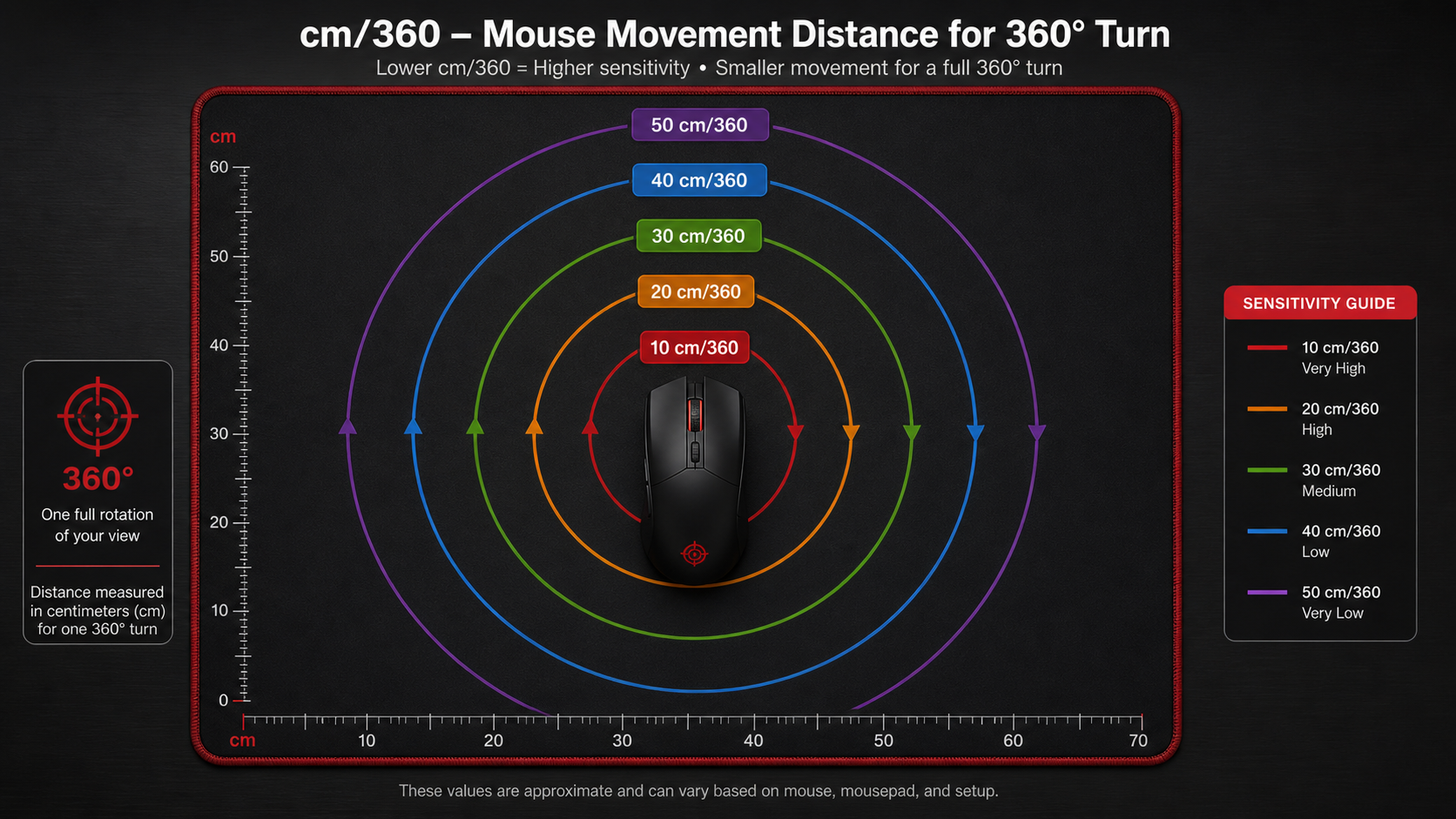
How to measure your cm/360:
Open your game and face a distinct landmark
Pick a wall corner, sign, or any easily identifiable point in the game world. Place your mouse at the left edge of your mousepad.
Rotate exactly 360 degrees until you face the same landmark again
Move your mouse in one smooth motion to the right. Keep going until your crosshair is back on the exact same spot you started at. Mark where your mouse ends up.
Measure the distance your mouse traveled
Use a ruler or measuring tape to check how far (in cm) your mouse moved from start to finish. That number is your cm/360.
Recommended cm/360 by Game
If you play multiple games, matching your cm/360 across them ensures your muscle memory transfers.
The beauty of cm/360 is that it's completely game-agnostic. Whether you switch between Valorant, CS2, and Apex, you can use conversion tools (like mouse-sensitivity.com) to calculate the exact in-game sensitivity that gives you the same cm/360 in each title. This means your arm movements stay consistent — only the game changes.
For Indian setups: If your desk limits you to about 35cm of mouse movement space, you'll want a cm/360 no higher than about 50-55cm to avoid constantly running out of pad. With a full-size desk mat (45cm+ of usable space), you can comfortably go up to 65-70cm/360.
Common Sensitivity Mistakes
These are the errors we see most often from players who struggle with their aim. Avoid these traps:
"Changing sensitivity after every bad game"
The #1 mistake. You had a bad game, so you blame your settings and change them. Next game is also bad (because you're on unfamiliar settings), so you change again. This cycle destroys muscle memory. Bad games happen to pros too — on their unchanging sensitivity. Commit for a week minimum.
"Copying a pro's exact settings without context"
Incomplete approach. TenZ uses 800 DPI / 0.4 sens — but he also has a 120cm desk, a massive mousepad, years of muscle memory, and plays 8+ hours daily. If your mousepad is 30cm wide and you play 2 hours a day, his settings might not work for you. Use pro settings as a starting range, not an exact target.
"Using extremely low sensitivity without the desk space"
Physical limitation. If you play at 65+ cm/360 but only have 25cm of mousepad, you'll constantly run out of space and have to lift your mouse. This creates dead zones in your aim. Either get a larger pad or use a sensitivity that fits your available space. Forcing ultra-low sens on a tiny pad is counterproductive.
"Playing on very high DPI with very low in-game sens"
Technically suboptimal. Some players set their mouse to 3200+ DPI and then use 0.05 in-game sensitivity to compensate. While this gives a similar eDPI, extremely low in-game sensitivity values can introduce rounding errors in some game engines. Stick to 400-1600 DPI and use reasonable in-game values.
"Different sensitivity for each game with no conversion"
Muscle memory confusion. If you play Valorant at 50 cm/360 and Apex at 15 cm/360, your brain has to maintain two completely different sets of muscle memory. While Apex naturally needs higher sens, try to keep your cm/360 values within a reasonable range of each other. Use sensitivity converters to find equivalent settings.
Mousepad Sizes Available in India
For low-sensitivity FPS gaming, you need at least a Large pad (450x400mm). Here's what's commonly available on Amazon India:
- Medium (350x250mm): Only suitable for high-sensitivity players. Rs 200-400.
- Large (450x400mm): Minimum for arm aimers. Rs 400-600. Brands: Redgear, Ant Esports.
- Extended/Desk Mat (900x400mm): Ideal for low-sens players. Rs 500-900. Brands: Cosmic Byte, RPM Euro, AmazonBasics.
- XL (1200x600mm): Full desk coverage. Rs 800-1500. Best for dedicated gaming desks.
Frequently Asked Questions
What DPI do Valorant pros use?
What is eDPI and how do I calculate it?
Should I use 400 or 800 DPI for FPS games?
What is a good eDPI for Valorant?
What is cm/360 and why does it matter?
Do I need a large mousepad for low DPI?
Can I use the same sensitivity across Valorant, CS2, and Apex?
The Bottom Line
TL;DR
There's no single "best" DPI setting — but there IS a proven range for each game. Set your mouse to 800 DPI, then use these in-game sensitivity starting points: Valorant: 0.30-0.40 | CS2: 0.8-1.2 | Apex: 1.2-1.5.
Use the cm/360 method to ensure consistency across games. Get a large mousepad (at least 450x400mm — dirt cheap in India). Disable Windows pointer acceleration. Then commit to your settings for a week before making any changes. Muscle memory beats tweaking every time.
The pros didn't find their perfect sensitivity overnight. They picked something reasonable, committed to it, and let thousands of hours of practice do the rest. The settings matter less than the consistency. Stop hunting for the "perfect" number and start building your aim.
Related Guides