
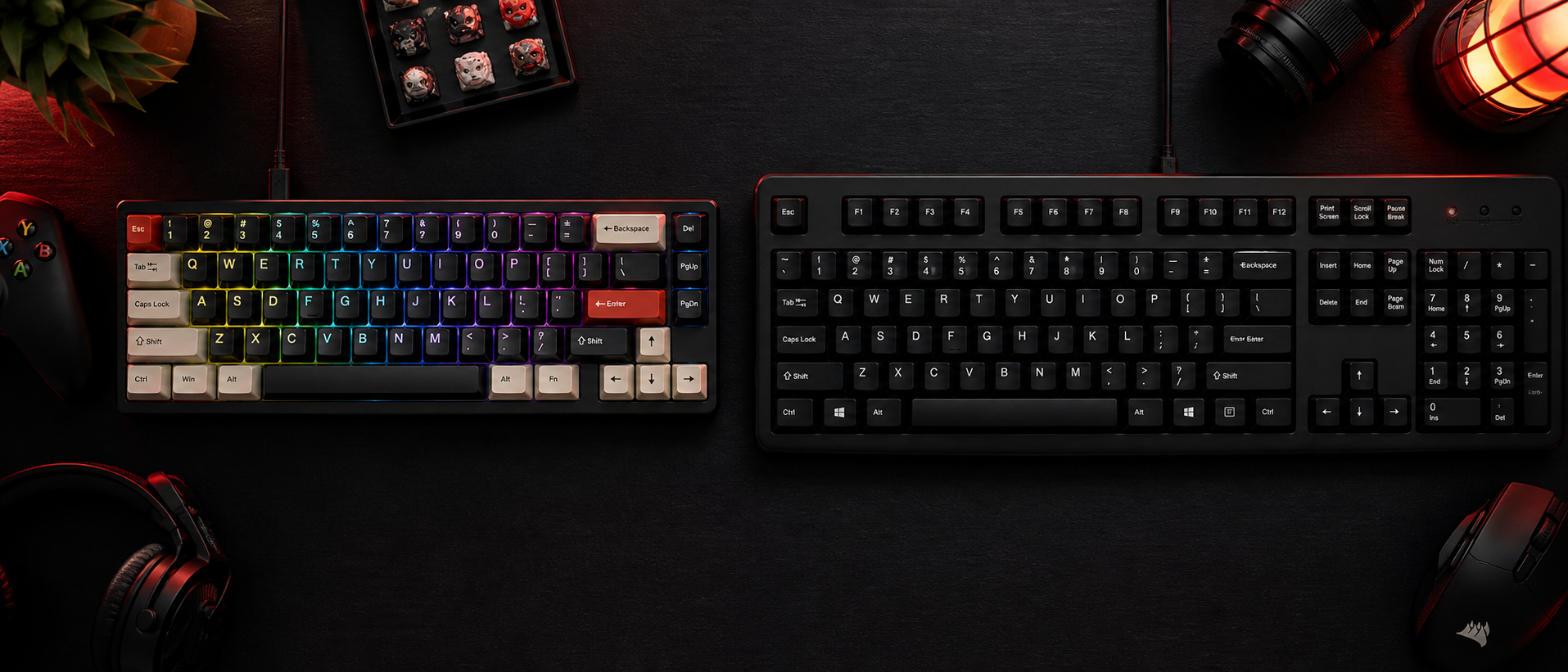
If you've ever walked into a gaming cafe or watched a mechanical keyboard review, you've probably heard the satisfying clack-clack-clack that makes membrane keyboards sound like typing on wet bread. But is that clicky goodness actually worth the premium? Or is the humble membrane keyboard quietly doing its job just fine?
We've tested dozens of keyboards across both types — from Rs 500 membrane slabs to Rs 10,000 hot-swappable mechanical boards. Here's everything we've learned, stripped of the hype.
What Is a Mechanical Keyboard?
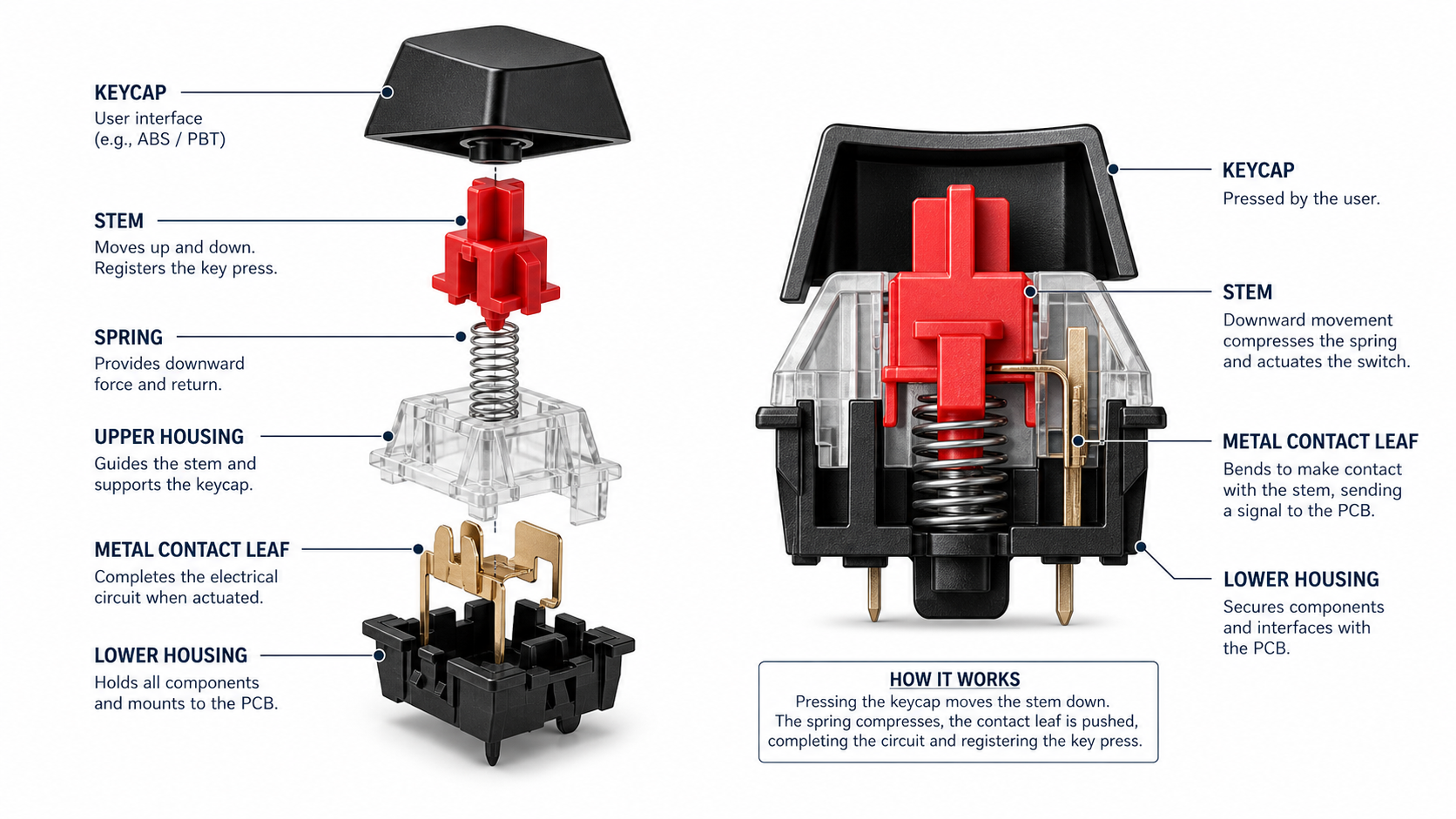
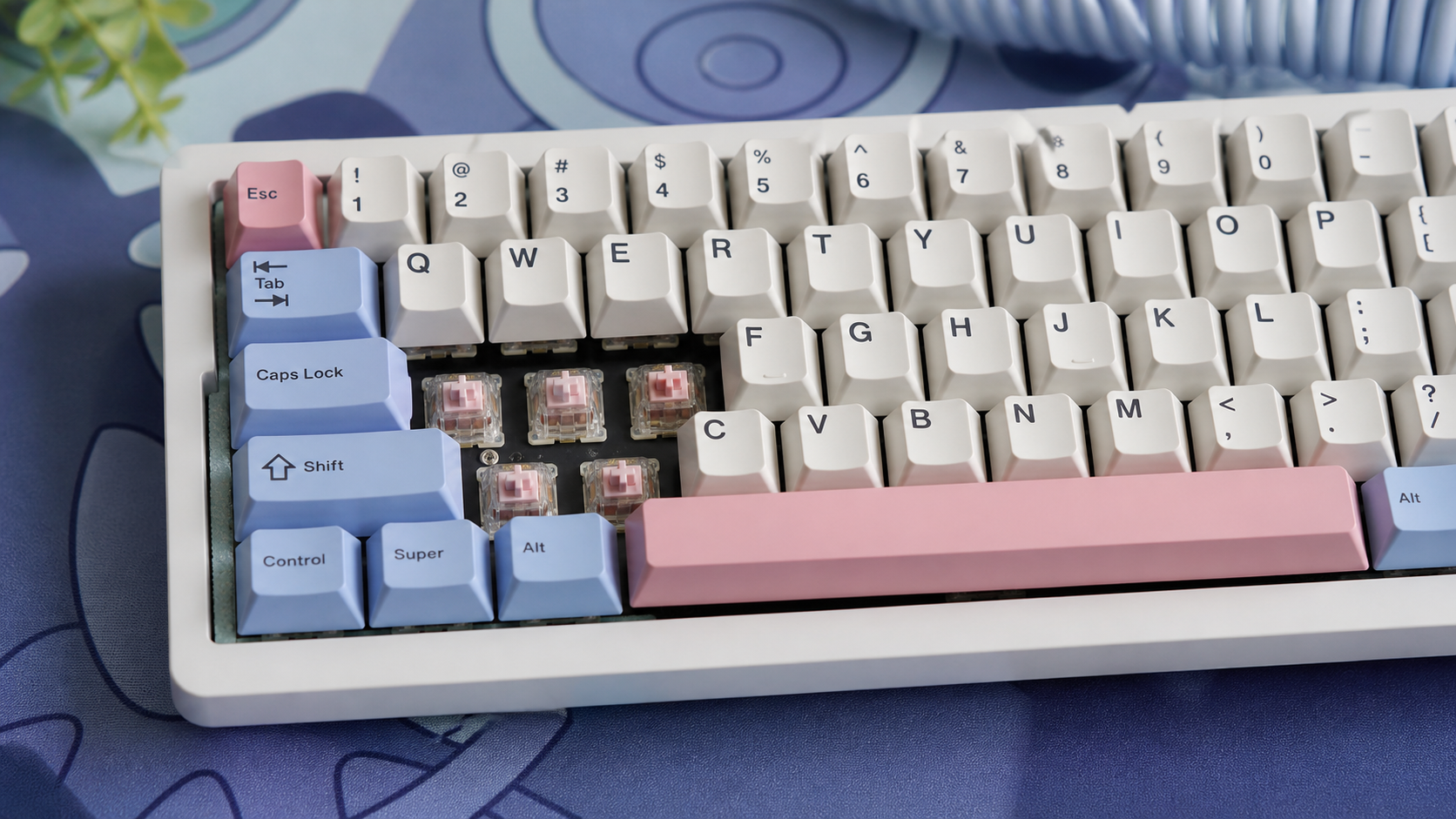
A mechanical keyboard uses individual physical switches under each key. Every key has its own spring-loaded mechanism with a housing, stem, and metal contact leaf. When you press a key, the stem pushes down, the contact leaf registers the input, and the spring pushes the key back up.
This per-key mechanism is what gives mechanical keyboards their distinct feel. Different switch types (linear, tactile, clicky) change how the key press feels and sounds — which is why the mechanical keyboard world has an almost obsessive switch culture.
The 3 Main Switch Types
Linear
Smooth press, no bump. Fastest for gaming. Quiet-ish. (Cherry MX Red, Gateron Yellow)
Tactile
Noticeable bump when key registers. Great for typing accuracy. (Cherry MX Brown, Akko CS Lavender)
Clicky
Bump + audible click. Satisfying but loud. Your roommate will hate you. (Cherry MX Blue, Kailh Box White)
What Is a Membrane Keyboard?
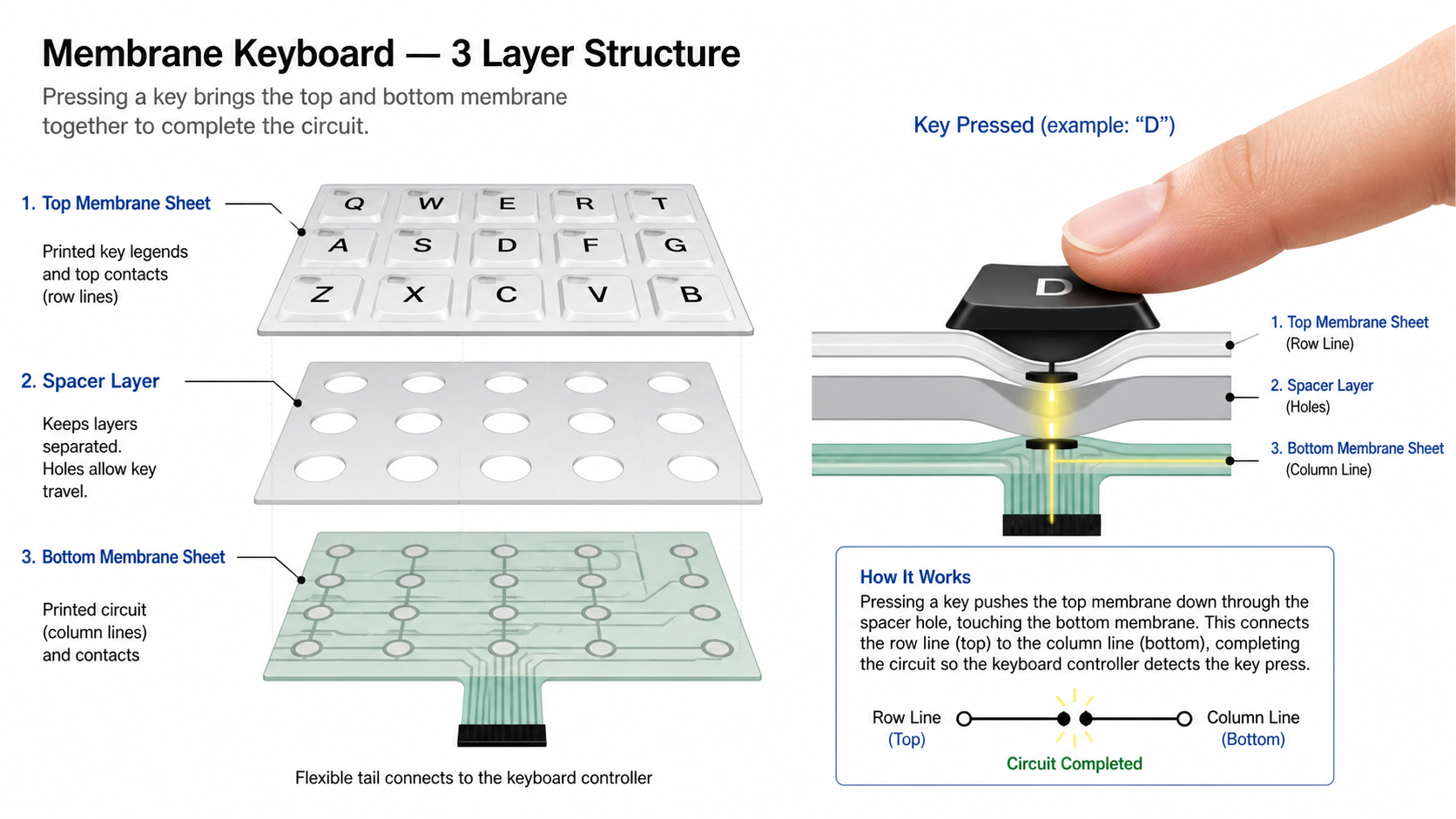
A membrane keyboard uses a single pressure pad system under all the keys. Instead of individual switches, there are three flexible layers: a top membrane layer, a middle spacer layer with holes, and a bottom membrane layer with printed circuits. When you press a key, the top layer pushes through the spacer hole and touches the bottom layer, completing a circuit.
This design is simpler, cheaper to manufacture, and inherently quieter. It's why almost every office keyboard, laptop keyboard, and budget keyboard uses membrane technology. The tradeoff? A mushier, less precise feel with no tactile feedback to tell you when a key has actually registered.
Head-to-Head Comparison
Here's the quick overview before we dive deeper into each factor.
| Factor | Mechanical | Membrane |
|---|---|---|
| Typing Feel | Crisp, precise, satisfying | Soft, mushy, quiet |
| Gaming Performance | Better | Adequate for casual |
| Noise Level | Moderate to loud | Quieter |
| Durability | 50–100M keypresses | 5–10M keypresses |
| Price (India) | Rs 1,500 – Rs 25,000+ | Rs 300 – Rs 2,000 |
| Customization | Keycaps, switches, mods | Almost none |
| Weight | Heavier (stable) | Lighter (portable) |
| N-Key Rollover | Full NKRO | Usually 6KRO or less |
Typing Feel & Feedback
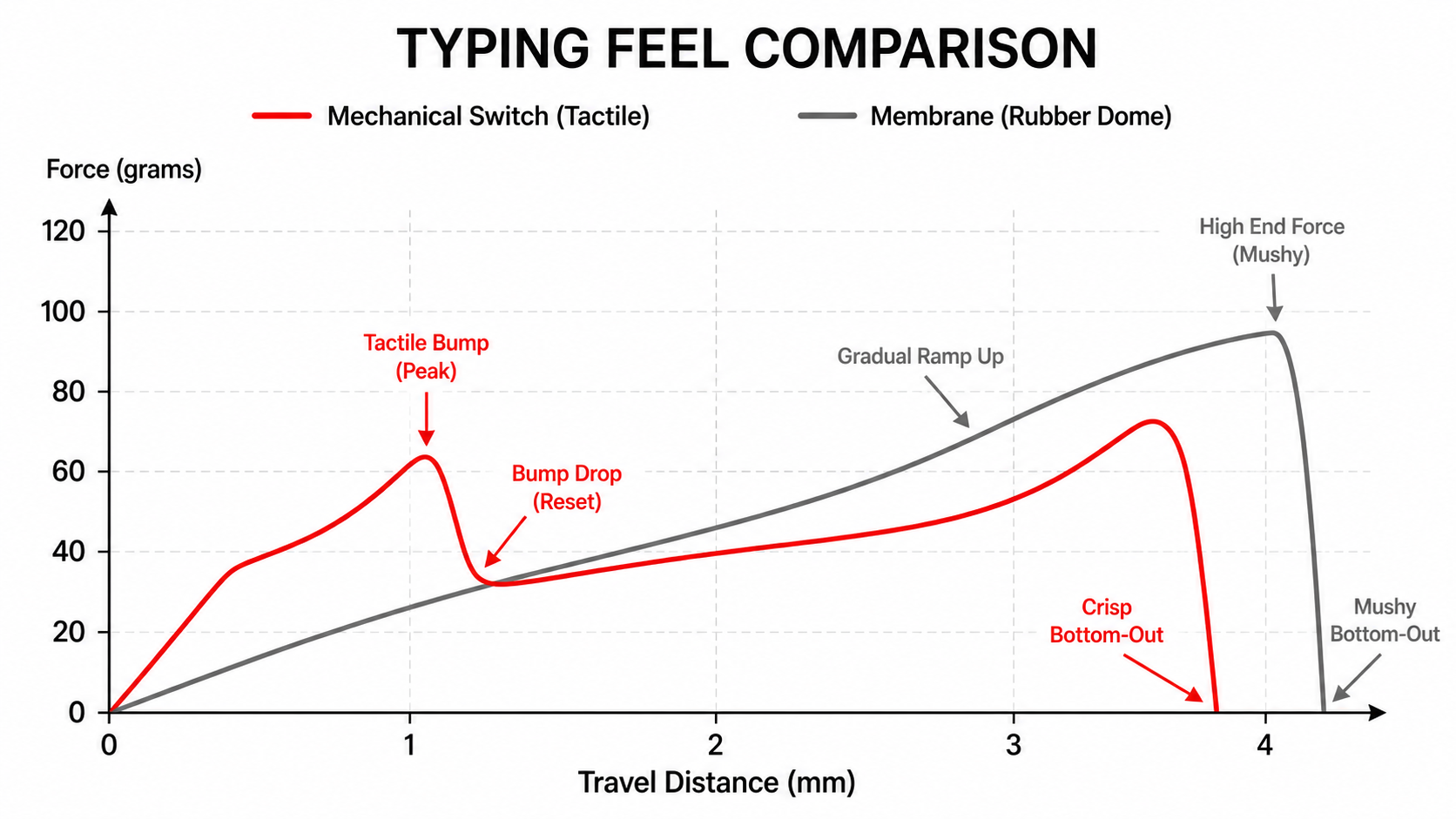
This is where mechanical keyboards genuinely shine, and it's not just hype. Every key press on a mechanical board has a defined actuation point — the exact distance where the key registers. You feel it happen. With tactile switches, there's a physical bump. With clicky switches, there's a bump and an audible click. Even linear switches have a smooth, consistent resistance curve that lets you develop muscle memory.
Membrane keyboards feel... flat. You press down and hit a squishy rubber dome. There's no clear feedback telling you "yes, that registered." You end up bottoming out on every keystroke, which increases finger fatigue over long sessions.
The practical difference: If you type for 6+ hours a day — whether coding, writing, or gaming — mechanical keyboards reduce fatigue and improve accuracy. For casual use (30–60 minutes of emails), the difference barely matters.
Gaming Performance
For competitive gaming, mechanical keyboards have three real advantages:
Faster actuation
Linear switches (like Cherry MX Speed Silver) actuate at 1.0–1.2mm vs 2.5–3mm for membrane. That's real milliseconds saved on rapid key presses.
N-Key Rollover (NKRO)
Most mechanical boards support full NKRO — every simultaneous key press registers. Membrane keyboards often cap at 6 keys (6KRO), which means key combos can get dropped in intense moments.
Consistent force across keys
Each mechanical switch behaves identically. Membrane keyboards can develop uneven spots as the rubber dome wears — some keys feel softer, others stiffer.
Reality check: If you're playing Valorant or CS2 competitively, yes — a mechanical keyboard gives you a measurable edge. If you're playing Stardew Valley or GTA V casually, a membrane keyboard is perfectly fine. Don't let anyone tell you otherwise.
Noise Levels
Let's be honest — mechanical keyboards can be loud. Clicky switches (MX Blue, Kailh Box White) are intentionally noisy. Even linear switches produce a distinct "thock" or "clack" depending on the board's construction. If you're gaming at 2 AM while your family sleeps, or taking calls while typing, noise matters.
Membrane keyboards are inherently quiet. The rubber dome absorbs most of the impact, and there's no metal-on-metal contact. The only sound is the soft "thud" of bottoming out.
Pro Tip: Want Mechanical + Quiet?
Go with silent linear switches (Cherry MX Silent Red, Gateron Silent Yellow) or add sound-dampening mods like PE foam, tape mod, and silicone pour. Many modern pre-built boards from Keychron, Royal Kludge, and Akko come with decent stock dampening.
Durability & Lifespan
This is where mechanical keyboards are objectively superior, and it's not close.
Mechanical
- 50–100 million keypresses per switch
- 8–10+ year lifespan with daily use
- Individual switches replaceable (hot-swap)
- Keycaps replaceable and upgradeable
Membrane
- 5–10 million keypresses
- 2–3 year lifespan typically
- Cannot repair individual keys
- Rubber dome degrades over time
Here's the cost-per-year argument that usually settles the debate: A Rs 3,000 mechanical keyboard lasting 8 years costs Rs 375/year. A Rs 800 membrane keyboard replaced every 2.5 years costs Rs 320/year. The difference is negligible — but the mechanical board gives you a dramatically better experience the entire time.
Price Comparison (India)
The price gap between mechanical and membrane has shrunk significantly in 2026. Chinese switch manufacturers (Gateron, Outemu, Kailh) have driven mechanical keyboard prices down to the point where decent entry-level boards start at Rs 1,500.
| Budget | Mechanical Options | Membrane Options |
|---|---|---|
| Under Rs 1,000 | Very limited (off-brand only) | Plenty of solid options (Logitech K120, Zebronics, Redgear) |
| Rs 1,000 – 2,000 | Entry-level (Redragon K552, Cosmic Byte CB-GK-18) | Feature-rich (RGB, media keys, wrist rest) |
| Rs 2,000 – 5,000 | Best value (Royal Kludge, Keychron C-series, Akko) | Diminishing returns — not worth it |
| Rs 5,000+ | Premium (Keychron Q/V series, Ducky, custom) | Only Topre (hybrid) — niche |
Our take: If your budget is under Rs 1,000, membrane is your only real choice. Between Rs 1,000–2,000, mechanical becomes viable. Above Rs 2,000, there's zero reason to buy membrane.
Looking for Specific Recommendations?
We've tested and ranked the best gaming keyboards at every price point in India.
Customization & Modding
If customization matters to you, mechanical keyboards are in a completely different league. The mod scene in India has grown massively, with sellers on GeM Keyboard and local Discord groups offering:
- Hot-swappable switches — swap switches without soldering. Try linears for gaming, tactiles for work, all on the same board.
- Custom keycaps — PBT double-shot, dye-sub, artisan keycaps. Change the look and feel entirely.
- Sound mods — PE foam, tape mod, silicone pour, switch films, and spring swaps to tune the acoustic signature.
- Stabilizer mods — band-aid, lube, and wire balance for rattle-free spacebar and modifier keys.
- Custom firmware — QMK/VIA support on many boards for programmable layers, macros, and RGB control.
Membrane keyboards? You can... change the wrist rest. Maybe add a skin. That's about it.
Who Should Buy What?
Buy Mechanical If...
- ▸ You play competitive/multiplayer games (Valorant, CS2, Apex, Dota 2)
- ▸ You type for 4+ hours daily (coding, writing, data entry)
- ▸ You want a keyboard that lasts 5–10 years
- ▸ You enjoy customizing your setup
- ▸ Your budget is Rs 1,500 or above
Buy Membrane If...
- ▸ Your budget is strictly under Rs 1,000
- ▸ You need a quiet keyboard for shared spaces or late-night use
- ▸ You only use the keyboard casually (emails, browsing, casual games)
- ▸ You need a lightweight, portable keyboard
- ▸ You're buying for an office where spill-resistance matters
Frequently Asked Questions
Is a mechanical keyboard worth it for gaming?
Are membrane keyboards good for office work?
How long do mechanical keyboards last compared to membrane?
Can I make a mechanical keyboard quieter?
What is the cheapest good mechanical keyboard in India?
Our Verdict
The Bottom Line
For most gamers and heavy typists in India, a mechanical keyboard is the better investment. The entry price has dropped dramatically — you can get a genuinely good mechanical board for Rs 2,000–3,000 that will last years and feel better every single day you use it.
Membrane keyboards still make sense if you're on a tight budget (under Rs 1,000), need silence above all else, or simply don't care about the typing experience. There's no shame in that — the best keyboard is the one that works for your situation.
But if you've never tried a mechanical keyboard, we'd strongly recommend going to a Croma, Reliance Digital, or a local computer store and pressing a few keys. That 10-second test usually settles the debate faster than any article can.
Related Guides
Best Gaming Keyboards Under Rs 2,000
Our top picks for budget mechanical boards
Best Gaming Keyboards Under Rs 5,000
Mid-range mechanical keyboards with premium features
Best Gaming Mice Under Rs 2,000
Complete your setup with the right mouse
Best Gaming Mousepads in India
Pair your keyboard with the right surface