Buying Guide · keyboards Keyboards

BEST GAMING KEYBOARDS UNDER
₹2,000 IN INDIA (2026)

Under ₹2,000 is where budget mechanical keyboards get genuinely good in India. You can now get hot-swappable switches, per-key RGB, detachable USB-C, and software support at prices that were impossible just a couple of years ago.

By RageQuitters Team Updated May 2, 2026 5 keyboards tested Prices verified

We tested eight keyboards in this range. Three were excluded — one priced way over budget at ₹8,152, and two with no listed price at the time of writing. Here are the five you can actually buy right now, ranked by key feel, build quality, features, latency, and value.

ALL 5 KEYBOARDS COMPARED
Rank Keyboards SwitchesLayoutConnectivityBody Price
#1 Top Pick ZEBRONICS Transformer PRO Membrane (keyboard)Full-size (104 keys)2.4GHz WirelessAluminium ₹1,799
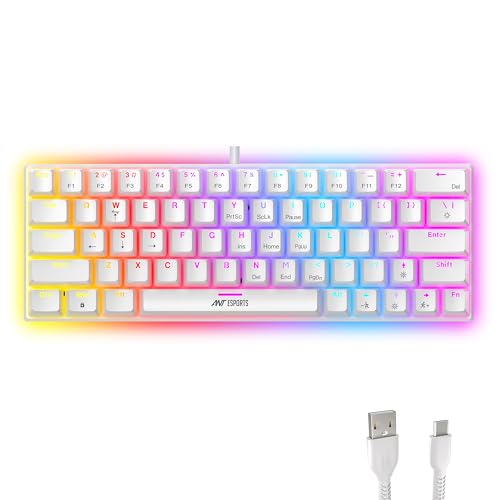
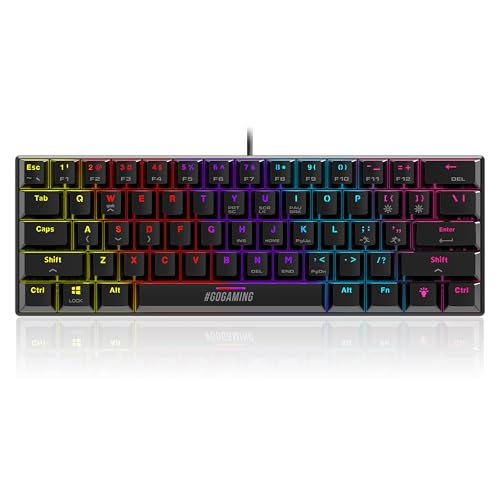
#2 Best Mechanical Ant Esports MK1300 V2 Outemu Red (Hot-Swap)60% (61 keys)Wired USB-CPlastic ₹1,799
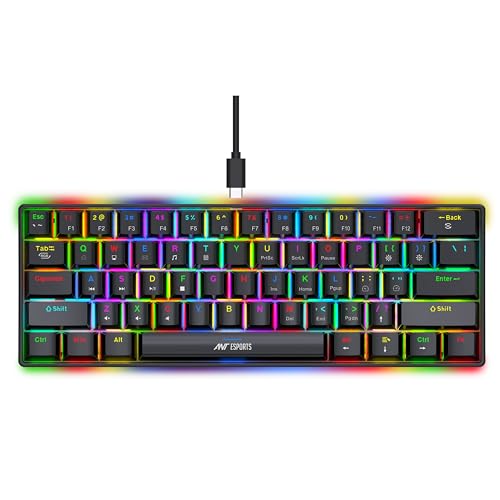
#3 Cosmic Byte Themis Outemu Blue60% (61 keys)Wired USB-CPlastic ₹1,999
#4 Best Budget Cosmic Byte Pandora TKL Outemu Red (Hot-Swap)TKL (87 keys)WiredPlastic ₹1,599
#5 Ant Esports MK1000 Outemu BlueTKL (87 keys)WiredMetal top plate ₹1,199

How We Rated These Products

Budget gaming keyboards rated on key feel, build, features, latency, and bang-for-buck value for Indian gamers.

Scored out of 10
Key Feel
25%

Switch type, actuation force, tactile feedback, and overall typing/gaming feel.

Build Quality
20%

Case material, keycap quality, stabiliser rattle, and overall construction.

Features
20%

RGB lighting, software support, macros, media controls, hot-swap capability.

Latency
15%

Polling rate, response time, anti-ghosting, and N-key rollover performance.

Value
20%

Overall performance delivered relative to the sub-₹2,000 price point.

Detailed Reviews

ZEBRONICS Transformer PRO

ZEBRONICS Transformer PRO

Top Pick

Best Overall Keyboard Combo Under ₹2,000 — Wireless + Mouse Included

Our Rating

9.2

₹1,799

Check Price

Specifications

Switches Membrane
Layout Full-size (104 keys)
Connectivity 2.4GHz Wireless
Body Aluminium
Battery Built-in rechargeable
Cable Type-C charging
Keycaps Double-shot
Mouse DPI Up to 4,000

Pros

  • 36,700+ ratings at 4.2 stars with 1K+ monthly buyers — overwhelmingly proven
  • Aluminium body feels premium and solid at a price where everything else is plastic
  • Wireless keyboard + mouse combo at ₹1,799 is unmatched value
  • Built-in rechargeable battery with Type-C charging — no hunting for AAs

Cons

  • Membrane switches — not mechanical, so key feel lacks the crisp tactility of real switches
  • Wireless adds slight latency compared to wired mechanical boards
  • Full-size layout takes up more desk space than 60% or TKL alternatives

Rating Breakdown

Key Feel 8.2
Build Quality 9.5
Features 9.5
Latency 8.8
Value 9.8

Our Verdict

The Zebronics Transformer PRO is not a mechanical keyboard — and that's okay. What it is, is an aluminium-body wireless keyboard and mouse combo at ₹1,799 that 36,000+ people have rated and over 1,000 buy every month. The 2.4GHz wireless connection is stable for casual and mid-level gaming, the double-shot keycaps hold up, and the included mouse with up to 4,000 DPI is genuinely usable. If you want a clean wireless setup with zero cable clutter, this is the most value-dense pick in the budget.

Best For Gamers who want a complete wireless keyboard + mouse combo with premium build at a budget price
Ant Esports MK1300 V2

Ant Esports MK1300 V2

Best Mechanical

Best 60% Mechanical Keyboard Under ₹2,000 — Hot-Swap + RGB + USB-C

Our Rating

9

₹1,799

Check Price

Specifications

Switches Outemu Red (Hot-Swappable)
Layout 60% (61 keys)
Connectivity Wired USB-C (Detachable)
Anti-Ghosting Full N-Key Rollover
Keycaps ABS
RGB Per-key RGB with software
Switch Life 50 million keypresses
Compatibility PC / Mac

Pros

  • Hot-swappable switches at ₹1,799 — swap to your preferred switches without soldering
  • Linear Outemu Red switches are smooth and quiet, ideal for both gaming and late-night typing
  • Detachable USB-C cable for easy portability and cable replacement
  • Full software support for RGB customisation, macros, and key remapping

Cons

  • 60% layout has no dedicated arrow keys or function row — steep learning curve
  • ABS keycaps will develop shine over time compared to PBT
  • 4.1-star rating suggests some quality control variance across units

Rating Breakdown

Key Feel 9.2
Build Quality 8.5
Features 9.5
Latency 9.2
Value 9.0

Our Verdict

The MK1300 V2 is the mechanical keyboard to get if you want the full enthusiast experience under ₹2,000. Hot-swappable Outemu Red switches, detachable USB-C, per-key RGB with software control, and full N-key rollover — this ticks every box. The linear reds are butter-smooth for gaming, and the compact 60% layout frees up massive desk space for mouse movement. If you're an FPS player, this is the one.

Best For FPS gamers and keyboard enthusiasts who want hot-swap mechanical switches with full RGB under ₹2,000
Cosmic Byte Themis

Cosmic Byte Themis

Per-Key RGB Mechanical With Clicky Blue Switches and Software

Our Rating

8.6

₹1,999

Check Price

Specifications

Switches Outemu Blue
Layout 60% (61 keys)
Connectivity Wired USB-C
Anti-Ghosting Full Key
Keycaps Double-shot injection moulded
RGB Per-key Spectra RGB (10+ modes)
Switch Life 50 million keypresses
Software Macro + RGB control

Pros

  • Double-shot injection moulded keycaps are more durable than standard ABS — legends won't fade
  • Per-key Spectra RGB with 10+ modes and full software customisation
  • Outemu Blue switches deliver satisfying clicky feedback for typing and gaming
  • Software support for macros, key remapping, and lighting profiles

Cons

  • ₹1,999 is the ceiling price — less room for value compared to ₹1,599 or ₹1,799 options
  • Blue switches are loud — not ideal for shared spaces or late-night sessions
  • No hot-swap support — you're locked into blue switches

Rating Breakdown

Key Feel 8.8
Build Quality 8.8
Features 8.8
Latency 8.5
Value 8.0

Our Verdict

The Cosmic Byte Themis is the pick for gamers who love the clicky tactile feedback of blue switches. The double-shot keycaps are a genuine step above the ABS caps on cheaper boards, and the per-key Spectra RGB looks stunning. Software support for macros adds competitive utility. The main trade-off is the ₹1,999 price tag — at the very top of the budget — and the lack of hot-swap, which locks you into blues forever.

Best For Gamers and typists who love clicky switches and want per-key RGB with software support
Cosmic Byte Pandora TKL

Cosmic Byte Pandora TKL

Best Budget

Best Budget TKL Mechanical Keyboard at ₹1,599 — Hot-Swap + Rainbow LED

Our Rating

8.4

₹1,599

Check Price

Specifications

Switches Outemu Red (Swappable)
Layout TKL (87 keys)
Connectivity Wired
Anti-Ghosting Full Key
Keycaps Double-shot injection moulded
LED Rainbow (20 effects + 8 game modes)
Switch Life 50 million keypresses
Key Count 104 keys (full-size layout listed but TKL form)

Pros

  • ₹1,599 with hot-swappable Outemu Red switches is the cheapest hot-swap mechanical option here
  • 100+ bought in past month with 967 reviews at 4.1 stars — solid track record
  • TKL layout keeps arrow keys and function row while saving desk space
  • 20 backlight effects plus 8 game modes for visual variety

Cons

  • Rainbow LED only — no per-key RGB like the Themis or MK1300 V2
  • Double-shot keycaps are decent but the overall plastic build feels budget
  • No software support — all customisation is done on-board only

Rating Breakdown

Key Feel 8.5
Build Quality 8.0
Features 8.0
Latency 8.5
Value 9.0

Our Verdict

The Pandora TKL is the smart pick if you want mechanical hot-swap at the lowest possible price. At ₹1,599, you get Outemu Red switches you can swap out later, a TKL layout that keeps your arrow keys (unlike 60% boards), and full anti-ghosting. The trade-off is rainbow-only LED and no software support. But for pure typing and gaming feel per rupee, it's hard to beat.

Best For Budget-conscious gamers who want a TKL mechanical keyboard with hot-swap capability at the lowest price
Ant Esports MK1000

Ant Esports MK1000

Battle-Tested TKL With Metal Panel and Blue Switches at ₹1,199

Our Rating

8

₹1,199

Check Price

Specifications

Switches Outemu Blue
Layout TKL (87 keys)
Connectivity Wired
Anti-Ghosting 87-key rollover
Keycaps Double-shot ABS
LED Multicolour (6 preset effects)
Switch Life 50 million keypresses
Top Plate Brushed metal

Pros

  • ₹1,199 is the cheapest mechanical keyboard in this roundup — incredible entry price
  • Brushed metal top plate adds rigidity and premium feel that plastic boards lack
  • 1,532 reviews at 3.9 stars — a well-established, time-tested model
  • Double-shot ABS keycaps are durable and won't lose their legends

Cons

  • 3.9-star rating is the lowest here — some users report inconsistent switch feel
  • No hot-swap — you're stuck with Outemu Blue switches permanently
  • Only 6 preset lighting effects with no software customisation

Rating Breakdown

Key Feel 8.0
Build Quality 8.5
Features 7.2
Latency 8.0
Value 8.5

Our Verdict

The MK1000 has been in the Indian market for years, and 1,500+ reviews prove it's a reliable workhorse. The brushed metal top plate gives it a build quality advantage over many plastic-body competitors. At ₹1,199, it's the cheapest way to get real mechanical switches for gaming. The downsides — no hot-swap, limited lighting, and a 3.9-star average — are fair trade-offs at this price. A solid first mechanical keyboard.

Best For First-time mechanical keyboard buyers who want proven reliability and a metal build at the lowest price

OUR VERDICT — BEST BY USE CASE

Best Overall
ZEBRONICS Transformer PRO
Wireless keyboard + mouse combo with aluminium body at ₹1,799 — 36K+ ratings can't be wrong
Best Mechanical
Ant Esports MK1300 V2
Hot-swap Outemu Red + per-key RGB + USB-C — the full enthusiast package under ₹2,000
Best for Typing
Cosmic Byte Themis
Clicky blue switches with double-shot keycaps and software macro support
Best Budget
Cosmic Byte Pandora TKL
Cheapest hot-swap mechanical at ₹1,599 — TKL layout keeps arrow keys too

Buying Guide

Switch Type Matters Most

Red (linear) switches are smooth and quiet — ideal for gaming. Blue (clicky) switches give satisfying tactile feedback but are loud. If you game at night or in shared spaces, go red. If you love the click, go blue. Hot-swap boards let you change later.

60% vs TKL vs Full-Size

60% keyboards (61 keys) save the most desk space but sacrifice arrow and function keys. TKL (87 keys) drops the numpad but keeps arrows and F-keys. Full-size (104 keys) has everything but eats desk space. FPS gamers benefit most from 60% or TKL for mouse room.

Hot-Swap Capability

Hot-swappable keyboards let you replace switches without soldering. This is a huge advantage under ₹2,000 — start with budget Outemu switches and upgrade later. The MK1300 V2 and Pandora TKL both offer this.

Wired vs Wireless Under ₹2,000

Wired keyboards have zero latency and are the standard for competitive gaming. The Zebronics Transformer PRO is the only wireless option here, and its 2.4GHz connection is good enough for casual gaming. For ranked play, stick with wired.

Keycap Quality

Double-shot keycaps have legends moulded into two layers of plastic — they never fade. Single-shot printed keycaps wear out over time. At this price, most boards offer double-shot ABS, which is the minimum you should accept.

Frequently Asked Questions

Which is the best gaming keyboard under ₹2,000 in India?

The ZEBRONICS Transformer PRO is our top pick for overall value — it's a wireless keyboard + mouse combo with an aluminium body at ₹1,799. For the best pure mechanical keyboard, the Ant Esports MK1300 V2 offers hot-swap switches, per-key RGB, and USB-C at the same price.

Are mechanical keyboards under ₹2,000 worth it?

Yes. You can get genuine Outemu mechanical switches with 50 million keypress ratings, hot-swap capability, and N-key rollover under ₹2,000. The MK1300 V2 and Pandora TKL both prove that budget mechanical keyboards can deliver a serious gaming experience.

Should I get a 60% or TKL keyboard for gaming?

60% is better for FPS gaming — the compact layout gives you maximum mouse space. TKL is more versatile if you need arrow keys and F-keys for other games or productivity. If you're unsure, TKL is the safer choice.

What are hot-swappable switches and why do they matter?

Hot-swappable keyboards let you pull out and replace switches without soldering. This means you can start with budget Outemu switches and upgrade to premium Gateron or Cherry switches later. At under ₹2,000, the Ant Esports MK1300 V2 and Cosmic Byte Pandora TKL offer this feature.

Red vs Blue switches — which is better for gaming?

Red (linear) switches are faster and quieter — best for competitive gaming where speed matters. Blue (clicky) switches have tactile feedback and a satisfying click — great for typing and casual gaming. Reds are generally preferred for FPS, blues for strategy and typing-heavy use.

Is the Zebronics Transformer PRO good for gaming even though it's membrane?

For casual to mid-level gaming, yes. Its 2.4GHz wireless connection is stable, and the aluminium body feels premium. But if you play competitive FPS games like Valorant or CS2, a wired mechanical keyboard like the MK1300 V2 will give you lower latency and better key response.

We may earn a commission via Amazon.in affiliate links. Prices shown are indicative — check the retailer for current rates. This doesn't affect our reviews.