
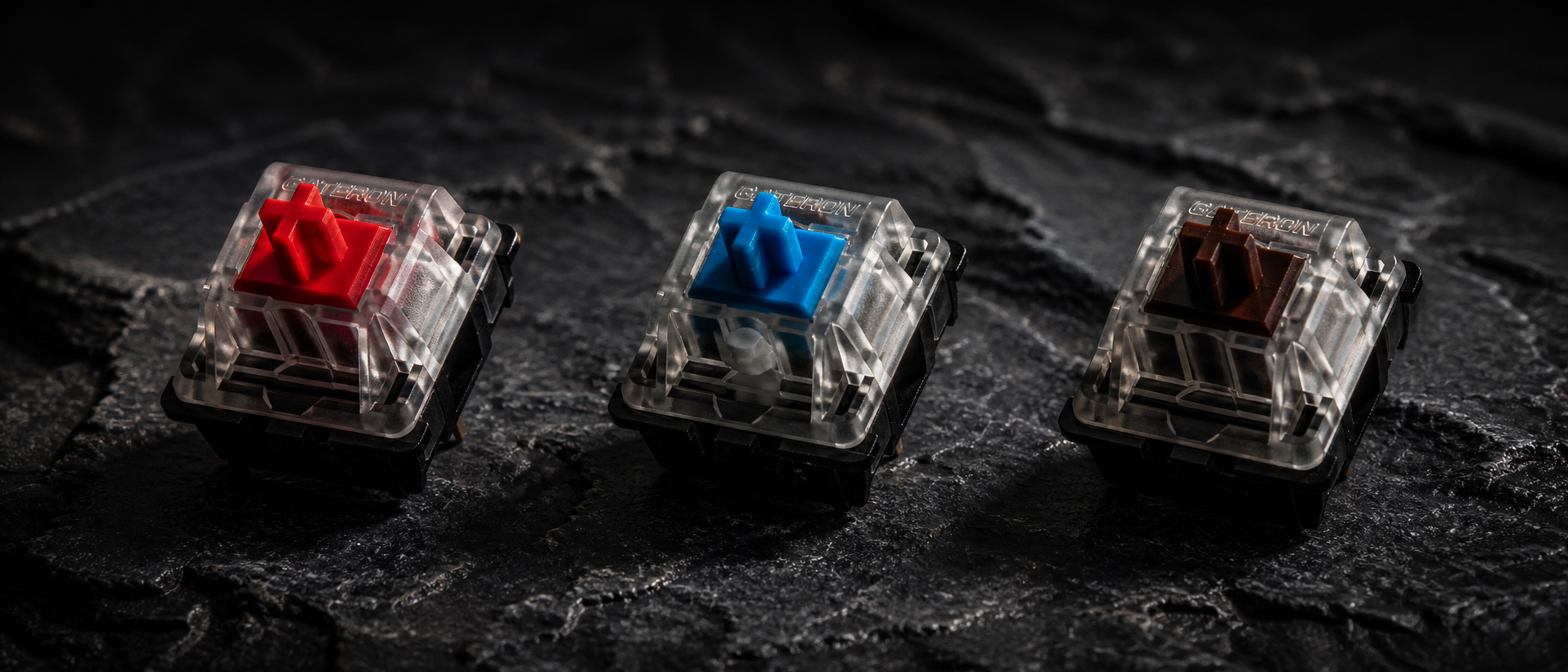
You're about to buy a mechanical keyboard. You've picked your budget, chosen a form factor, maybe even decided on a brand. Then comes the question that stops everyone: Red, Blue, or Brown switches?
The answer isn't as simple as "Red for gaming, Blue for typing." Each switch type has distinct characteristics that affect not just how your keyboard sounds, but how it feels during rapid key presses, long typing sessions, and those clutch late-night Valorant rounds. Here's everything you need to know — explained simply, with Indian gaming setups in mind.
Mechanical Switch Basics
Before we compare the three switch types, let's quickly understand what's happening inside a mechanical switch. Every mechanical key switch has the same core components:
Stem (the colored part)
This is what your keycap sits on. The stem's shape determines the switch type — it controls whether you feel a bump, hear a click, or get a smooth ride down.
Spring
Provides resistance and pushes the key back up. Spring weight is measured in grams — lighter springs (45g) mean easier key presses, heavier springs (60g+) mean more resistance.
Metal Contact Leaves
When the stem pushes down far enough, these metal pieces touch and complete a circuit — that's when your keypress actually registers (the actuation point).
Housing (top and bottom)
The plastic shell that holds everything together. Housing material affects sound — nylon housings are thockier, polycarbonate ones are more pingy.
The type of switch — linear, clicky, or tactile — is determined by the stem's internal geometry. It's what makes a Red feel completely different from a Blue, even though they look similar from outside.
Key Terms to Know
- Actuation Force: How much pressure (in grams) needed to register a keypress
- Actuation Point: How far down (in mm) you need to press before the key registers
- Total Travel: The full distance the key can travel from top to bottom
- Bottom Out: Pressing the key all the way down past the actuation point
Red Switches (Linear)
Red switches are linear — meaning the keypress is completely smooth from top to bottom. There's no bump, no click, no feedback at all until you hit the bottom. Imagine pressing down on a spring with nothing in the way. That's a linear switch.
How Red Switches Feel
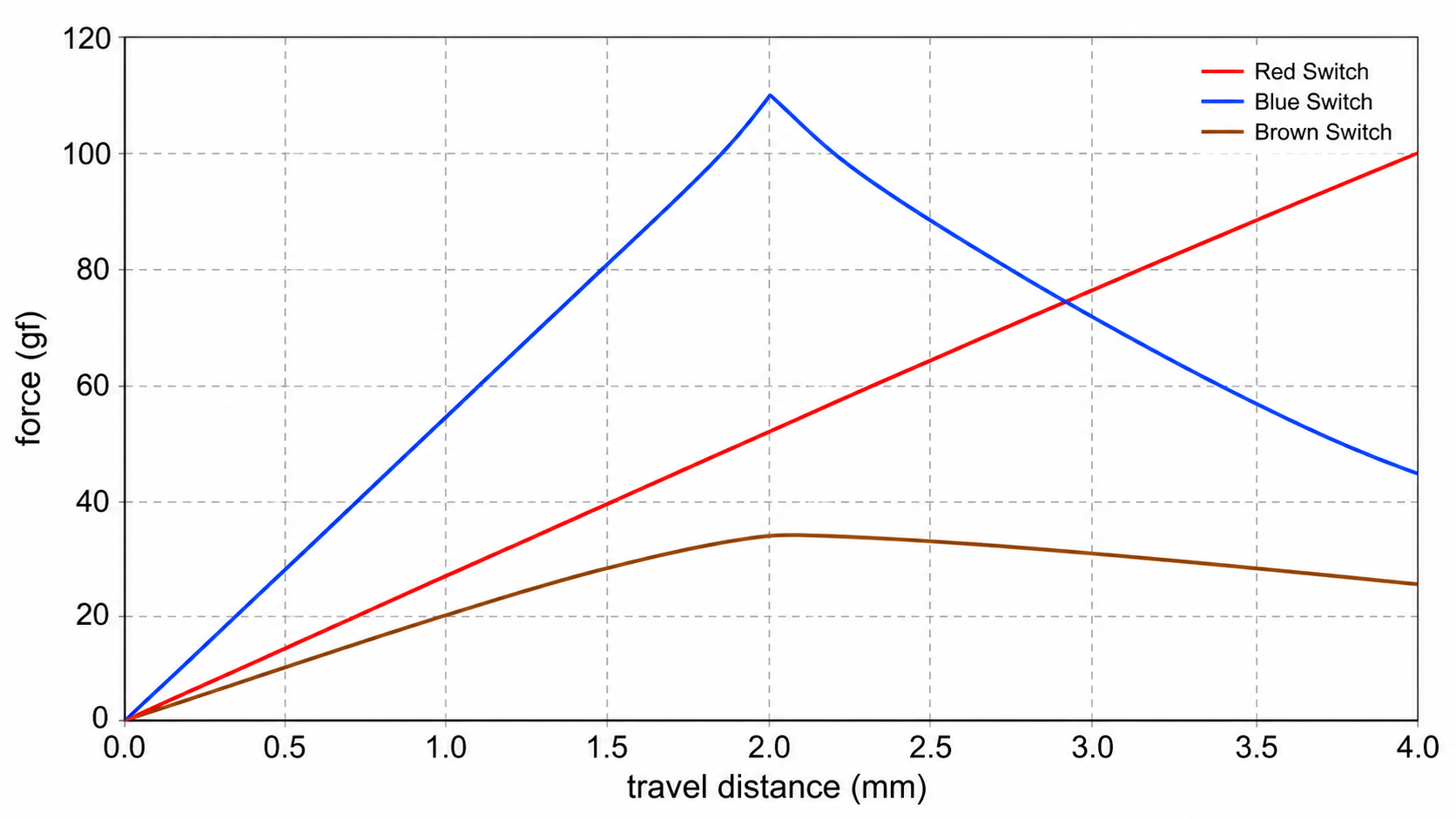
Pressing a Red switch feels like pushing through butter. There's uniform resistance throughout the entire keystroke — no sudden feedback telling you when the key actuated. This makes them incredibly fast for repeated inputs because your finger doesn't have to overcome any resistance bump on the way back up.
Pros
- + Fastest for rapid key presses
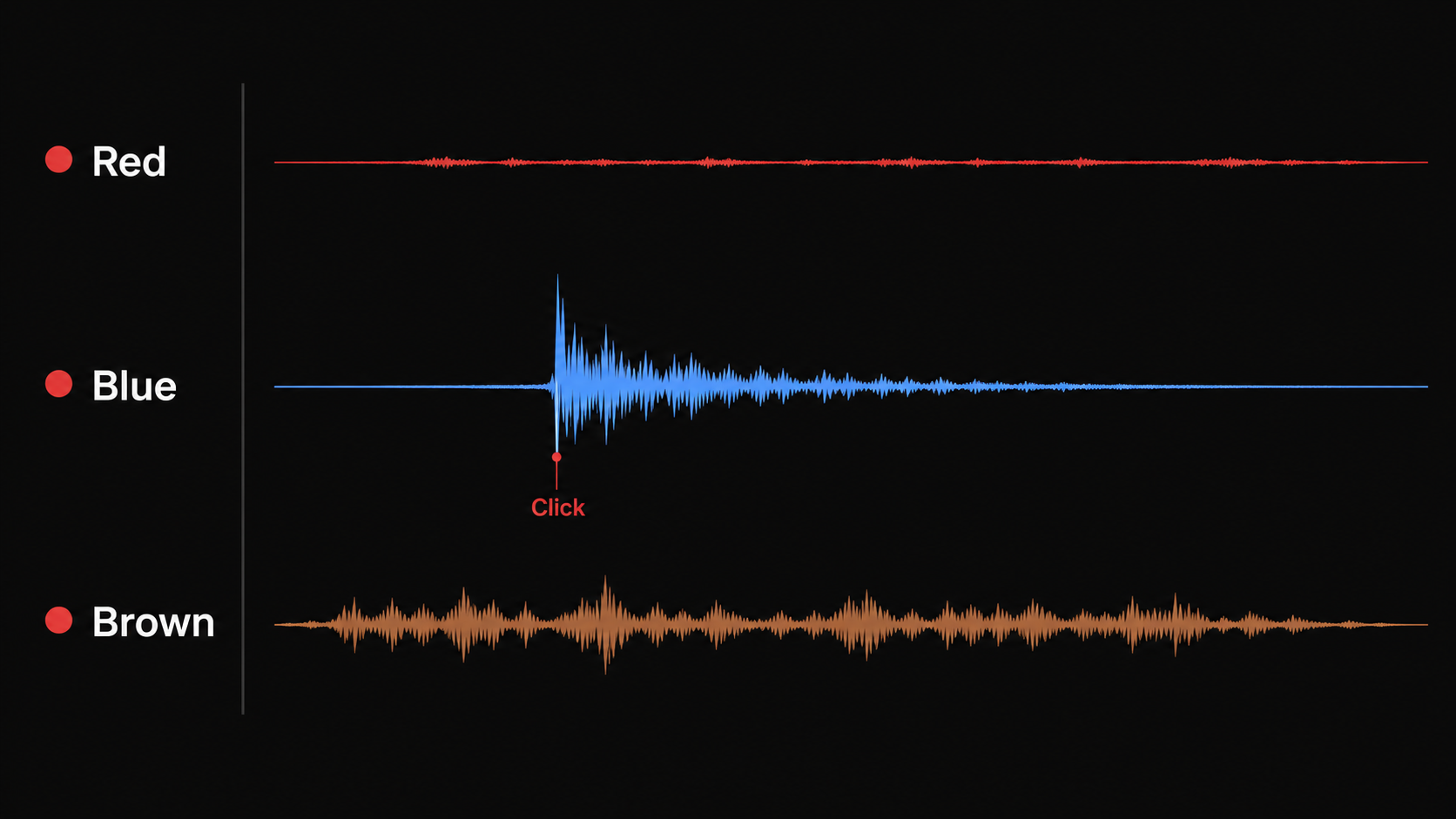
- + Quietest switch type
- + Low fatigue during long sessions
- + Great for double-tapping
Cons
- - Easy to accidentally press keys
- - No feedback = more typos for some
- - Can feel "mushy" or "dead" to new users
- - Less satisfying for typing
Who uses Reds? The majority of competitive FPS players and esports professionals. When you need to spam strafe keys (A-D-A-D) in Valorant or rapidly crouch-spam in PUBG, that smooth, bump-free action makes a genuine difference. Every millisecond of resistance removed helps.
Common variants: Cherry MX Red (45g, the original), Gateron Red (smoother out of box), Kailh Red (slightly scratchier), Outemu Red (budget-friendly, found in Cosmic Byte and Redragon keyboards in India). There are also "Speed" or "Silver" variants with shorter actuation distances (1.2mm vs 2.0mm) for even faster response.
Blue Switches (Clicky)
Blue switches are clicky — they produce a distinct tactile bump AND an audible click sound at the actuation point. There's a separate mechanism inside (a click jacket or click bar) that creates that signature "typewriter" sound everyone associates with mechanical keyboards.
How Blue Switches Feel
Pressing a Blue switch feels like two distinct stages. You press down, hit a sharp bump (with an audible CLICK), and then the key drops past the actuation point to the bottom. Releasing the key, you feel and hear another lighter click on the way back up. It's extremely satisfying — like popping bubble wrap with every keystroke.
Pros
- + Most satisfying typing feel
- + Clear feedback on every keypress
- + Fewer accidental key presses
- + Great for learning touch typing
Cons
- - Very loud (50-60 dB)
- - Disruptive in shared spaces
- - Slower for double-tapping
- - Mic picks up clicks on voice chat
Who uses Blues? Writers, programmers, and people who love the typewriter aesthetic. Some casual gamers enjoy Blues for single-player or strategy games. However, they're rarely used in competitive gaming because the click mechanism creates a slight delay on the return stroke — making rapid repeated presses slower compared to linear switches.
The India noise problem: Let's be real — if you're gaming at 1 AM in a joint family setup or a shared hostel room, Blue switches will get you complaints. The click is audible through walls. Your Discord teammates will hear it. Your mic's noise gate will struggle. If you live alone or have a dedicated gaming room, Blues are fine. Otherwise, think twice.
Common variants: Cherry MX Blue (50g, crisp click), Gateron Blue (slightly lighter feel), Outemu Blue (sharper click, found in budget keyboards like Redgear Shadow Blade), Kailh Box White (improved click mechanism, less wobble). Kailh Box Jades are a heavier, thicker-clicking variant loved by enthusiasts.
Brown Switches (Tactile)
Brown switches are tactile — they have a noticeable bump at the actuation point (like Blues) but WITHOUT the click sound. Think of them as the middle ground: you get physical feedback telling you when the key registered, but your room stays relatively quiet.
How Brown Switches Feel
Pressing a Brown switch feels like a subtle speed bump halfway through the keypress. You push down, feel a gentle resistance peak, and then the key drops smoothly to the bottom. The bump is much softer than Blues — some people call it "scratchy" rather than "bumpy." It's there, but it doesn't demand your attention the way a Blue click does.
Pros
- + Best all-rounder (gaming + typing)
- + Moderate noise level
- + Tactile feedback without the click
- + Good for shared spaces
Cons
- - Bump too subtle for some
- - Not as fast as Reds for gaming
- - Not as satisfying as Blues for typing
- - "Jack of all trades, master of none"
Who uses Browns? People who want ONE keyboard for everything — gaming sessions, college assignments, office work, Discord chatting. Browns are the Swiss army knife of switches. They won't give you the absolute fastest gaming input or the most satisfying typing experience, but they do both well enough that you never feel limited.
Common variants: Cherry MX Brown (45g, subtle bump), Gateron Brown (smoother travel), Outemu Brown (more pronounced bump, common in Cosmic Byte keyboards), Kailh Brown (slightly heavier). For enthusiasts wanting more tactility, Akko CS Lavender Purple or Durock T1 switches offer a stronger bump without adding click noise.
Head-to-Head Comparison
Here's every spec that matters, side by side. These values are based on Cherry MX switches — other brands (Gateron, Outemu, Kailh) have similar but not identical specs.
| Spec | Red (Linear) | Blue (Clicky) | Brown (Tactile) |
|---|---|---|---|
| Actuation Force | 45g | 50g | 45g |
| Actuation Point | 2.0 mm | 2.2 mm | 2.0 mm |
| Total Travel | 4.0 mm | 4.0 mm | 4.0 mm |
| Feel | Smooth, no bump | Sharp bump + audible click | Gentle bump, no click |
| Sound Level | Quiet (~35 dB) | Loud (~55 dB) | Moderate (~40 dB) |
| Best For | Competitive gaming, rapid inputs | Typing, single-player games | All-purpose (gaming + typing) |
| Worst For | Typing accuracy (no feedback) | Shared rooms, voice chat | Purists who want extremes |
| Lifespan | 50-100 million presses | 50-100 million presses | 50-100 million presses |
Best Switch for Gaming
If gaming is your primary use case — especially competitive FPS titles like Valorant, CS2, Apex Legends, or PUBG — Red switches win this category.
Here's why:
No bump = faster repeated presses
When you're strafing left-right rapidly, the lack of a tactile bump means your finger doesn't have to push past any resistance peak on the upstroke. This translates to faster ADAD spam and quicker double-taps.
Light actuation = less fatigue
At 45g with no bump, your fingers do less total work per keystroke. Over a 4-5 hour gaming session, this adds up. Your hands stay fresher, your reactions stay sharper.
Quiet operation for voice chat
Your teammates on Discord or in-game voice won't hear your keyboard. This matters more than people think — no one wants to play with the person whose clicks blast through the mic.
However: If you play primarily strategy games, MOBAs, or single-player titles where rapid key repetition isn't critical, the advantage of Reds diminishes. Brown or even Blue switches work perfectly fine for Civilization VI, Dota 2, or Elden Ring.
Pro player preference: An estimated 60-65% of professional esports players use linear switches (Red or Speed Silver). About 25-30% use tactile (Brown), and only around 5-10% use clicky (Blue). The numbers are clear.
Best Switch for Typing
If your primary use is typing — whether that's college assignments, coding, content writing, or office work — Blue switches offer the most satisfying experience.
The click provides unambiguous confirmation that your keypress registered. This helps develop typing rhythm, reduces uncertainty about whether a key was pressed, and gives that classic typewriter satisfaction that makes long writing sessions enjoyable rather than tedious.
But there's a massive caveat for Indian users: If you share a room with siblings, live in a hostel, or have your setup in the hall where family watches TV — Blue switches will become a problem. The sound carries. It's rhythmic and penetrating. At 2 AM during exam season, your roommate will not find it "satisfying."
If noise matters but typing feel is important: Go with Brown switches. You still get that tactile bump confirming each keypress, but without the audible click. Many typists find Browns perfectly satisfying once they adjust. For even more typing feel without noise, consider tactile switches with a stronger bump like the Akko CS Lavender Purple — available in India through Keychron and mech keyboard vendors.
Best Switch for Gaming + Typing
If you use one keyboard for everything — gaming at night, assignments during the day, occasional coding, chatting on Discord — Brown switches are your answer.
Why Brown Is the Best Compromise
If you can only buy ONE keyboard and need it to do everything — Brown switches. Every time.
This is exactly why Brown is the most popular switch type worldwide. It's not the best at anything, but it's never the worst either. For Indian college students or working professionals who game after hours, Browns make the most practical sense.
Popular Keyboards by Switch Type (India)
Here are some of the most accessible mechanical keyboards in India by switch type. Prices are approximate and fluctuate on Amazon/Flipkart:
Red Switch Keyboards
Linear, quiet, gaming-focused
- Cosmic Byte CB-GK-18 Firefly — Outemu Red, Rs 2,500-3,000. Full-size, RGB, solid entry-level.
- Redragon K552 Kumara — Outemu Red, Rs 2,800-3,200. TKL, proven reliability.
- Royal Kludge RK84 — RK Red (Hot-swappable), Rs 4,000-5,000. 75% layout, wireless, excellent value.
- Keychron K2 / K8 — Gateron Red, Rs 6,000-8,000. Premium build, Mac/Windows, wireless.
- HyperX Alloy Origins Core — HyperX Red, Rs 7,000-8,500. TKL, aircraft-grade aluminium.
Blue Switch Keyboards
Clicky, satisfying, typing-focused
- Cosmic Byte CB-GK-16 Firefly — Outemu Blue, Rs 2,200-2,800. Budget-friendly, good click.
- Redgear Shadow Blade — Outemu Blue, Rs 2,000-2,500. Popular entry-level, full-size.
- Redragon K530 Draconic — Outemu Blue, Rs 3,500-4,000. 60% layout, Bluetooth.
- Royal Kludge RK61 — RK Blue (Hot-swappable), Rs 3,000-4,000. Compact, wireless.
- Keychron C1 — Gateron Blue, Rs 4,500-5,500. TKL, solid build quality.
Brown Switch Keyboards
Tactile, moderate noise, all-rounder
- Cosmic Byte CB-GK-18 Firefly — Outemu Brown, Rs 2,500-3,000. Same keyboard, different switch option.
- Royal Kludge RK84 / RK68 — RK Brown (Hot-swappable), Rs 4,000-5,000. Best value pick.
- Keychron K2 V2 — Gateron Brown, Rs 6,500-7,500. The go-to recommendation for most people.
- HyperX Alloy MKW100 — HyperX Brown, Rs 5,500-6,500. Full-size, detachable cable.
- Keychron Q1 — Gateron G Pro Brown, Rs 12,000-15,000. Premium gasket-mount, CNC aluminium.
Hot-Swap Tip for Indian Buyers
If you're unsure which switch type you'll prefer, buy a hot-swappable keyboard (like Royal Kludge RK84 or Keychron Q/V series). These let you pull out switches and replace them without soldering. Start with Browns, and if you decide you want something faster or clickier later, just swap the switches — no need to buy a whole new keyboard. Switch packs (Gateron, Akko) are available on meckeys.com and stackskb.com in India.
Frequently Asked Questions
Are Red switches better than Brown for gaming?
Are Blue switches too loud for gaming?
Which switch is best for both gaming and typing?
What is the difference between Cherry MX and Gateron switches?
Can I use O-rings to make Blue switches quieter?
Do mechanical switch types affect input latency in games?
The Bottom Line
Our Verdict
There's no universally "best" switch — only the best switch for you. But here's our recommendation based on thousands of Indian gamer use cases:
Competitive FPS gamers (Valorant, CS2, Apex): Go with Red switches. The speed advantage is real, the quiet operation helps in voice chat, and your fingers will thank you during marathon ranked sessions.
Writers, programmers, typing enthusiasts: Go with Blue switches if you have a private space. If noise is a constraint (shared rooms, hostel, late-night use), go Brown instead.
Everyone else (gaming + typing + everything): Go with Brown switches. They do everything well, offend no one, and work perfectly for the one-keyboard-does-all setup most Indian gamers have.
And if you're still unsure? Get a hot-swappable keyboard and a switch tester pack from meckeys.com or stackskb.com. Try all three for a week each. Your fingers will tell you the answer faster than any article can.
Related Guides
Best Gaming Keyboards Under Rs 1,000
Budget membrane and mech-feel options
Best Gaming Keyboards Under Rs 2,000
Mechanical switch options at entry-level prices
All Mechanical Switch Types Explained
Linear, tactile, clicky — and everything in between
TKL vs Full-Size Keyboard
Which layout is right for your desk and playstyle?