
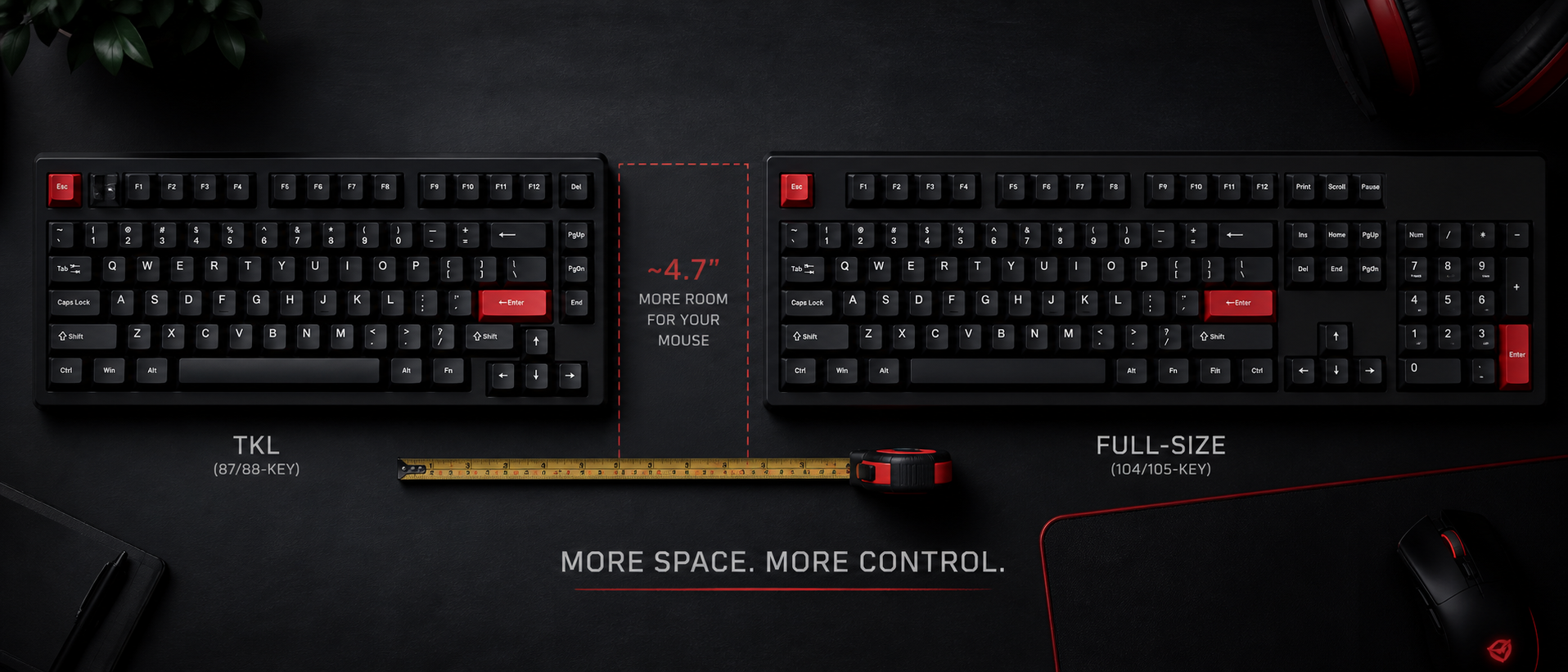
Walk into any gaming peripherals section on Amazon India and you'll find keyboards in every size imaginable. But the most common dilemma for Indian gamers remains: should I buy a TKL (tenkeyless) keyboard or a full-size one?
It's not just about aesthetics. The layout you choose affects your desk ergonomics, mouse space, gaming performance, and even work productivity. We've researched both layouts across FPS, MMO, and work-from-home use to give you a definitive answer.
What Is a TKL Keyboard?
TKL stands for Tenkeyless — literally a keyboard without the ten-key numpad. That's the number pad section on the right side of a traditional keyboard with digits 0-9, arithmetic operators, Num Lock, and Enter.
Full-Size (100%)
104-108 keys. Includes everything: function row, navigation cluster, arrow keys, and numpad. Width: ~44-46 cm.
TKL (80%)
87-88 keys. Removes the numpad but keeps everything else intact. Width: ~36-38 cm. Roughly 8 cm narrower.
A TKL keyboard retains all the keys most people actually use daily: the full QWERTY layout, function row (F1-F12), arrow keys, and the navigation cluster (Home, End, Page Up, Page Down, Insert, Delete). You only lose the dedicated number pad.
Quick Fact
The "tenkeyless" name is slightly misleading — you actually lose 17-20 keys, not just 10. The numpad section includes digits 0-9, plus Num Lock, /, *, -, +, Enter, and the decimal point. But "tenkeyless" stuck as the industry term because the 10 number keys are what people miss most.
Size & Layout Comparison
Let's put the two layouts side by side with hard numbers. This table covers the practical differences that matter when you're buying:
| Specification | TKL (80%) | Full Size (100%) |
|---|---|---|
| Key Count | 87-88 keys | 104-108 keys |
| Width | ~36-38 cm | ~44-46 cm |
| Weight (Mech) | 700-900 g | 900-1200 g |
| Numpad | Not included | Included |
| Function Row | Yes | Yes |
| Arrow Keys | Yes | Yes |
| Price Range (India) | Rs 2,000 - Rs 15,000 | Rs 2,500 - Rs 18,000 |
| Best For | FPS gaming, limited desk space, portability | MMO gaming, data entry, accounting, all-purpose |
As you can see, TKL doesn't sacrifice anything critical for most users. The trade-off is simple: numpad access vs desk space. Everything else remains identical between the two layouts.
Desk Space & Ergonomics
This is where TKL keyboards genuinely shine, and it's the primary reason competitive gamers prefer them. Let's talk about why those 8 cm matter more than you'd think.
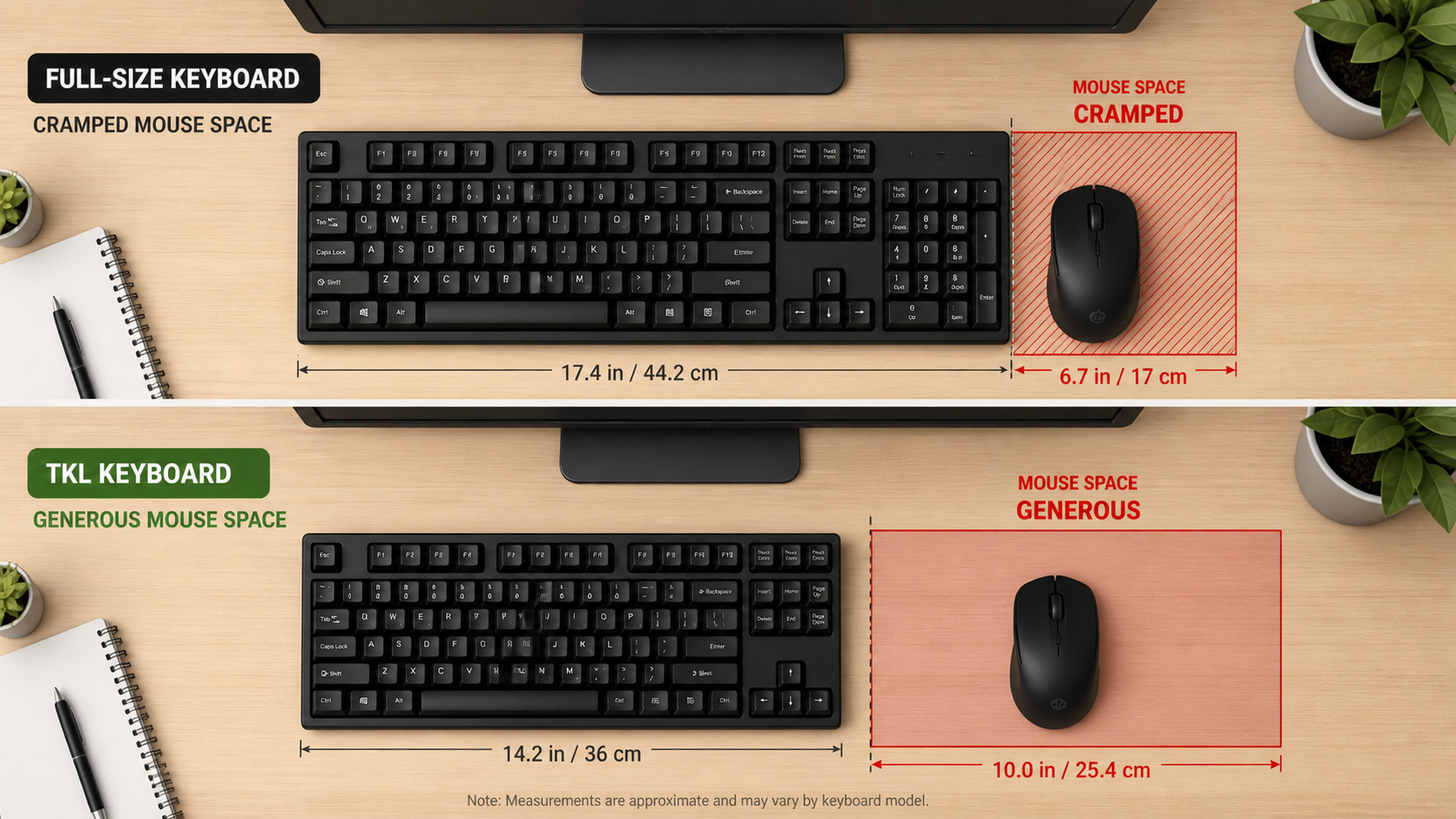
More Mouse Real Estate
With a full-size keyboard centred on a standard 120 cm Indian desk, your mouse gets roughly 35-40 cm of horizontal space. Switch to TKL, and that jumps to 43-48 cm. For low-sensitivity FPS players who sweep their mouse in large arcs, this extra room is the difference between completing a 180-degree turn and running out of pad.
Centred Typing Position
Here's something most people overlook: on a full-size keyboard, the actual typing area (the alpha keys) is shifted left because of the numpad on the right. This means your hands and shoulders are slightly offset from your monitor's centre. Over 8-10 hours of work-from-home sessions, this asymmetry contributes to shoulder and neck strain.
A TKL keyboard lets the typing area sit closer to your body's midline. Your elbows stay at a natural angle. Your mouse hand sits closer to your keyboard hand. It's a subtle change that adds up over months.
Portability
If you attend LAN events, carry your keyboard to a friend's house, or switch between home and office, TKL is noticeably easier to transport. It fits in standard laptop bags and smaller backpack pockets. Many Indian gaming cafes have cramped desk setups where a full-size board simply doesn't fit comfortably.
Indian Desk Reality Check
Most computer desks sold in India (especially budget ones from Amazon and local furniture shops) are 100-120 cm wide. After placing a monitor, a full-size keyboard, and a mousepad, you're often left with barely enough room for a small mouse mat. A TKL keyboard on these desks is practically a necessity, not a luxury.
Gaming Advantages
Let's get specific about how keyboard layout affects your gaming performance across different genres:
FPS / Tactical Shooters
Valorant, CS2, Apex Legends, PUBG, Overwatch 2
FPS players use low DPI + low sensitivity, which means large mouse sweeps. The extra 8 cm of desk space from dropping the numpad directly translates to more room for flicks and 180-degree turns. Pro CS2 players universally use TKL or smaller layouts. You'll never see a numpad at a Valorant tournament.
MMO / RPG
World of Warcraft, Final Fantasy XIV, Lost Ark, Genshin Impact
MMOs have dozens of abilities. Many players bind Numpad 1-9 to ability bars, macros, or chat commands. If you've been playing WoW for years with numpad binds, switching to TKL means relearning muscle memory. That said, plenty of MMO players use TKL and bind abilities to Shift/Ctrl modifiers instead — it's a preference, not a requirement.
MOBA / Battle Royale
Dota 2, League of Legends, Fortnite, BGMI
MOBA and BR games don't typically use numpad bindings. The extra desk space benefits your mouse hand, and the more compact form factor lets you position your keyboard at an angle (tilted) more easily — a common setup for MOBA players. No real downside to TKL here.
The pattern is clear: unless you specifically use numpad bindings in MMOs, TKL is either better or neutral for gaming. The desk space advantage is universal; the numpad advantage is niche.
When You Need Full Size
Full-size keyboards aren't obsolete — they serve specific, legitimate use cases. Here's when the numpad is genuinely worth the desk space trade-off:
Data Entry & Accounting
If you enter numbers all day — spreadsheets, invoicing, Tally, accounting software — the numpad is 3-4x faster than the number row. This is non-negotiable for finance professionals.
3D Modelling & CAD
Software like Blender, AutoCAD, and SolidWorks uses numpad keys for viewport navigation (Numpad 1/3/7 for front/side/top views). Without it, you need workarounds or must enable "Emulate Numpad" options.
MMO Hotkey Binds
Veteran MMO players who've built years of muscle memory around numpad ability bindings. Relearning 20+ ability keybinds is genuinely painful and takes weeks of adjustment.
Windows Alt-Codes & Special Characters
If you regularly type special characters using Alt+numpad codes (common for multilingual typing), you need a physical numpad. The number row doesn't work for Alt-codes on Windows.
Shared Family/Office Computer
If multiple people use the same keyboard and some need the numpad, a full-size board is the safe choice. You can't explain Fn layers to everyone.
The work-from-home angle: Many Indian gamers also use their gaming keyboard for WFH. If you're a developer, writer, or designer, TKL works perfectly — coders rarely need the numpad. But if you do GST calculations, manage inventory in Excel, or use Tally ERP, keep the full-size board.
The External Numpad Compromise
Want the best of both worlds? Buy a TKL keyboard and a separate USB numpad (Rs 300-800 on Amazon India). Place the numpad to your left or pull it out only when needed. This gives you TKL desk space for gaming and numpad access for work. Brands like Quantum, Zebronics, and AmazonBasics sell decent standalone numpads.
Other Layouts (75%, 65%, 60%)
TKL and full-size aren't your only options. The mechanical keyboard community has popularized several compact layouts. Here's how they compare:
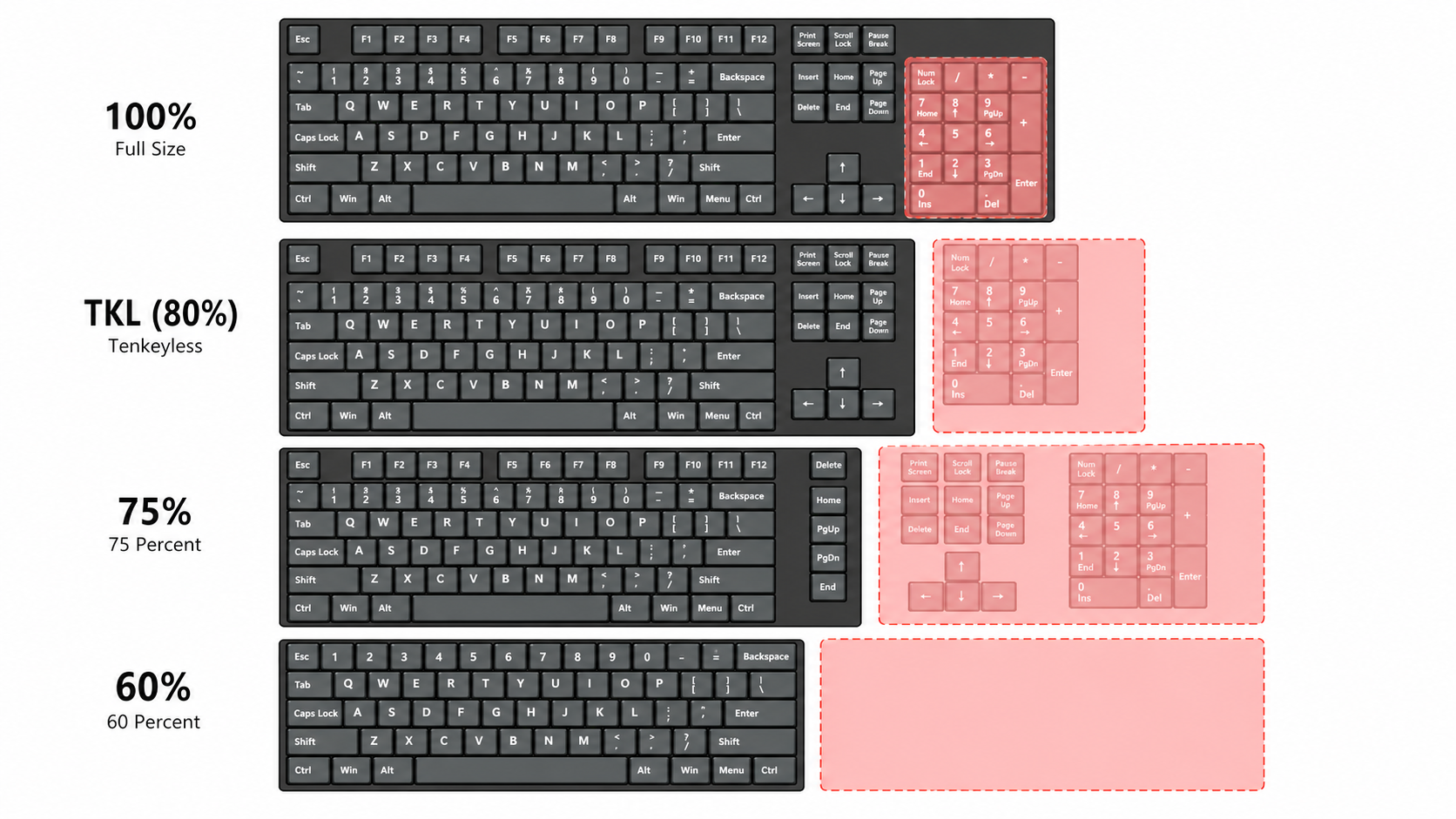
| Layout | Keys | What's Missing | Best For |
|---|---|---|---|
| Full-Size (100%) | 104-108 | Nothing | Data entry, MMOs |
| TKL (80%) | 87-88 | Numpad | FPS gaming, general use |
| 75% | 82-84 | Numpad + spacing between key clusters | Compact without sacrificing function keys |
| 65% | 66-68 | Numpad + function row + nav cluster | Minimal aesthetic with arrow keys |
| 60% | 61-64 | Numpad + function row + nav + arrows | Maximum desk space, enthusiast use |
Our recommendation for most Indian gamers: TKL or 75% is the sweet spot. You keep all essential keys (especially arrow keys and F-keys) while gaining meaningful desk space. 65% and 60% layouts require learning function layers and are better suited for enthusiasts who enjoy customizing their keyboard firmware.
The 75% layout (think Keychron K2/V1 or Royal Kludge RK84) is becoming increasingly popular in India because it offers nearly TKL functionality in a more compact form factor. It retains the function row and arrow keys but removes the spacing between key clusters, making it about 2 cm narrower than TKL.
Popular Options in India
Here are some well-regarded mechanical keyboards in both layouts, readily available on Amazon India and Flipkart with proper warranty:
TKL Keyboards (Budget to Mid-Range)
Cosmic Byte CB-GK-18 Firefly (Rs 2,200-2,800)
Outemu Blue/Red switches, RGB, detachable cable. The go-to budget TKL in India. Solid build for the price, though keycaps are thin ABS.
Redragon K552 Kumara (Rs 2,500-3,200)
Outemu Blue/Red/Brown switches, single-colour or RGB backlight. A global best-seller that's proven reliable. Metal top plate gives it surprising heft. Great first mechanical keyboard.
HyperX Alloy Origins Core (Rs 6,500-8,000)
HyperX Red (linear) or Aqua (tactile) switches, aircraft-grade aluminium body, USB-C, full RGB. The mid-range king. Excellent stock stabilizers and a premium feel without the premium price tag.
Keychron K8 / K8 Pro (Rs 7,000-12,000)
Gateron switches (hot-swappable on Pro), wireless Bluetooth + USB-C, Mac/Windows compatible, PBT keycaps on Pro. The best TKL for people who want quality without going custom. QMK/VIA support on Pro model.
Full-Size Keyboards (Budget to Mid-Range)
Cosmic Byte CB-GK-02 Corona (Rs 2,500-3,000)
Full-size with Outemu Blue switches, rainbow LED, braided cable. Budget-friendly full-size option. Numpad included for productivity use.
Redragon K556 Devarajas (Rs 3,500-4,500)
Full-size, Outemu Brown switches, RGB, aluminium top plate. One of the best value full-size mechs in India. Good for mixed gaming and office use.
HyperX Alloy MKW100 (Rs 5,500-7,000)
Full-size, HyperX Red switches, aluminium frame, detachable wrist rest, RGB. Comfortable for long sessions with the included wrist rest. Solid full-size gaming option.
Keychron C2 / C2 Pro (Rs 5,000-8,000)
Full-size, Gateron switches (hot-swap on Pro), USB-C, Mac/Windows compatible, white backlight or RGB. The full-size Keychron for those who want numpad with quality. Wired only but excellent typing experience.
Pro tip: If you're on a tight budget (under Rs 3,000), both Cosmic Byte and Redragon offer excellent value. The Redragon K552 TKL is arguably the best entry point into mechanical keyboards in India. For Rs 6,000-8,000, HyperX Alloy Origins Core is hard to beat for TKL, and the Keychron C2 Pro is the full-size equivalent.
Which Should You Buy?
After all that information, here's a simple decision framework based on your primary use case:
Buy TKL If...
- You play FPS games (Valorant, CS2, Apex, PUBG)
- Your desk is 120 cm or narrower
- You use low mouse sensitivity and need room to sweep
- You're a programmer, writer, or designer (WFH)
- You want better shoulder/wrist ergonomics
- You carry your keyboard to LAN events or between setups
Buy Full Size If...
- You do data entry, accounting, or heavy Excel/Tally work
- You use 3D modelling software (Blender, AutoCAD) daily
- You play MMOs with numpad-bound abilities
- You have a large desk (140 cm+) with plenty of room
- Multiple family members share the keyboard
- You use Windows Alt-codes for special characters
If you're still unsure, ask yourself one question: "When did I last use the numpad?" If you can't remember or the answer is "rarely," TKL is the right choice. You won't miss what you never used, and you'll immediately appreciate the extra desk space.
Frequently Asked Questions
What does TKL mean in keyboards?
Is TKL better than full-size for gaming?
Can I use a TKL keyboard for programming and work?
What is the size difference between TKL and full-size keyboards?
Are TKL keyboards cheaper than full-size?
Should I get a 60% keyboard instead of TKL?
The Bottom Line
Our Verdict
For the majority of Indian gamers — especially those playing FPS titles on standard-sized desks — TKL is the better choice. The extra desk space translates directly to better mouse control, improved ergonomics, and a cleaner setup. You lose a numpad you probably don't use anyway.
Full-size still makes sense if your workflow genuinely requires number input — data entry, accounting in Tally, or 3D viewport navigation in Blender. But for pure gaming and general productivity (coding, writing, browsing), TKL wins on every metric that matters.
And if you want the best of both worlds, buy a TKL keyboard with an external USB numpad. Use the numpad for work, stow it away for gaming. Problem solved for under Rs 800 extra.
Related Guides
Best Gaming Keyboards Under Rs 1,000
Budget membrane and mech-feel options
Best Gaming Keyboards Under Rs 2,000
Entry-level mechanical keyboards in India
Red vs Blue vs Brown Switches
Which switch type is best for gaming?
Mechanical Keyboard Switch Types Explained
Linear, tactile, clicky — the complete guide