
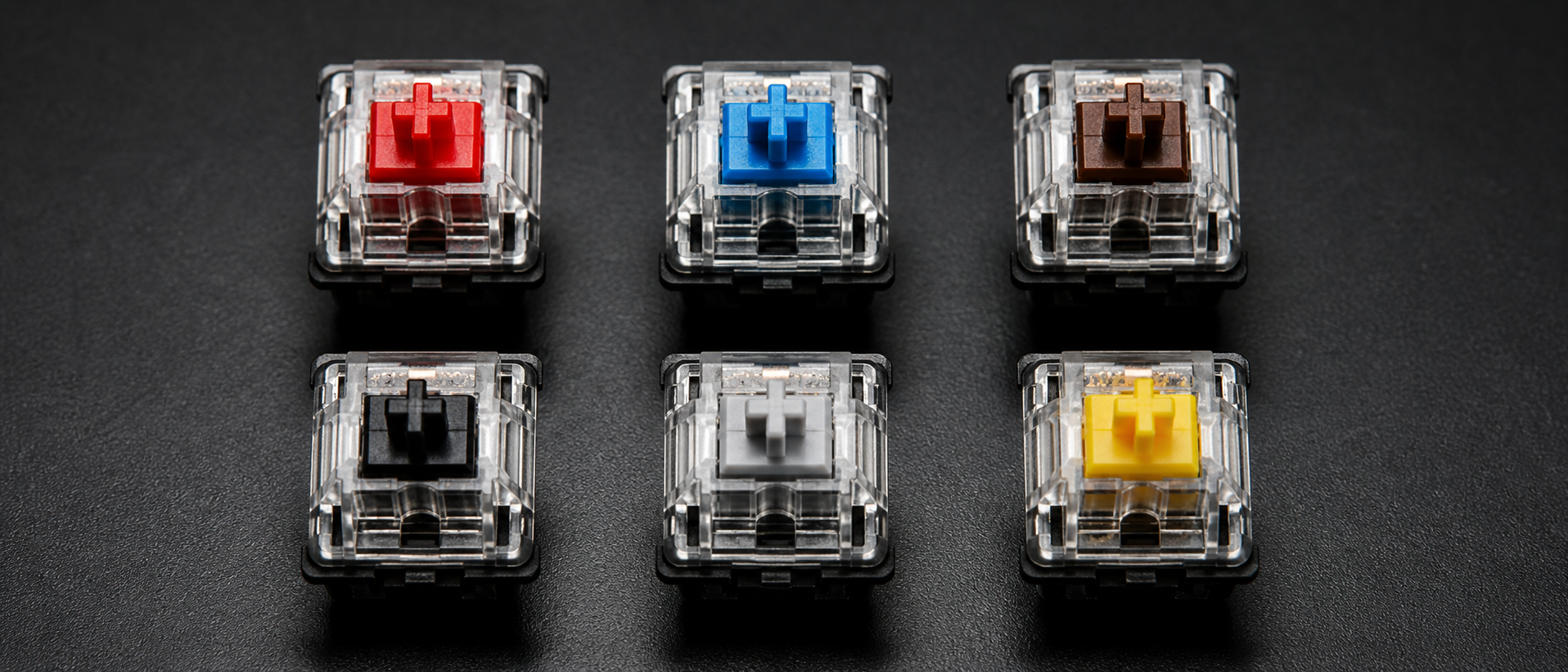
You're browsing keyboards on Amazon India. One listing says "Blue switches — best for typing." Another claims "Red switches — ultimate gaming experience." A third mentions "Gateron Yellow" like it's some premium upgrade. What do any of these actually mean, and which one should you buy?
The switch determines how a keyboard feels, sounds, and performs. Pick wrong and you'll hate the noise, fatigue your fingers, or miss keypresses in competitive games. This guide breaks down every switch type available in India — from budget Outemu to premium Cherry MX.
How Mechanical Switches Work
Every mechanical switch has the same basic anatomy. Understanding these parts helps you make sense of spec sheets and marketing claims:
Keycap + Stem
The stem is the coloured cross-shaped piece that sticks up from the switch. Your keycap sits on top of it. The stem colour tells you the switch type — red stem = linear, blue = clicky, brown = tactile.
Spring
The spring determines how heavy the switch feels (actuation force). Lighter springs (35-45g) mean less effort to press; heavier springs (60-80g) require more deliberate keypresses. The spring pushes the stem back up after you release.
Metal Contact Leaves
Two thin metal pieces inside the switch. When you press down far enough, the stem pushes these contacts together, completing the circuit. This is the "actuation point" — the moment your keypress registers.
Housing (Top + Bottom)
The plastic shell that holds everything together. Housing material affects sound — nylon housings are deeper/thockier, polycarbonate housings are higher-pitched and let RGB shine through better.
When you press a key, the stem travels downward against the spring, hits the actuation point (where the keypress registers), and continues to the bottom (called "bottoming out"). The total distance from top to bottom is the total travel, and the point where it registers is the actuation distance.
The difference between switch types comes down to what happens during that downward travel — whether it's smooth, bumpy, or clicky.
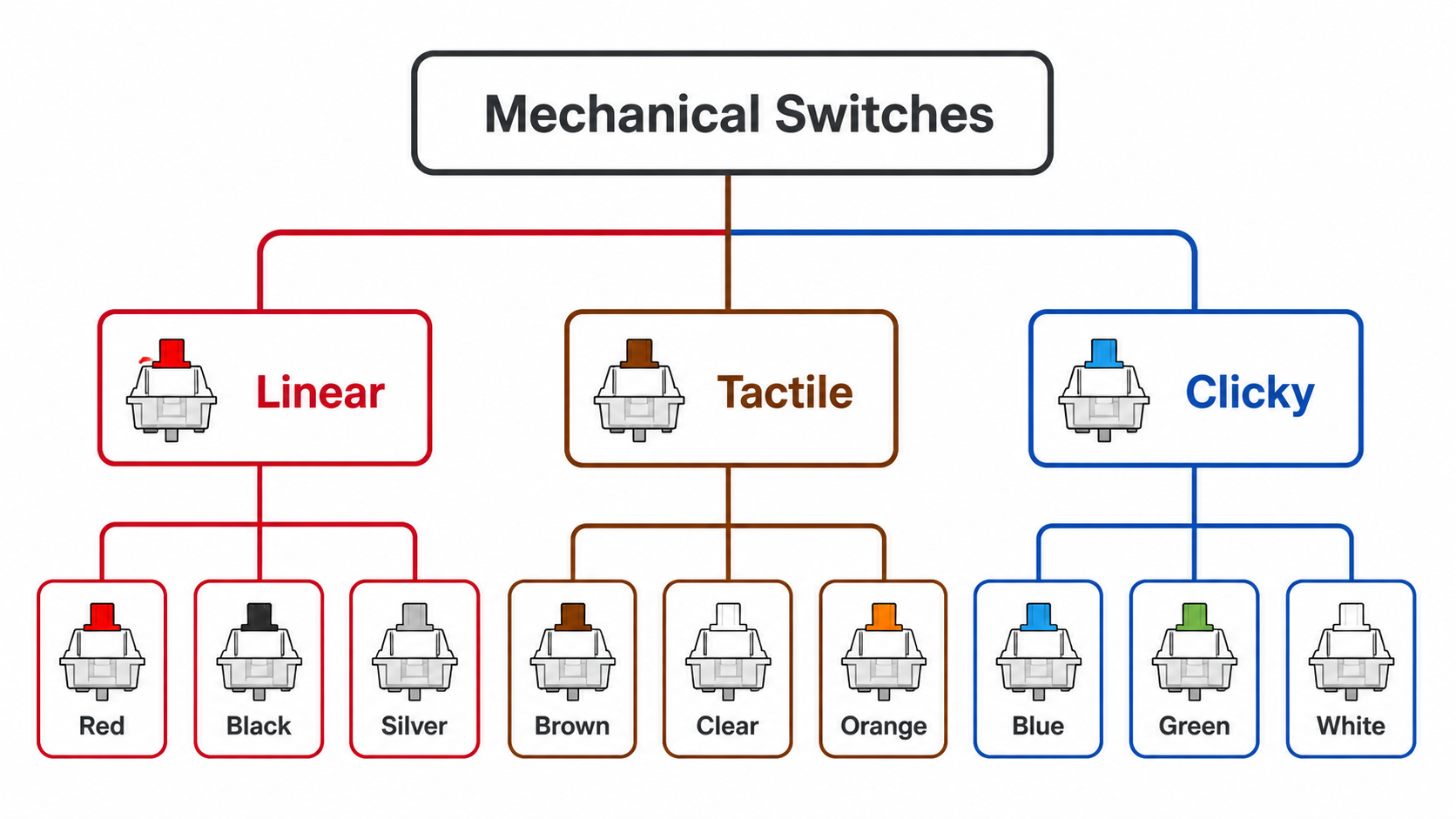
Linear Switches
The simplest type. Press down and the stem travels straight down with zero bumps, zero clicks — just smooth, consistent resistance from the spring. Think of a laptop key but with more travel and a satisfying "thock" at the bottom.
Why Gamers Love Linear
No bump means no resistance halfway through. This allows faster double-taps and rapid keypresses — critical in games where you're spamming WASD, strafing in Valorant, or bunny-hopping in CS2. Your finger doesn't fight a tactile bump on every press.
Feel: Smooth top to bottom — no feedback telling you when the key actuates. Sound: Quieter than other types. Main sound is the "clack" of bottoming out. Can be silenced further with O-rings or silent variants.
| Switch | Actuation Force | Actuation Point | Total Travel | Notes |
|---|---|---|---|---|
| Cherry MX Red | 45g | 2.0mm | 4.0mm | The classic linear. Gold standard. |
| Cherry MX Black | 60g | 2.0mm | 4.0mm | Heavier Red. Prevents accidental presses. |
| Gateron Yellow | 50g | 2.0mm | 4.0mm | Cult favourite. Smoother than Cherry out of box. |
| Gateron Red | 45g | 2.0mm | 4.0mm | Cherry Red equivalent. Smoother stock feel. |
| Outemu Red | 50g | 2.0mm | 4.0mm | Budget king. Found in most sub-Rs 3K boards. |
| Kailh Red | 50g | 2.0mm | 4.0mm | Slightly heavier than Cherry. Decent smoothness. |
Best for: Competitive gaming, fast-paced titles, people who dislike noisy keyboards. Popular Indian keyboards: Cosmic Byte CB-GK-18 Firefly (Outemu Red), Redragon K552 Kumara (Outemu Red), Royal Kludge RK61 (Gateron Red/Yellow hot-swap), HyperX Alloy Origins Core (Cherry MX Red).
Tactile Switches
Tactile switches have a small bump partway through the keypress. When your finger hits this bump, you know the key has actuated — without needing to bottom out. It's like a subtle "checkpoint" in the keystroke that says "yep, that registered."
Feel: Smooth travel, then a noticeable bump at actuation, then smooth to bottom. Bump size varies — Brown has a gentle bump, Glorious Panda has a sharp one. Sound: Slightly louder than linear, significantly quieter than clicky. More "thock" than "click."
| Switch | Actuation Force | Actuation Point | Total Travel | Notes |
|---|---|---|---|---|
| Cherry MX Brown | 55g | 2.0mm | 4.0mm | The classic "all-rounder." Gentle bump. |
| Gateron Brown | 55g | 2.0mm | 4.0mm | Smoother than Cherry Brown. Slightly less bump. |
| Outemu Brown | 55g | 2.0mm | 4.0mm | Scratchier bump but functional. Budget pick. |
| Cherry MX Clear | 65g | 2.0mm | 4.0mm | Heavier Brown. More pronounced bump. Typing favourite. |
| Akko CS Lavender Purple | 36g | 1.9mm | 4.0mm | Ultra-light tactile. Popular in Indian mech community. |
Best for: People who want feedback without noise, typists who need confirmation without bottoming out, and gamers who play a mix of genres. Often called the "safe" choice. Popular Indian keyboards: TVS Gold Bharat (Cherry Brown equivalent), Cosmic Byte CB-GK-16 (Outemu Brown), Ant Esports MK1000 (Outemu Brown), Logitech G413 SE.
The "Brown Switches Are Bad" Debate
In the mechanical keyboard community, you'll hear people say "Browns are just scratchy Reds" or "pick a side — go linear or go clicky." There's some truth here — Cherry MX Browns have a very subtle bump that some find unsatisfying. But for many Indian gamers buying their first mech board, Brown is genuinely a safe middle ground. Don't let keyboard snobs make you overthink this.
Clicky Switches
Clicky switches combine a tactile bump with an audible "click" on each keypress. A separate mechanism (click jacket or click bar) produces a sharp click at the actuation point. Both your finger and ears know the key registered.
Feel: Sharp bump with an audible click — like a vintage typewriter. Sound: Loud. Every keypress is audible across the room. Satisfying for some, maddening for roommates and Discord teammates.
| Switch | Actuation Force | Actuation Point | Total Travel | Notes |
|---|---|---|---|---|
| Cherry MX Blue | 60g | 2.2mm | 4.0mm | The iconic clicky. Loved by typists worldwide. |
| Cherry MX Green | 80g | 2.2mm | 4.0mm | Heavy Blue. Prevents accidental presses. |
| Outemu Blue | 60g | 2.2mm | 4.0mm | Louder and clickier than Cherry. Budget favourite. |
| Gateron Blue | 60g | 2.3mm | 4.0mm | Slightly softer click than Cherry. Still loud. |
| Kailh Box White/Jade | 50g | 1.8mm | 3.6mm | Click bar design. Crispest, sharpest click available. |
Best for: Pure typists, data entry, people who love auditory feedback, solo gamers without voice chat. Popular Indian keyboards: TVS Gold (the legend of Indian offices), Redgear Shadow Amulet (Outemu Blue), Zebronics Max Ninja (Outemu Blue), Cosmic Byte CB-GK-02 (Outemu Blue), HyperX Alloy Origins (Cherry MX Blue).
Warning for Hostel and PG Gamers
If you live in a shared room, hostel, or PG accommodation — think twice before getting Blue switches. During late-night gaming sessions, your roommate will hear every single keypress. Many Indian gamers have learned this the hard way. Stick to Red or Brown if you share a living space.
Speed / Rapid Trigger Switches
Speed switches are a sub-category of linear switches designed for competitive gaming. They have a shorter actuation distance — typically 1.0-1.2mm instead of the standard 2.0mm. This means the key registers faster because the stem doesn't need to travel as far before triggering.
Rapid Trigger takes this further. Found in Hall Effect (magnetic) switches, it removes the fixed actuation point entirely. The switch continuously detects stem position via a magnetic sensor — move 0.1mm down = press, 0.1mm up = release. This allows impossibly fast key releases and re-presses, critical for counter-strafing in CS2 and Valorant.
| Switch | Actuation | Total Travel | Technology | Notes |
|---|---|---|---|---|
| Cherry MX Speed Silver | 1.2mm | 3.4mm | Mechanical | 45g force. Shorter travel, still mechanical. |
| Razer Optical (Linear) | 1.0mm | 3.5mm | Optical | Light-based actuation. No debounce delay. |
| Gateron Magnetic Jade | 0.1-3.8mm (adjustable) | 4.0mm | Hall Effect | Rapid Trigger. Fully customizable actuation. |
| Wooting Lekker (Geon) | 0.1-4.0mm (adjustable) | 4.0mm | Hall Effect | Pioneer of Rapid Trigger. Premium pricing. |
| DrunkDeer A75 | 0.2-3.6mm (adjustable) | 4.0mm | Hall Effect | Budget Rapid Trigger. Available on Amazon India. |
Best for: Competitive FPS players (counter-strafing in CS2/Valorant), rhythm games, and anyone who wants every millisecond of advantage.
Availability in India: The DrunkDeer A75 is on Amazon India (~Rs 7,000-8,000). Razer Huntsman V3 Pro runs Rs 15,000-25,000. Budget Hall Effect options from Gamakay and VXE are appearing via AliExpress and Meckeys. Wooting remains import-only.
Switch Brands: Cherry, Gateron, Kailh, Outemu
The same switch type (Red, Brown, Blue) is manufactured by different companies. Each brand has its own characteristics:
| Brand | Origin | Smoothness | Durability | Price in India | Found In |
|---|---|---|---|---|---|
| Cherry MX | Germany | Good (benefits from lube) | 100M keypresses | Rs 4,500-12,000 (keyboards) | HyperX, Corsair, Ducky, Leopold |
| Gateron | China | Excellent stock (smoother than Cherry) | 80M keypresses | Rs 2,500-8,000 / Rs 15-30 per switch | Royal Kludge, Keychron, Gamakay, Akko |
| Kailh | China | Average (Box series much better) | 80M keypresses | Rs 20-45 per switch | Keychron, Indian mech stores |
| Outemu | China | Below avg (scratchy, needs lube) | 50M keypresses | Rs 1,500-3,000 (keyboards) | Cosmic Byte, Redgear, Redragon, Zebronics |
Cherry MX is the original — the patent expired in 2014, opening the floodgates for clones. Best consistency and QC in the business, but you pay a premium. Gateron is the community favourite, offering butter-smooth feel at lower prices. Kailh innovates with Box switches (dust/water resistant, IP56) and unique click bar designs. Outemu dominates India's budget segment — found in 80% of sub-Rs 3,000 boards. Scratchy stock but perfectly functional, and benefits hugely from a simple lube job.
India pricing reality: Under Rs 3,000 = Outemu. Rs 3,000-6,000 = Gateron (Royal Kludge, Gamakay). Rs 6,000+ = Cherry MX, Gateron Pro. Rs 10,000+ = enthusiast territory (Kailh Box, Akko CS, specialty switches).
Understanding Switch Specs
Switch spec sheets throw around numbers that can be confusing if you don't know what they mean. Here's what each specification actually tells you:
| Spec | What It Means | Typical Range |
|---|---|---|
| Actuation Force | How hard you press for the key to register. Light = faster but more accidental presses. Heavy = deliberate but fatiguing. | 35-45g (light), 55-65g (medium), 70g+ (heavy) |
| Actuation Distance | How far the key travels before registering. Shorter = faster response but higher mis-press risk. | 2.0mm (standard), 1.0-1.2mm (speed) |
| Total Travel | Full distance from rest to bottomed out. More travel = more cushion before hard bottom-out. | 4.0mm (standard), 2.5-3.2mm (low-profile) |
| Bottom-Out Force | Force to fully press key down. Always higher than actuation force. What most people actually feel since they bottom out every press. | 60-80g typically (Cherry MX Red: 60g bottom-out) |
| Reset Point / Hysteresis | Where the switch deactivates on release. Less hysteresis = faster key release detection = better for rapid tapping. | Slightly above actuation point (0.2-0.6mm gap) |
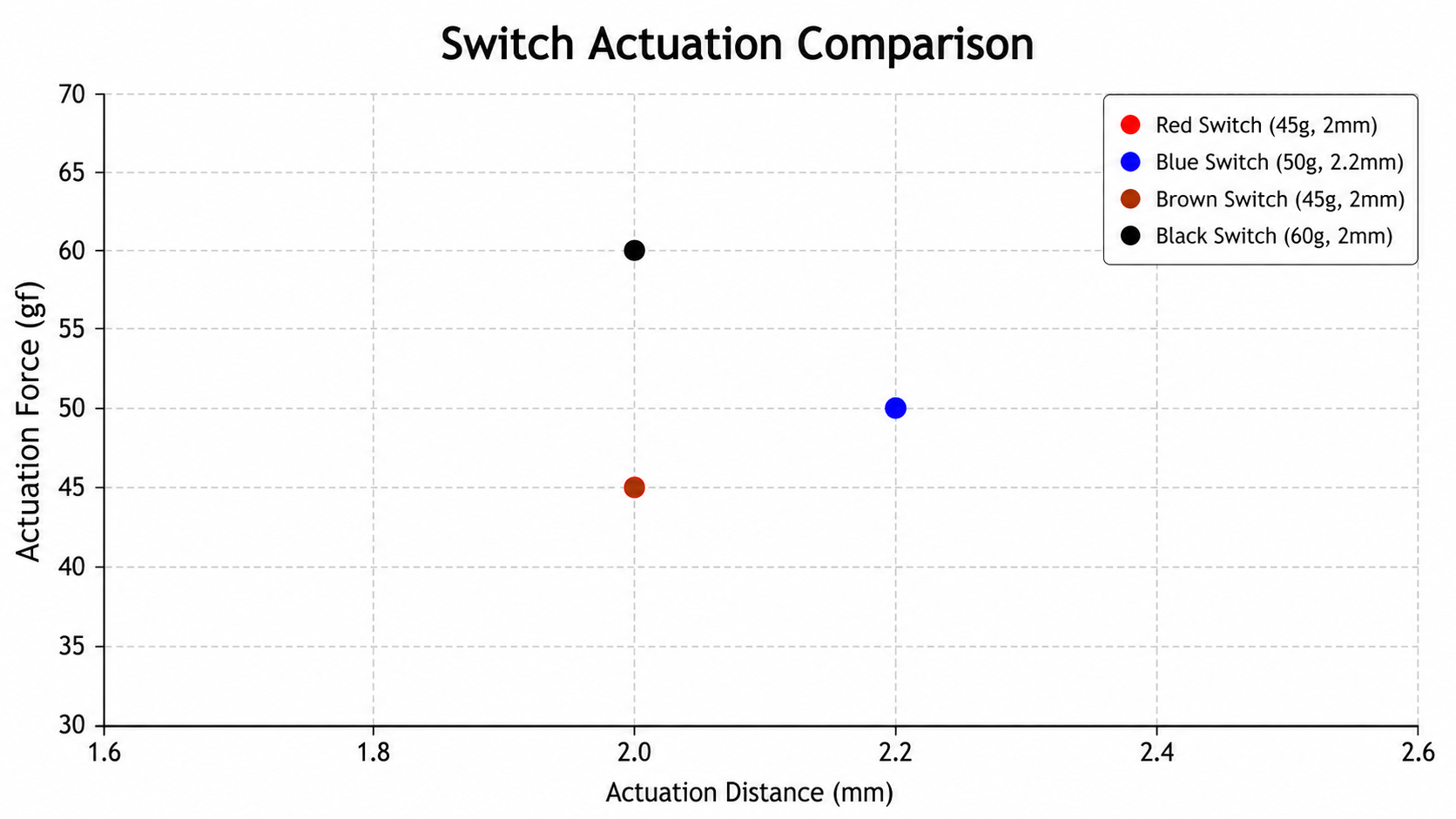
Practical takeaway: Most people bottom out keys, so focus on bottom-out force. For most Indian gamers buying their first mech board, 45-55g actuation force is the sweet spot — not too light for accidental presses, not too heavy for 3-hour sessions.
Hot-Swappable vs Soldered
One of the most important features when buying a mechanical keyboard in India in 2026 — and luckily, the market has shifted in your favour.
Hot-Swappable
Pull out switches and push in new ones — no soldering. Try different switch types, mix per key, repair easily. Costs Rs 500-1,000 more. Slight wobble possible if sockets are loose. Check 3-pin vs 5-pin compatibility before buying switches.
Soldered
Permanent connection — rock solid stability, zero wobble. But changing switches requires a desoldering iron. Cheaper upfront, expensive to modify later. You're stuck with whatever switch you chose.
The hot-swap revolution in India: Brands like Royal Kludge (RK61, RK68, RK84), Gamakay (LK67, TK68), Redragon (K617 Fizz), and Zebronics now offer hot-swap boards from Rs 2,500-3,000. Buy a budget board with Outemu switches today, upgrade to Gateron Yellows later without buying a new keyboard.
Hot-Swap Tip for Indian Buyers
When buying a hot-swap board, check whether it supports 3-pin or 5-pin switches. 5-pin sockets accept both 3-pin and 5-pin switches (two extra plastic legs for stability). 3-pin sockets only accept 3-pin switches — you'd need to clip the extra legs off 5-pin switches. Most budget Indian boards (Royal Kludge, Redragon) support 5-pin, but always verify from reviews. Also, some Outemu hot-swap boards only accept Outemu switches due to slightly different pin thickness — this is common in older Redragon and Cosmic Byte models.
Where to buy switches in India: Meckeys.com, GenesisPC.in, StacksKB, and Rectangles.store sell standalone switches. Prices: Rs 10-15/switch (Outemu), Rs 25-40 (Gateron), Rs 50-80 (Kailh/Akko). For a 65% board you need ~68 switches (Rs 700-2,700 depending on brand).
Best Switch Types for Gaming
Let's cut through the marketing and give you direct recommendations based on game type, budget, and available keyboards in India:
| Use Case | Best Switch | Why | Indian Picks |
|---|---|---|---|
| Competitive FPS Valorant, CS2, Apex | Linear (Red/Yellow) or Speed/Hall Effect | Smooth, fast actuation. No bump to slow rapid key presses. Rapid Trigger = counter-strafe advantage. | Budget: Redragon K552 (Outemu Red) Mid: RK84 (Gateron Yellow) Premium: DrunkDeer A75 (Hall Effect) |
| MOBA / Strategy Dota 2, LoL, AoE | Tactile (Brown) or Light Linear | Tactile feedback confirms ability casts. Speed matters less than FPS — personal preference. | Budget: Ant Esports MK1000 (Outemu Brown) Mid: RK68 (Gateron Brown) Premium: Leopold FC660M (Cherry Brown) |
| Gaming + Typing Work + Play combo | Tactile (Brown) or Gateron Yellow | Brown for typing feedback + quiet gaming. Yellow for smooth gaming + heavier to prevent typos. | Budget: Cosmic Byte CB-GK-16 (Brown) Mid: RK84 hot-swap (try both) Premium: Keychron Q1 (Gateron Pro Brown) |
| Pure Typing Content, code, data entry | Clicky (Blue) or Heavy Tactile | Rhythmic click maintains typing cadence. Reduces missed keys. Extremely satisfying for typists. | Budget: TVS Gold (legendary) Mid: RK61 (Outemu Blue, hot-swap) Premium: Leopold FC900R (Cherry Blue) |
Frequently Asked Questions
Which switch type is best for gaming?
Are Outemu switches good for gaming?
What is the difference between Cherry MX Red and Brown?
What does hot-swappable mean in a keyboard?
Are clicky switches bad for gaming?
Gateron vs Cherry MX — which is better?
How long do mechanical switches last?
The Bottom Line
TL;DR
There is no universally "best" switch — only the best switch for you. But here's the simplified decision tree for Indian gamers:
Competitive FPS gamer? → Linear (Gateron Yellow or Cherry MX Red). Get a hot-swap board so you can try Speed/Hall Effect switches later.
Mix of gaming and typing? → Tactile (Gateron/Cherry Brown) or Gateron Yellow if you prefer smooth.
Pure typist who doesn't care about noise? → Clicky (Blue switches of any brand).
Not sure / first mechanical keyboard? → Buy a hot-swap board with Brown switches. Try them. If you want smoother, swap to Yellow. If you want clicky, swap to Blue. Problem solved without buying three keyboards.
The most important advice: Buy a hot-swappable keyboard. Period. In India's budget segment (Rs 2,500-5,000), options like the Royal Kludge RK61/RK68/RK84 give you hot-swap, wireless, and Gateron switches. Start there, experiment with different switches for Rs 20-40 each from Meckeys or GenesisPC, and find your personal preference without wasting money on multiple boards.
Your switch preference will evolve over time. Many enthusiasts start with Blue (the satisfying click), move to Brown (quieter for others), and eventually land on linear (once they prioritize gaming speed). Hot-swap lets you take that journey on a single keyboard.