
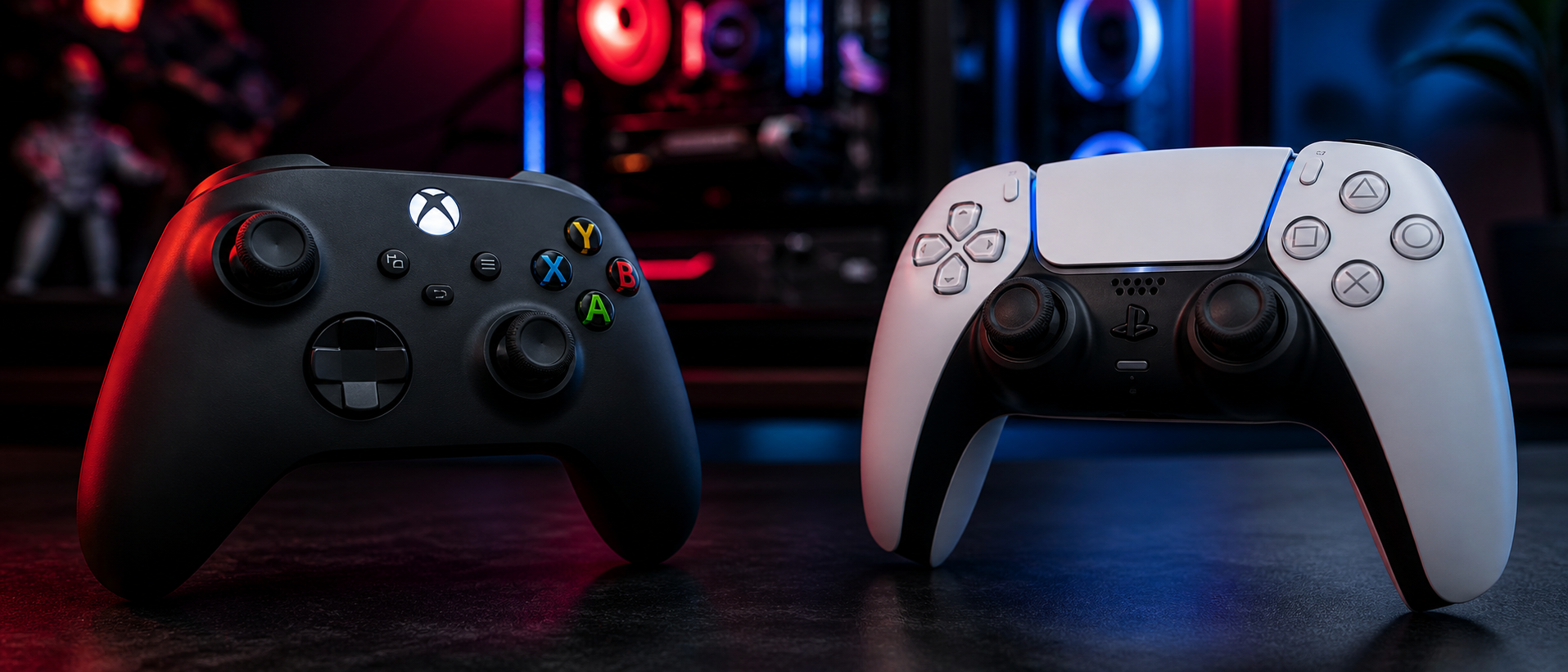
In 2026, PC gamers in India have never had it better when it comes to controller options. The two heavyweights — Microsoft's Xbox Wireless Controller and Sony's PS5 DualSense — both work on PC, both feel incredible in hand, and both have passionate fanbases insisting theirs is better.
But the truth is nuanced. One plugs into Windows like it was born there; the other brings revolutionary haptic technology that can transform how games feel. Your choice depends on what you value: seamless compatibility or cutting-edge features. Let's break down every angle — from setup friction to pricing on Amazon India — so you can make the right call.
Controllers for PC Gaming in 2026
The landscape has shifted dramatically. Five years ago, using a PS controller on PC was a hassle involving third-party wrappers and community drivers. Today, Steam natively supports the DualSense, and Windows itself has improved PlayStation controller detection. Still, the Xbox controller remains the gold standard for PC gaming — every PC game with controller support is designed with Xbox button layouts in mind.
Xbox Wireless Controller (2020+)
Microsoft's latest revision with textured grips, USB-C, share button, and low-latency Bluetooth 5.0. Designed to work flawlessly with Windows 10/11 out of the box.
PS5 DualSense (2020+)
Sony's revolutionary controller featuring adaptive triggers, HD haptic feedback, built-in mic, and a unique two-tone design. PC support via USB, Bluetooth, or Steam Input.
Both controllers represent the pinnacle of first-party gamepad design. The question isn't which is "better" in a vacuum — it's which works better for your specific PC gaming setup and preferences.
PC Compatibility & Setup
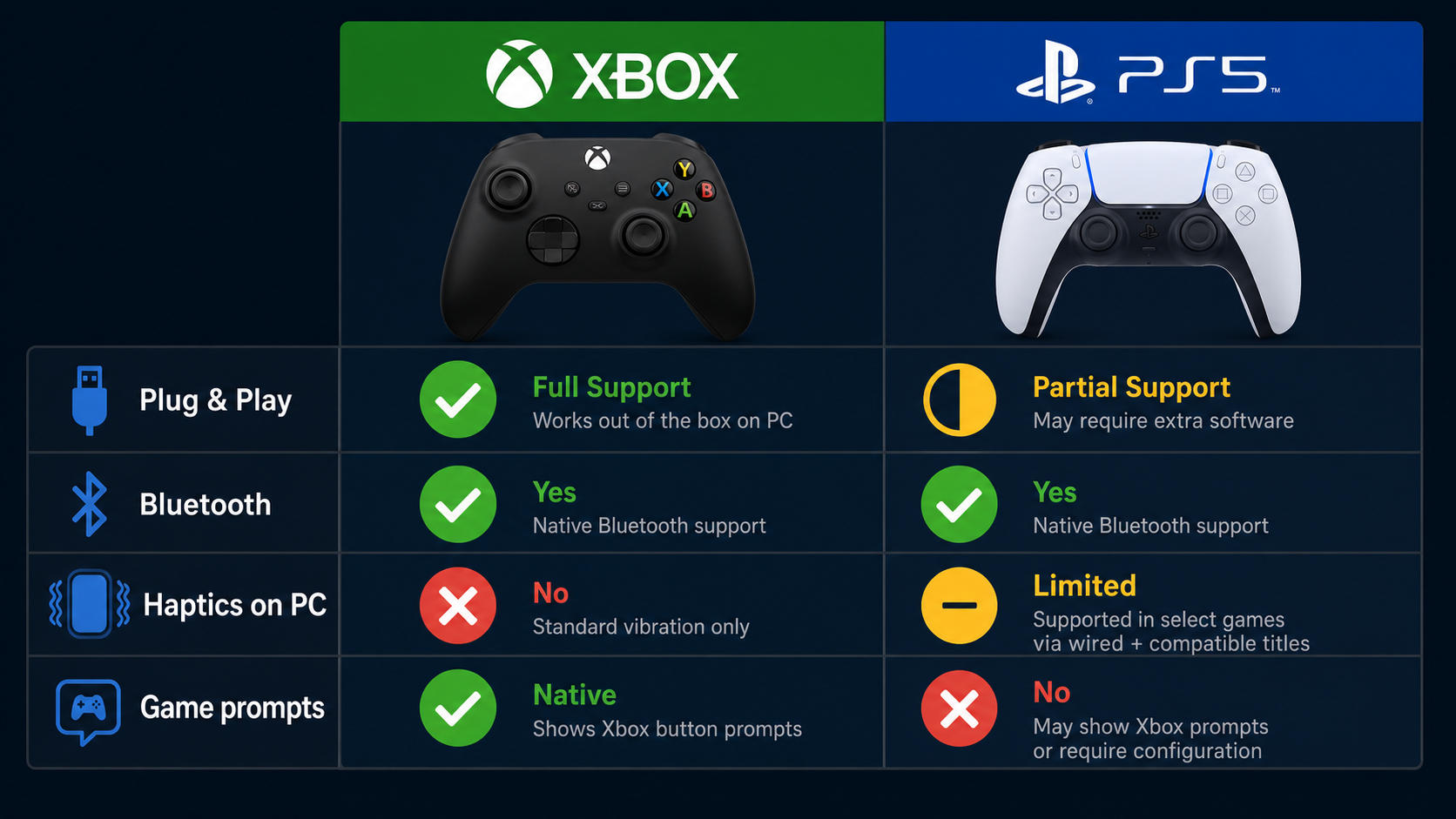
This is where the Xbox controller has its biggest advantage — and it's not a small one. Let's compare the setup experience:
Xbox: Plug and Play
Connect via USB-C cable or pair via Bluetooth — done. Over USB it enumerates as a standard USB HID input device, so Windows recognizes it instantly with zero additional software. The Xbox Accessories app (optional) lets you remap buttons and update firmware. Every game with controller support works immediately.
PS5 DualSense: Works, But With Caveats
Connect via USB-C or Bluetooth and Windows detects it as a generic gamepad. Steam's built-in DualSense support adds full functionality including haptics. Outside Steam, you may need DS4Windows for proper mapping. Some non-Steam games may not recognize it without additional configuration.
The Xbox Wireless Adapter
For the absolute best wireless experience on PC, Microsoft sells the Xbox Wireless Adapter for Windows (Rs 2,000-2,500 in India). It provides a proprietary low-latency wireless connection — lower than Bluetooth — and supports up to 8 controllers simultaneously. The DualSense has no equivalent; it's Bluetooth or USB only on PC.
Bottom line on compatibility: If you want zero friction, the Xbox controller wins decisively. If you primarily game through Steam and don't mind a one-time setup, the DualSense works nearly as well — but "nearly" still means occasional hiccups with non-Steam launchers like Epic Games Store or older DirectInput titles.
Ergonomics & Comfort
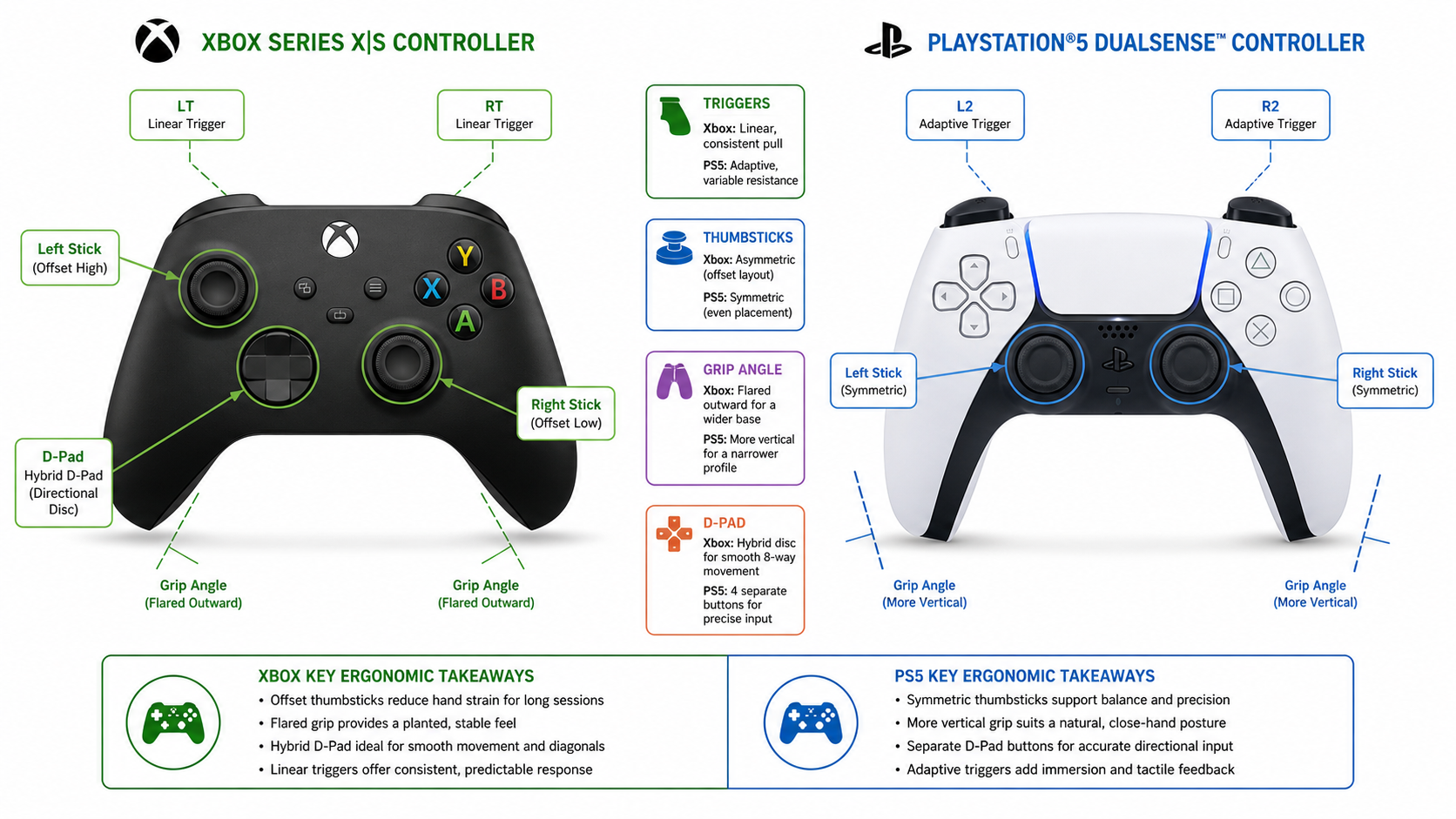
Both controllers are excellently designed, but they follow different ergonomic philosophies. Your preference often comes down to hand size and what you grew up using.
| Aspect | Xbox Controller | PS5 DualSense |
|---|---|---|
| Stick Layout | Asymmetric (left stick up, right stick down) | Symmetric (both sticks at bottom center) |
| Weight | 287g (with AA batteries) | 280g (built-in battery) |
| Grip Style | Rounded, textured grips; fits naturally in palm | Wider, flatter profile; more angular grip |
| Triggers | Smooth, consistent resistance | Adaptive — variable resistance per game |
| D-Pad | Faceted dish design; excellent for all inputs | Traditional cross; good for fighting games |
| Best For | Larger hands; shooters; long sessions | Medium hands; action-adventure; immersion |
The Xbox controller's asymmetric stick layout places the left stick where your thumb naturally rests, which many find more comfortable for games that primarily use the left stick for movement (most games). The DualSense's symmetric layout is familiar to PlayStation veterans and works particularly well for fighting games where the D-pad is primary.
For marathon gaming sessions — common in India's weekend LAN parties or late-night Elden Ring runs — the Xbox controller's rounded palm grip tends to cause less fatigue. The DualSense is slightly wider and its angular design can press into smaller hands over 3-4 hour sessions. Neither is bad; both are among the most ergonomic controllers ever made.
Unique Features Compared
Beyond basic input, each controller brings exclusive features to the table:
Xbox Exclusive Features
- + Share button for instant screenshots/clips
- + Xbox Accessories app for full remapping
- + Swappable AA batteries or rechargeable pack
- + Xbox Wireless Adapter support (sub-4ms latency)
- + Textured dot pattern on triggers and bumpers
- + 3.5mm headphone jack
DualSense Exclusive Features
- + Adaptive triggers with variable resistance
- + HD haptic feedback (replaces traditional rumble)
- + Built-in microphone and speaker
- + Capacitive touchpad (usable as mouse on PC)
- + Create button with customizable functions
- + LED light bar with customizable colors
- + Built-in rechargeable battery (USB-C charging)
On paper, the DualSense packs more innovative tech. The adaptive triggers and haptic feedback are genuinely game-changing — when supported. The built-in mic is surprisingly useful for quick voice chat without a headset. The touchpad can serve as a mouse pointer in Steam Big Picture mode.
The Xbox controller takes a more conservative but reliable approach. Everything it does, it does consistently across all PC games without needing developer implementation. Sometimes boring reliability beats impressive but inconsistent innovation.
Haptic Feedback & Adaptive Triggers
This deserves its own section because it's the DualSense's killer feature — and the reason many gamers choose it despite the compatibility trade-offs.
What are adaptive triggers? Instead of a simple spring, the DualSense triggers contain small motors that can dynamically adjust resistance. Drawing a bowstring feels heavy. Accelerating a car provides realistic throttle feedback. Pulling a gun trigger gives that satisfying click-break point. Each game implements it differently.
What is HD haptic feedback? Traditional rumble motors are imprecise — they just vibrate. The DualSense uses voice-coil actuators (similar to speaker drivers) that can produce incredibly nuanced vibrations. You can feel raindrops individually, sense different terrain textures, or experience a sword's impact location on the controller.
PC Support Reality Check
Here's the catch: these features only work in games that specifically implement them on PC. As of 2026, notable PC games with full DualSense support include:
- Death Stranding: Director's Cut
- Metro Exodus: Enhanced Edition
- Final Fantasy VII Remake Intergrade
- Returnal
- Marvel's Spider-Man series
- God of War Ragnarok
- Assassin's Creed Mirage
- Call of Duty: Modern Warfare III
- F1 24
- Forza Horizon 5 (haptics only, no adaptive triggers)
That's a growing but still limited list compared to the hundreds of games that simply work with Xbox rumble out of the box.
The Xbox controller uses traditional impulse triggers — dual rumble motors in the triggers themselves, plus two in the body. It's not as sophisticated as the DualSense, but it works in virtually every game with vibration support. No developer implementation needed; it just works.
Our take: If you primarily play the Sony PC ports (which India's gaming community loves), the DualSense haptics are genuinely worth experiencing. If you play a wide variety of games or competitive multiplayer, the consistent Xbox rumble is more practical.
Battery Life & Connectivity
Power management and connection options differ significantly between the two:
| Specification | Xbox Controller | PS5 DualSense |
|---|---|---|
| Wired Connection | USB-C | USB-C |
| Wireless | Bluetooth 5.0 + Xbox Wireless Protocol | Bluetooth 5.1 |
| Battery Type | 2x AA (or optional rechargeable pack) | Built-in 1,560 mAh Li-ion |
| Battery Life | ~40 hours (AA) / ~30 hours (rechargeable) | ~12-15 hours (haptics on) / ~20 hours (haptics off) |
| Charging | Swap batteries or charge via USB (with battery pack) | USB-C (charge while playing) |
| Wireless Latency | ~4ms (Wireless Adapter) / ~8ms (Bluetooth) | ~8-10ms (Bluetooth) |
| Weight | 287g (with batteries) | 280g |
The Xbox controller's battery life is exceptional — 40 hours on a pair of AAs means you can game for weeks without thinking about charging. This is huge during long gaming weekends. The trade-off is that you either keep buying Duracell batteries (about Rs 150-200 for a 4-pack that lasts months) or invest Rs 1,500-2,000 in the official Play and Charge Kit.
The DualSense's built-in battery is more convenient (no batteries to swap) but 12-15 hours with haptics enabled means you're charging every 2-3 sessions. In India's gaming culture where 6-8 hour weekend sessions are common, this can be frustrating. Pro tip: keep a USB-C cable plugged in during intense sessions.
For competitive gamers, the Xbox Wireless Adapter's sub-4ms latency provides a measurable advantage over Bluetooth. This matters in fast-paced shooters and fighting games where input delay equals missed frames.
Game Support & Button Prompts
This is an underrated factor that significantly affects daily usability:
Xbox button prompts are the PC standard. When a game says "Press A to continue" or shows the ABXY button layout, it's showing Xbox prompts. This is because Microsoft's XInput API has been the PC controller standard since Windows Vista. Even in 2026, the vast majority of PC games — from AAA titles to indie games — only show Xbox prompts by default.
PlayStation prompts are catching up, but slowly. If you use a DualSense, many games will still show Xbox buttons. You'll need to mentally translate: Triangle = Y, Square = X, Cross = A, Circle = B. This becomes second nature for PlayStation veterans, but it's genuinely confusing for newcomers.
Games with native PlayStation prompts on PC
Sony PC ports (God of War, Spider-Man, Returnal, Horizon), many Ubisoft titles, recent EA games, Elden Ring, Cyberpunk 2077, Baldur's Gate 3, Hades II, and most games released after 2023 with Steam Input support.
Games stuck on Xbox prompts only
Many older titles (pre-2020), some indie games, most games on Game Pass PC app, several multiplayer-focused titles. DS4Windows can force a workaround, but it's imperfect.
Steam's role: Valve has done tremendous work making the DualSense a first-class citizen on PC through Steam Input. When you launch games through Steam with PlayStation configuration enabled, most games correctly detect and display PlayStation prompts. This works even for non-Steam games added to your library.
If you use Xbox Game Pass for PC (popular in India for its Rs 349/month value), note that the Xbox app works best with — surprise — Xbox controllers. DualSense support is functional but you'll only see Xbox prompts.
Pricing & Availability in India
Let's talk numbers. Prices in India fluctuate based on import duties, sales, and availability:
| Controller | Price (India) | Where to Buy |
|---|---|---|
| Xbox Wireless Controller | Rs 4,990 - 5,590 | Amazon, Flipkart, Reliance Digital |
| Xbox Elite Series 2 | Rs 13,490 - 15,990 | Amazon, Flipkart (limited stock) |
| PS5 DualSense | Rs 5,490 - 6,290 | Amazon, Flipkart, ShopatSC, GamesTheShop |
| PS5 DualSense Edge | Rs 18,990 - 19,990 | Sony Center, Amazon (when in stock) |
| Xbox Wireless Adapter | Rs 2,000 - 2,500 | Amazon (import), Flipkart |
| Xbox Play & Charge Kit | Rs 1,590 - 2,190 | Amazon, Flipkart |
The standard Xbox controller is roughly Rs 500-800 cheaper than the DualSense in India. Add the Play & Charge Kit and the gap narrows. The Xbox Wireless Adapter is an additional investment but provides the best wireless experience money can buy.
Sale tips for Indian buyers: Both controllers see significant discounts during Amazon Great Indian Festival (October), Flipkart Big Billion Days, and Republic Day sales. The Xbox controller frequently drops to Rs 3,999-4,299 during major sales. The DualSense rarely goes below Rs 4,799 but limited-edition colors sometimes get clearance pricing.
Color variants cost the same in most cases, though special editions (like the Xbox 20th Anniversary or DualSense Cosmic Red) may carry a Rs 500-1,000 premium. Buy from authorized sellers — counterfeit Xbox controllers are common on Indian marketplaces. Look for "Sold by Appario Retail" or "Cloudtail India" on Amazon for genuine Microsoft products.
Third-Party Alternatives in India
Not everyone wants to spend Rs 5,000+ on a controller. India has a thriving budget controller market worth considering:
Budget: Under Rs 1,500
Cosmic Byte C3070W, RedGear Pro Wireless, Ant Esports GP310
These use XInput protocol so Windows sees them as Xbox controllers. Good for casual gaming — GTA V, FIFA, platformers. Build quality is noticeably plastic, analog sticks have less precision, and wireless range/latency can't match genuine controllers. The Cosmic Byte C3070W at Rs 1,200-1,400 offers the best value with decent 2.4GHz wireless and rumble.
Mid-Range: Rs 1,500 - 3,500
PowerA Enhanced Wired, 8BitDo Pro 2, EvoFox Elite Pro
The 8BitDo Pro 2 (Rs 3,000-3,500 on Amazon India) is the standout here — it offers Hall Effect sticks, customizable back buttons, and multi-platform support with excellent build quality. PowerA Enhanced Wired (Rs 2,500-3,000) is officially licensed by Microsoft and matches the Xbox layout perfectly, though it lacks wireless. The EvoFox Elite Pro (Rs 1,800-2,200) offers a good balance with 2.4GHz wireless and decent analog precision.
Premium Third-Party: Rs 3,500+
8BitDo Ultimate, GameSir G7, Scuf Instinct
The 8BitDo Ultimate (Rs 4,500-5,500 imported) rivals first-party controllers with a charging dock, Hall Effect sticks, and customizable software. The GameSir G7 (Rs 3,500-4,000) is wired but offers swappable faceplates and excellent build quality. Scuf and other pro controllers are import-only in India and cost Rs 12,000+ after duties — at that point, buy the Xbox Elite Series 2 instead.
Our recommendation for budget-conscious Indian gamers: If you can stretch to Rs 5,000, get the genuine Xbox controller — it'll last years and work perfectly with everything. If you're under Rs 2,000, the 8BitDo Pro 2 (imported) or Cosmic Byte C3070W (locally available) are your best bets. Avoid no-name controllers under Rs 500 — the stick drift and connection issues aren't worth the savings.
Frequently Asked Questions
Does the PS5 DualSense work on PC without extra software?
Which controller has better battery life for PC gaming?
Do PC games show PlayStation button prompts with a DualSense?
Is the Xbox Elite Controller worth it over the standard Xbox controller for PC?
Can I use adaptive triggers and haptics on PC?
Are third-party controllers like Cosmic Byte and RedGear good for PC gaming?
The Bottom Line
Our Verdict
For most PC gamers in India, the Xbox Wireless Controller is the better choice. It offers true plug-and-play compatibility, correct button prompts in every game, exceptional battery life, lower latency with the Wireless Adapter, and costs less. It's the safe, reliable pick that just works — and "just works" matters more than people think.
Choose the PS5 DualSense if: you primarily play Sony PC ports and want the full haptic/adaptive trigger experience, you're already a PlayStation gamer comfortable with the layout, you game mainly through Steam (which provides excellent DualSense support), or you value innovative features over seamless compatibility.
The DualSense is the more impressive piece of technology. When adaptive triggers kick in during Death Stranding or the haptics simulate rain in Spider-Man, it's genuinely magical. But that magic is limited to specific games. The Xbox controller's "magic" is that it never makes you think about compatibility — you just play.
Both are excellent controllers priced within Rs 1,000 of each other in India. You genuinely can't go wrong with either. But if you're asking us to pick one for a pure PC gaming setup — Xbox takes it by a narrow margin, primarily on compatibility and battery life.
SOURCES & REFERENCES
Our recommendations are based on research, comparison, and analysis — we don’t physically test products. The technical claims on this page are backed by the standards bodies and published research below.
- 1.
Related Guides
Best Game Controllers for PC in India
Our top picks across all budgets
Best Gaming Mouse Under Rs 2,000
When you prefer KB+M over controller
Earbuds vs Headphones for Gaming
Which audio setup pairs best with controller gaming
Best Gaming Headsets Under Rs 2,000
Affordable headsets for controller gaming sessions