
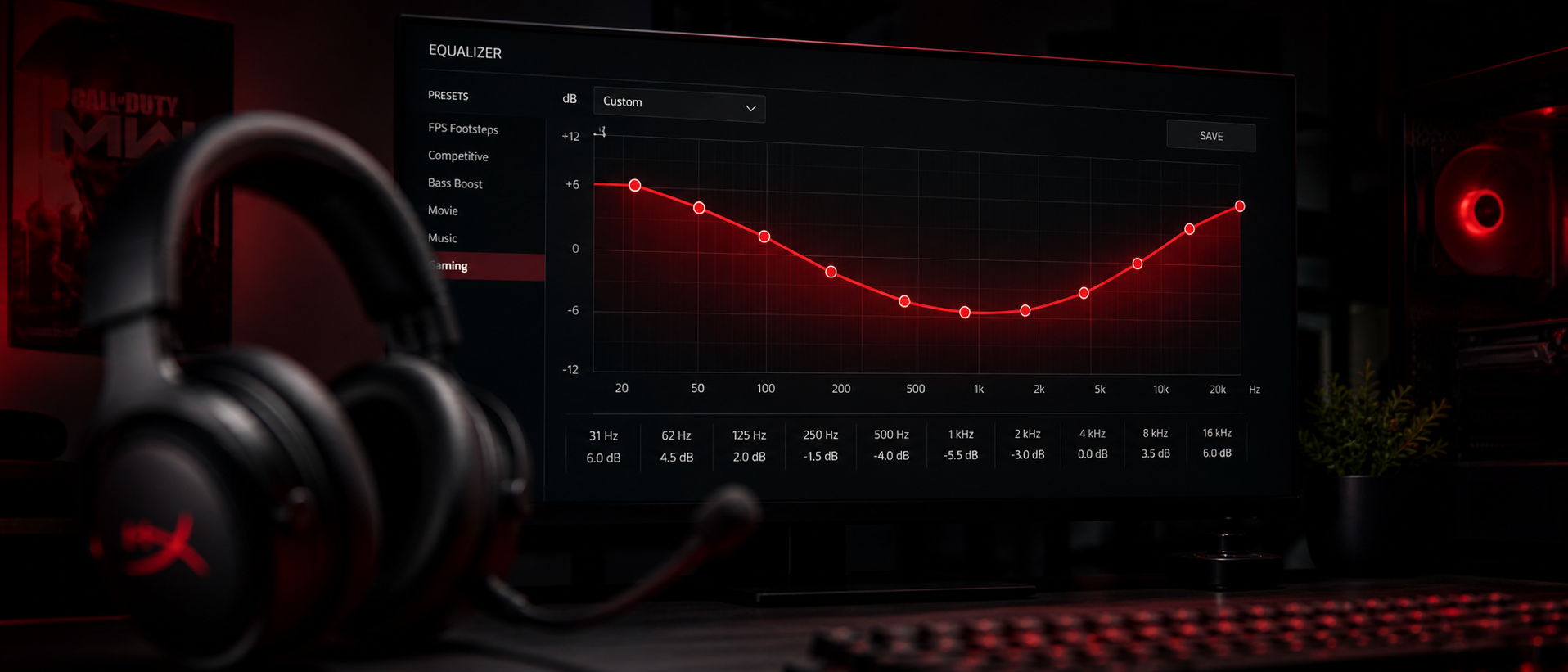
You just died in Valorant because you didn't hear the enemy Jett dashing behind you. Or maybe you're playing CS2 and can't separate footsteps from the ambient noise on Inferno. The problem isn't always your headset — it's often how the sound is being delivered to your ears.
EQ (equalization) lets you reshape your headset's audio output to emphasize the sounds that matter for gaming and reduce the ones that don't. Think of it as a free upgrade to your audio setup. This guide covers everything: what EQ is, which frequencies matter for different game types, and exact dB settings you can copy right now.
What Is EQ (Equalizer)?
An equalizer is a tool that lets you boost or cut specific frequency ranges in your audio output. Every sound you hear — from a deep explosion to a high-pitched grenade pin — exists at a specific frequency measured in Hertz (Hz).
Human hearing spans roughly 20 Hz to 20,000 Hz (20 kHz). An EQ divides this range into bands and lets you increase or decrease the volume of each band independently. By boosting the bands where important game sounds live and cutting the bands that cause fatigue or masking, you can dramatically improve your gaming audio.
Without EQ
All frequencies play at whatever level your headset naturally produces. Boomy bass can mask mid-range detail. Harsh treble causes listening fatigue.
With Gaming EQ
Footstep frequencies are boosted, explosion rumble is tamed, voice chat sits clearly in the mix. You hear what matters without turning up overall volume.
Think of EQ like the bass/treble knobs on an old stereo — but with much more precision. Instead of just "more bass" or "more treble," you can target exact frequency ranges like "boost 2.5 kHz by 4 dB" to highlight footstep detail specifically.
Important: EQ Is Not a Cheat
EQ doesn't create sounds that aren't there — it only adjusts the relative volume of frequencies already in your audio. It's completely legal in competitive gaming and used by many professional players. Think of it as optimizing your listening environment, like adjusting monitor brightness for better visibility.
Frequency Bands Explained
Before we dive into gaming presets, you need to understand what each frequency range sounds like. Here's the spectrum broken down into bands relevant to gaming:
| Band | Range | What It Sounds Like | Gaming Relevance |
|---|---|---|---|
| Sub-Bass | 20–60 Hz | Deep rumble, felt more than heard | Explosions, vehicle engines, environmental ambience |
| Bass | 60–250 Hz | Punch, body, warmth | Gunshot body, grenade thuds, heavy footsteps on wood |
| Low-Mids | 250–500 Hz | Fullness, muddiness if too much | Voice fundamental tones, ambient room sounds |
| Mids | 500 Hz–2 kHz | Vocal clarity, presence | Voice chat clarity, weapon reload sounds, UI cues |
| Upper-Mids | 2–4 kHz | Attack, edge, detail | Footsteps, knife pulls, ability sounds, callouts |
| Presence | 4–8 kHz | Brightness, sibilance | Footstep "crunch," shell casings, high-pitched alerts |
| Air/Brilliance | 8–20 kHz | Sparkle, airiness, shimmer | Spatial cues, reverb tails, environmental detail |
The key insight for gamers: most headsets sold in India (especially under Rs 5,000) are tuned with boosted bass and treble — a "V-shaped" response that sounds impressive for music but actually works against you in competitive games. That boomy bass masks the mid-range detail where footsteps and voice cues live.
Where Game Sounds Live on the Spectrum
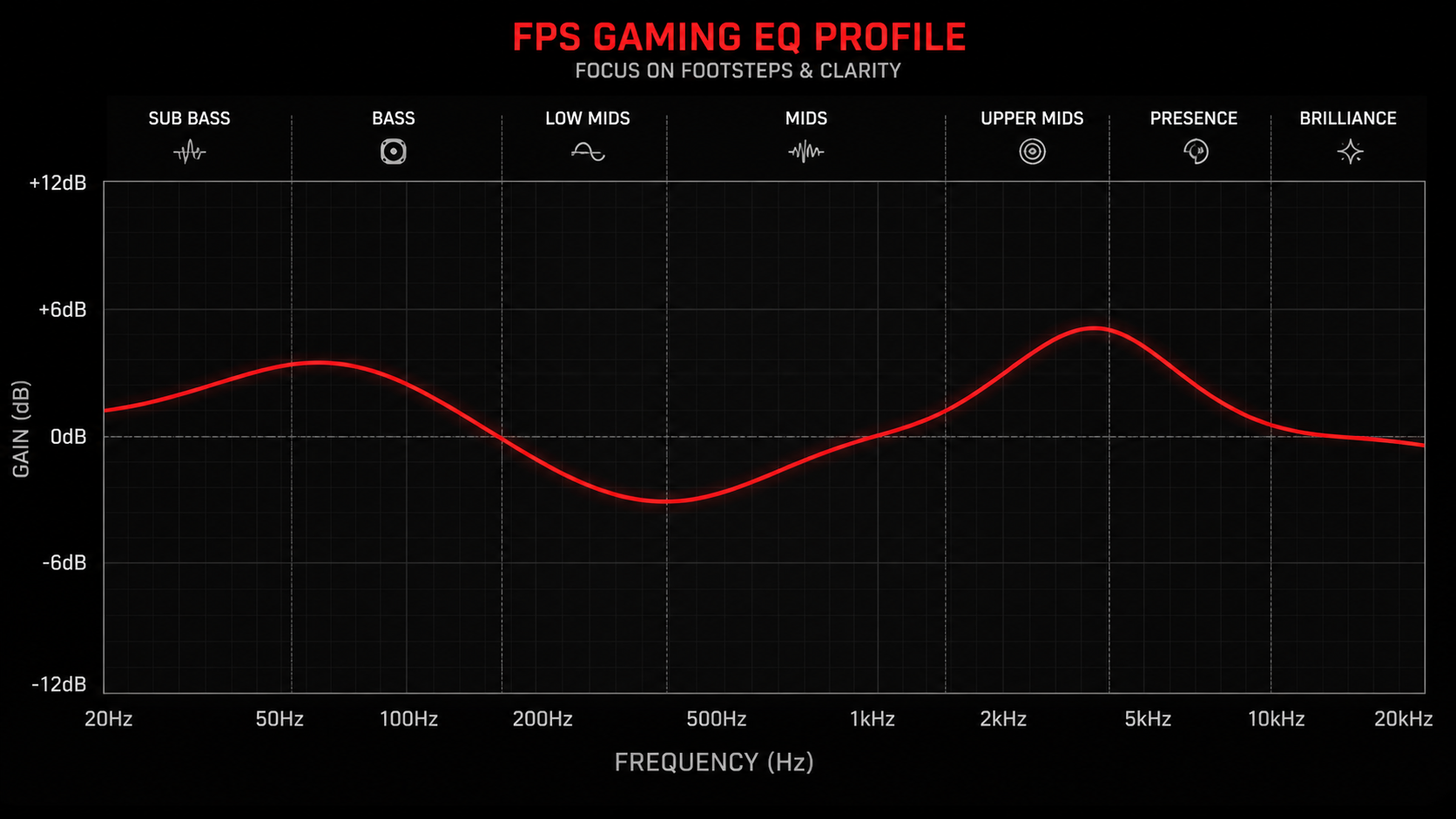
Game audio designers place different sounds at specific frequencies. Knowing this lets you target your EQ precisely:
Footsteps
The most critical sound in competitive FPS
Footstep "body" sits around 1–2 kHz, while the "crunch" and detail lives at 2–4 kHz. In Valorant, footsteps are heavily concentrated in the 2–3 kHz range. CS2 footstep audio has more presence at 1–2.5 kHz. Apex Legends footsteps are notoriously inconsistent but peak around 1.5–3.5 kHz.
Gunshots & Explosions
Loud, fatiguing, and often masking other sounds
The "boom" of gunshots and explosions sits in the 60–200 Hz range. The sharp "crack" component is higher at 3–6 kHz. Cutting sub-bass and lower bass slightly reduces the fatiguing rumble without losing the directional "crack" that tells you where shots are coming from.
Voice Chat & Callouts
Teammate communication clarity
Human voice fundamentals sit at 85–300 Hz, but the clarity and intelligibility comes from 500 Hz–3 kHz. This is why phone calls (which cut everything below 300 Hz and above 3.4 kHz) are still perfectly understandable. For gaming voice chat, the 1–3 kHz range is where consonants live — the sounds that separate "B site" from "D site."
Spatial & Directional Cues
Knowing where sounds come from
Your brain uses frequencies above 4 kHz to determine sound direction (especially vertical positioning). This is why boosting the "air" region slightly can improve your ability to tell if an enemy is above or below you. Don't overdo it though — too much treble causes listening fatigue quickly.
Best EQ for FPS Games (Footsteps & Positional Audio)
This is the most requested EQ type for gamers in India — and for good reason. Whether you're grinding ranked in Valorant, climbing to Global in CS2, or pushing Predator in Apex, hearing enemies before you see them is a massive advantage.
Here's our recommended FPS EQ preset. These values work as a starting point with most gaming headsets (HyperX Cloud II, Razer Kraken, JBL Quantum series, boAt Rockerz — all common in India):
| Frequency | Adjustment | Why |
|---|---|---|
| 31 Hz | -4 dB | Cut sub-bass rumble that masks other sounds |
| 62 Hz | -3 dB | Reduce explosion body without killing it entirely |
| 125 Hz | -2 dB | Slight bass reduction for clarity |
| 250 Hz | 0 dB | Leave flat — warmth without mud |
| 500 Hz | 0 dB | Neutral — voice fundamental range |
| 1 kHz | +2 dB | Start of footstep emphasis |
| 2 kHz | +4 dB | Core footstep frequency — maximum boost here |
| 4 kHz | +3 dB | Footstep detail and "crunch" |
| 8 kHz | +1 dB | Spatial awareness, directional cues |
| 16 kHz | 0 dB | Leave flat — avoid treble fatigue |
Game-Specific Tweaks
Valorant: Boost 2.5 kHz by an extra +1 dB. Valorant's footstep audio is very focused in this range. Also consider cutting 8 kHz by -1 dB if you find ability sounds (Raze nade, Sova dart) too piercing.
CS2: Keep 1 kHz at +3 dB instead of +2 dB. CS2 footsteps have more low-mid content than Valorant. The AK-47 and AWP can be fatiguing — cutting 100 Hz by -3 dB helps during extended matches.
Apex Legends: Boost 3 kHz by +4 dB. Apex has infamously hard-to-hear footsteps, and most of the useful audio information lives in the upper-mid range. Also try a wider boost from 1.5–4 kHz as footstep audio varies by legend and surface.
Critical note: These settings assume you've disabled any "virtual surround" or "7.1" processing in your headset software. Virtual surround adds phase manipulation that can conflict with EQ. Use stereo mode for competitive FPS — your brain does spatial processing better than DSP algorithms.
Best EQ for Cinematic/Story Games
Not every gaming session is a sweat-fest. When you're exploring Hyrule in Zelda, riding through Red Dead Redemption 2's open world, or experiencing God of War Ragnarok's epic soundtrack, you want a different sound profile — one that's immersive, theatrical, and emotionally engaging.
For cinematic games, a mild V-shaped (or U-shaped) curve works beautifully. This boosts bass for impact and treble for detail while keeping mids slightly recessed for a "surround sound" feel:
| Frequency | Adjustment | Why |
|---|---|---|
| 31 Hz | +3 dB | Deep sub-bass for rumble and impact |
| 62 Hz | +4 dB | Explosion impact, musical bass warmth |
| 125 Hz | +2 dB | Fullness and body to soundtrack |
| 250 Hz | 0 dB | Neutral transition |
| 500 Hz | -1 dB | Slight recession for "spaciousness" |
| 1 kHz | -1 dB | Pull back mids for wider soundstage feel |
| 2 kHz | 0 dB | Keep dialogue intelligible |
| 4 kHz | +1 dB | Detail without harshness |
| 8 kHz | +3 dB | Sparkle, environmental reverb tails |
| 16 kHz | +2 dB | Air and shimmer for orchestral soundtracks |
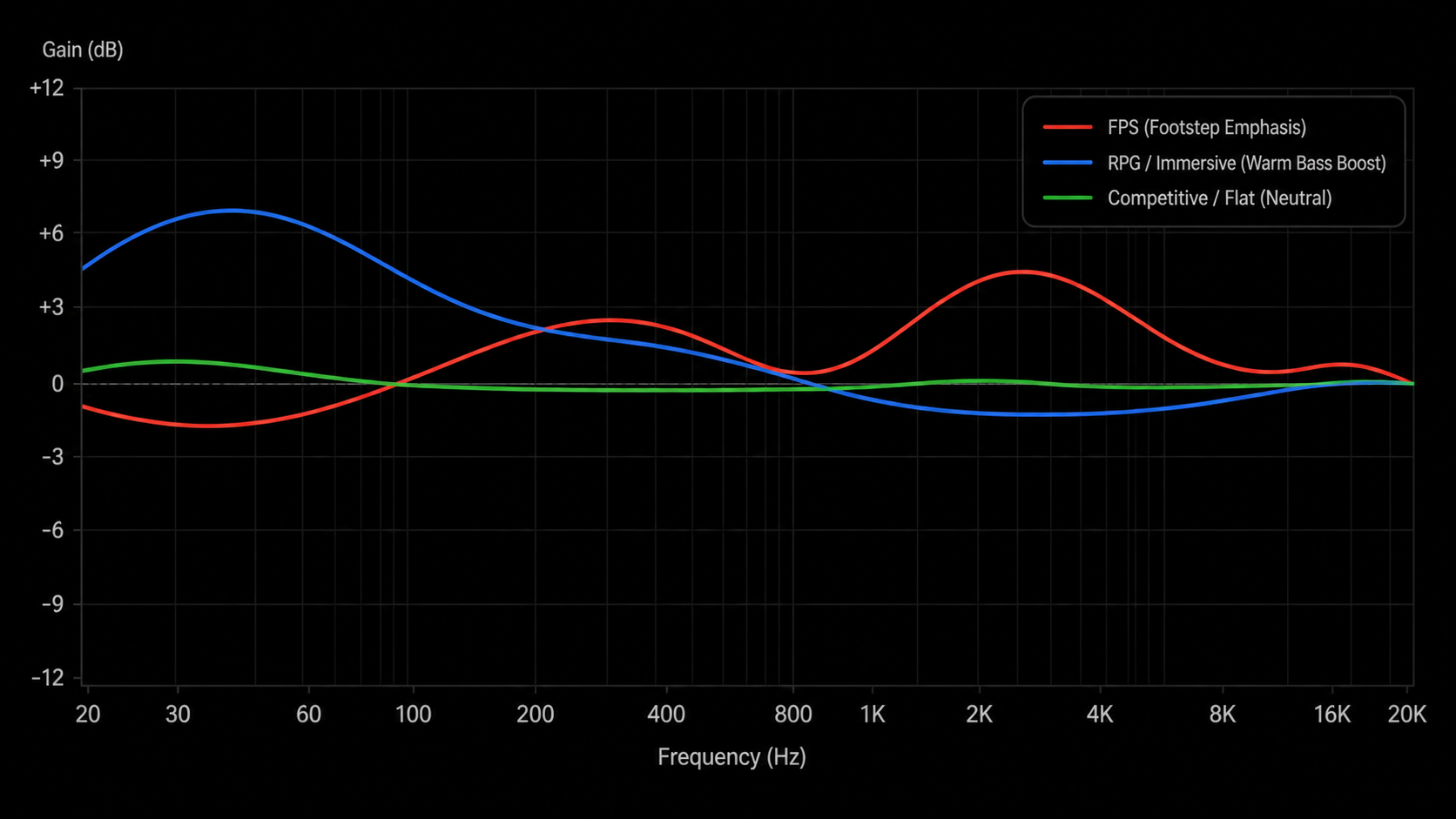
When to use cinematic EQ: Single-player story games, open-world exploration, horror games (where bass rumble adds tension), and any game where you're playing for the experience rather than competitive advantage. Games like Elden Ring, Baldur's Gate 3, Cyberpunk 2077, and Hogwarts Legacy benefit massively from this profile.
Optimizing for Voice Chat
If you spend most of your gaming time in Discord calls or in-game voice chat with friends, you might want to optimize specifically for voice clarity. This is especially useful if your teammates use cheap mics (very common in Indian gaming circles where everyone's on a budget).
Voice-optimized EQ targets intelligibility — making sure you understand every callout even when the game audio is loud:
Cut below 200 Hz by -3 to -5 dB
This removes the low-frequency rumble and proximity effect that makes cheap mics sound boomy and muffled. Most voice information is above 300 Hz anyway.
Boost 1 kHz – 3 kHz by +2 to +4 dB
This is the "intelligibility" range — where consonants and vocal clarity live. Boosting here makes "B site" clearly distinct from "D site" even in a noisy game.
Cut 5 kHz – 8 kHz by -2 dB (if harsh)
Cheap microphones often have harsh sibilance (sharp "S" and "T" sounds) in this range. A mild cut reduces listening fatigue during long Discord sessions.
Use Discord's built-in noise suppression
Pair your EQ with Discord's Krisp noise suppression. It removes background noise (fans, traffic — very relevant for Indian gamers in non-AC rooms) before it reaches your ears. This works on the incoming audio from teammates as well.
Pro Tip: Separate Game and Voice Audio
In Windows, you can set Discord to output through a different audio device (or virtual cable) than your game. This lets you apply different EQ settings to each — aggressive footstep EQ on your game audio, and voice-clarity EQ on Discord. Tools like VoiceMeeter Banana (free) make this possible. It's a more advanced setup but incredibly powerful.
EQ Software Guide (Free Options)
You don't need to spend money on EQ software. Here are the best free options available for Windows PC gamers in India:
Equalizer APO + Peace GUI
The gold standard for PC audio EQ
Equalizer APO is a free, open-source system-wide equalizer for Windows. It works with any headset — no brand-specific software needed. Peace EQ is a graphical interface that makes it much easier to use (Equalizer APO alone requires editing config files).
Headset Brand Software
Use what came with your headset
Most gaming headsets come with companion software that includes a basic EQ. Razer Synapse (Kraken, BlackShark), HyperX NGENUITY (Cloud series), SteelSeries GG (Arctis), Logitech G Hub (Pro X, G733), and JBL QuantumENGINE all include 10-band EQs with presets.
Windows Built-in EQ
Basic but available to everyone
Windows 11 has a basic audio enhancement in Sound Settings → your device → Audio Enhancements. It's limited (no frequency control), but you can access a basic EQ through your audio driver (Realtek Audio Console on most Indian laptops and desktops). Look for the "Equalizer" tab in Realtek Audio Console.
VoiceMeeter Banana
Virtual audio mixer with EQ
A free virtual audio mixer that lets you route different apps to different outputs, apply EQ per channel, and mix game + voice audio independently. It has a steeper learning curve but is incredibly powerful once set up. Donationware — free to use, pay what you want.
Our recommendation: If you're new to EQ, start with your headset's companion software (if available). If you want more control or your headset doesn't have software (common with budget headsets from boAt, Cosmic Byte, or Redgear sold on Amazon India), install Equalizer APO + Peace GUI. It works with literally any headset, including basic 3.5mm ones connected through a splitter or USB dongle.
Common EQ Mistakes
EQ is powerful but easy to mess up. Here are the most common errors we see gamers make:
"Boosting everything by +6 dB"
Why it's wrong: If you boost every frequency equally, you've just increased your volume — not changed your EQ at all. EQ is about relative differences between bands. If you want footsteps louder relative to explosions, cut bass and boost mids. Don't boost everything.
"Maxing out the boost on the footstep band"
Why it's wrong: Boosting 2–4 kHz by +10 dB or more will cause harshness, clipping, and listening fatigue within minutes. Keep boosts to a maximum of +5 dB. If you need more emphasis, achieve it by cutting other bands rather than boosting further. Subtraction is your friend.
"Using virtual 7.1 surround AND EQ together"
Why it's wrong: Virtual surround applies phase manipulation and reverb to simulate spatial audio. When you EQ on top of this processed signal, you're boosting artifacts and processing, not the original game audio. For competitive games, disable surround and use stereo + EQ. If you want surround for cinematic games, turn off EQ or use only mild adjustments.
"Copying a pro's exact EQ without considering your headset"
Why it's wrong: A pro using a Sennheiser HD 800S (flat, analytical) needs very different EQ than someone using a HyperX Cloud Stinger (V-shaped, bass-heavy). EQ settings are headset-dependent. The presets in this guide are starting points — you should adjust based on how your specific headset sounds.
"Never resetting to flat and re-evaluating"
Why it's wrong: Your ears adapt to whatever EQ you've been using. After a week, your "boosted" setting sounds normal and you're tempted to boost more. Periodically reset to flat (0 dB on all bands), listen for 5 minutes, then toggle your EQ back on. This keeps your adjustments honest and prevents progressive over-boosting.
Frequently Asked Questions
Should I use EQ for competitive gaming?
What is the best EQ setting for hearing footsteps?
Is Equalizer APO safe to install?
Does EQ add input lag or latency?
Should I use flat EQ or V-shaped for gaming?
Can EQ fix a bad gaming headset?
The Bottom Line
TL;DR
EQ is one of the most underrated free upgrades available to gamers. A few minutes of setup can transform your existing headset from "sounds fine" to "I can hear everything." You don't need new hardware — you need better tuning.
For competitive FPS: cut bass below 125 Hz, boost 1–4 kHz for footsteps, disable virtual surround, and use Equalizer APO + Peace GUI (free). For cinematic games: embrace a V-shaped curve with tasteful bass and treble boosts. For voice chat: focus on the 1–3 kHz intelligibility range and use Discord's noise suppression.
Start with our presets above, adjust by ear over a few days, and save profiles for different game types. The goal isn't to make your audio sound "processed" — it's to reveal detail your headset was hiding behind boomy bass and recessed mids.
And remember — if you're spending Rs 2,000–5,000 on a gaming headset in India, EQ is the difference between getting 70% of that headset's potential and getting 100%. It's free. There's no reason not to use it.
Related Guides
Best Gaming Headsets Under Rs 2,000
Budget picks that respond well to EQ
Best Gaming Headsets Under Rs 5,000
Mid-range headsets with great audio quality
How to Choose a Gaming Headset
Drivers, impedance, open vs closed — explained
Wired vs Wireless Gaming Headset
Latency, battery life, and audio quality compared