
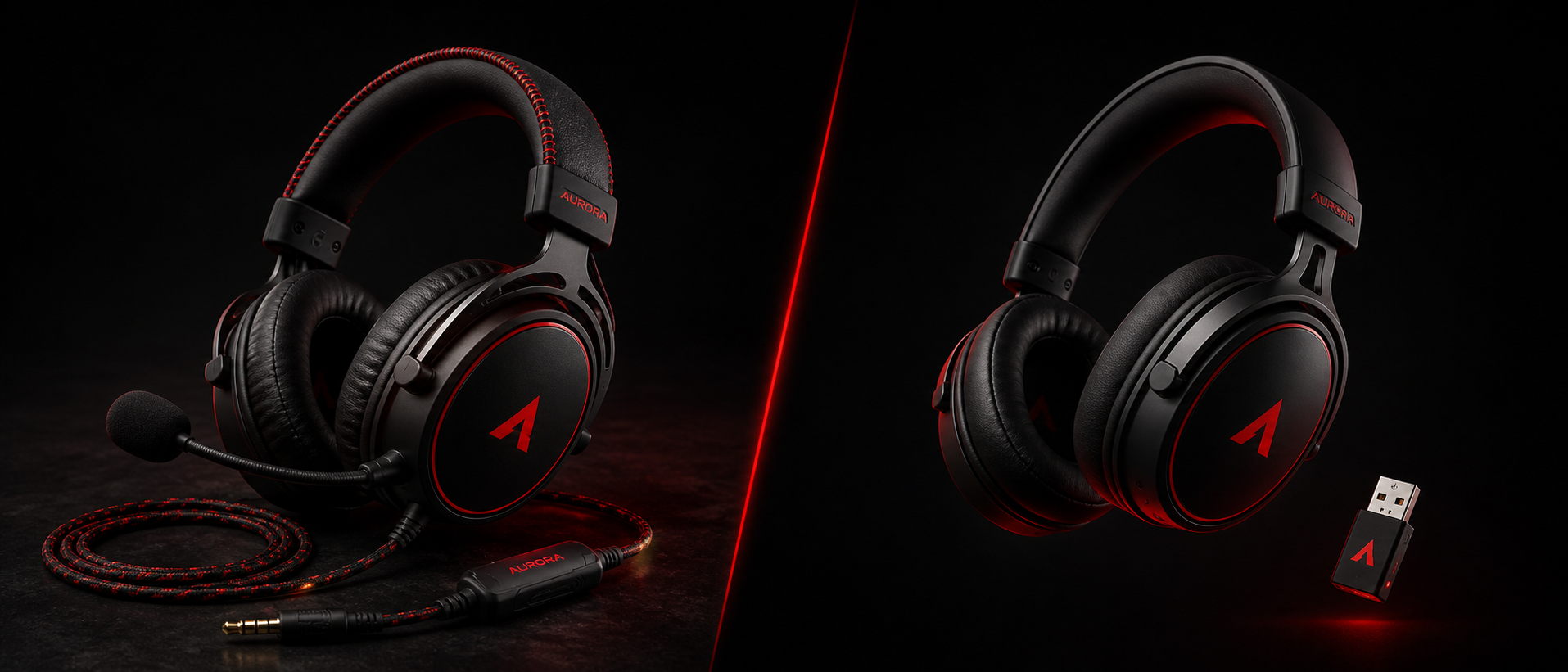
Five years ago, the answer was simple: if you're a serious gamer, go wired. Wireless meant latency, dropouts, and a dead headset mid-clutch. But it's 2026 now, and wireless audio tech has evolved dramatically. The question isn't whether wireless is "good enough" anymore — it's whether wired still justifies the cable hassle.
We've spent weeks researching both types for Valorant ranked lobbies, long Dota 2 sessions, and late-night single-player marathons. Here's everything you need to know before spending your money — with Indian pricing, local availability, and even our unique power-cut concerns factored in.
The State of Wireless in 2026
Wireless gaming headsets have come a long way. The key technologies driving this revolution:
2.4GHz Proprietary Dongles
Brands like Logitech (Lightspeed), SteelSeries (Quantum 2.0), Razer (HyperSpeed), and HyperX use dedicated 2.4GHz wireless that delivers sub-30ms latency — far below the threshold of human perception for audio.
Bluetooth 5.3 + LE Audio
The latest Bluetooth standard with LC3 codec offers improved latency (40-60ms in ideal conditions) and better battery life. Still not ideal for competitive FPS, but fine for casual and single-player gaming.
Battery Tech Improvements
Modern wireless headsets routinely deliver 60-120 hours on a single charge, with quick-charge features giving you hours of use from just 15 minutes of charging. Battery anxiety is becoming a thing of the past.
The bottom line: 2.4GHz wireless in 2026 is functionally identical to wired for gaming purposes. The latency difference exists on paper but is completely imperceptible during actual gameplay. Bluetooth is a different story — and that distinction matters.
Important Distinction
When we say "wireless gaming headset," we mean headsets that use a dedicated 2.4GHz USB dongle — not Bluetooth headphones repurposed for gaming. These are fundamentally different technologies with very different latency profiles. Many headsets in 2026 offer both (dual-mode), letting you switch between 2.4GHz for gaming and Bluetooth for phone calls or music.
Latency: Does It Actually Matter?
This is the biggest concern gamers have about wireless headsets. Let's put real numbers on it:
| Connection Type | Latency | Perceptible? | Competitive Viable? |
|---|---|---|---|
| Wired (3.5mm / USB) | ~0ms | No delay | Yes |
| 2.4GHz Wireless Dongle | 15 – 30ms | Not perceptible | Yes |
| Bluetooth (aptX Low Latency) | 40 – 80ms | Borderline | Casual only |
| Bluetooth (Standard SBC/AAC) | 100 – 200ms | Very noticeable | No |
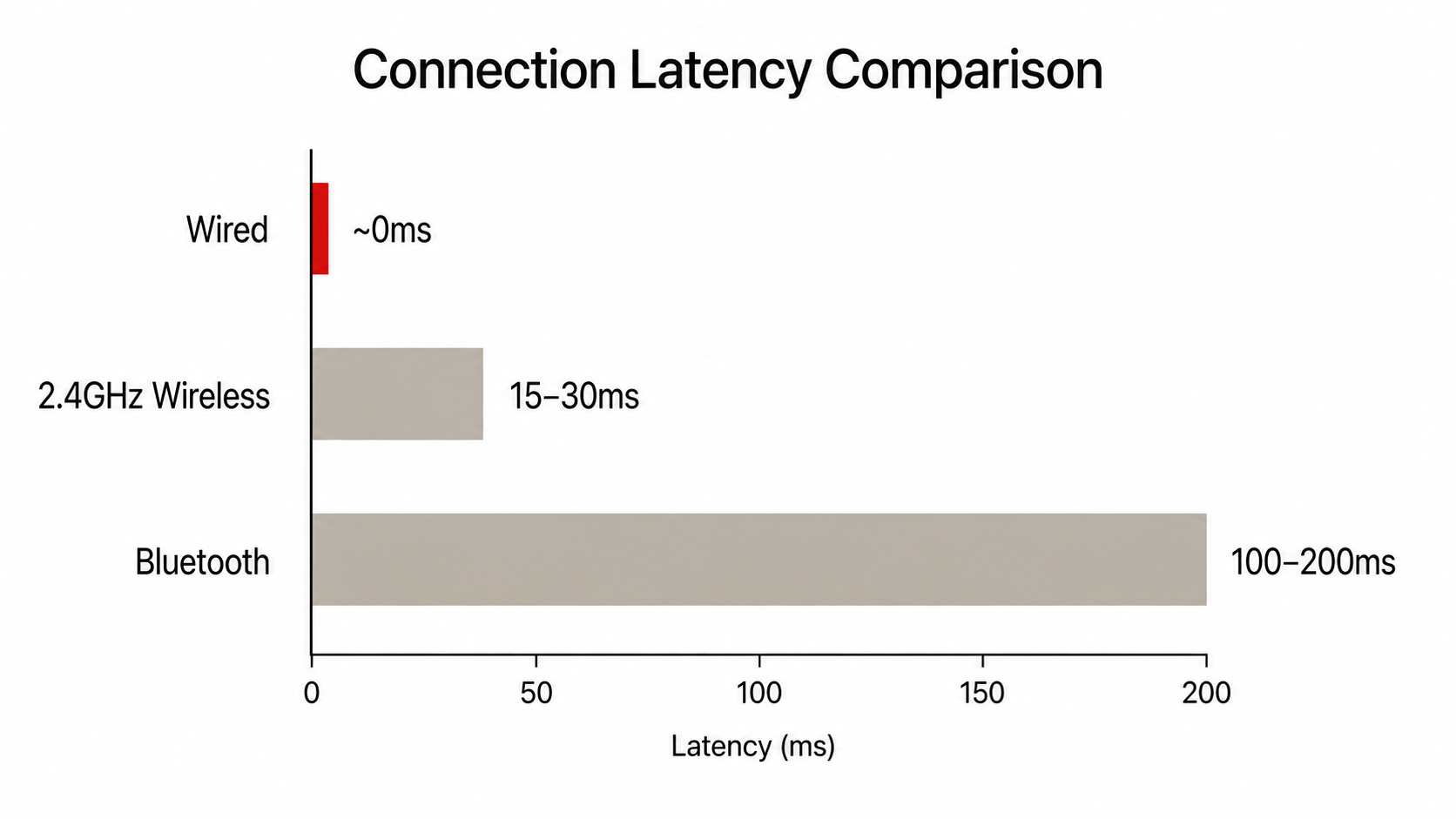
Here's the reality check: human hearing cannot perceive audio delays below ~30ms. Your brain literally cannot tell the difference between a wired headset and a 2.4GHz wireless one during gameplay. The footstep you hear in Valorant? It arrives at your ears within the same perceptual window either way.
The caveat: Bluetooth is a different beast entirely. Standard Bluetooth audio (SBC/AAC codec) introduces 100-200ms of delay. That means the gunshot you see on screen arrives at your ears a noticeable fraction of a second later. For competitive gaming where audio cues determine your reaction (hearing an enemy defuse, footstep direction in CS2), this is genuinely problematic.
The Latency Verdict
If you buy a wireless headset with a 2.4GHz dongle, latency is NOT a reason to choose wired anymore.
Sound Quality Comparison
This is where things get nuanced. The connection type (wired vs wireless) doesn't inherently determine sound quality — the drivers, tuning, and DAC do. However, there are practical differences:
Wired Advantage: Pure Analog Signal
A 3.5mm wired headset receives an analog signal directly from your motherboard's DAC or sound card. No compression, no encoding/decoding, no digital-to-analog conversion inside the headset. This means theoretically cleaner audio reproduction, especially in the sub-Rs 3,000 range where wireless headsets cut corners on internal DAC quality.
Wired Advantage: Budget-Friendly Quality
At the Rs 1,500-3,000 range, wired headsets like the HyperX Cloud Stinger 2 or Cosmic Byte GS430 put all their budget into driver quality and comfort. A wireless headset at this price has to sacrifice audio quality to fit in wireless tech and a battery.
Wireless Advantage: Built-in DAC Processing
Higher-end wireless headsets (Rs 8,000+) include their own DAC and amplifier, bypassing your motherboard's often mediocre onboard audio entirely. The Logitech G Pro X 2 and SteelSeries Arctis Nova 7, for instance, deliver audiophile-grade sound regardless of your PC's audio hardware.
Wireless Advantage: Software EQ & Spatial Audio
Wireless headsets from major brands come with companion software offering custom EQ profiles, spatial audio tuning (Tempest 3D, DTS Headphone:X), and microphone processing. While wired headsets can use system-level EQ, the integrated experience is smoother on wireless.
Our take: Below Rs 5,000, wired wins on sound quality per rupee. Above Rs 8,000, the gap essentially disappears. Between Rs 5,000-8,000, it's headset-specific — read reviews for the particular model you're considering rather than assuming one technology is better.
For gaming specifically (as opposed to music production), both wired and wireless deliver more than adequate sound quality for hearing directional audio cues, explosions, and voice chat clearly. The differences are subtle and won't impact your gameplay performance.
Convenience & Freedom
This is where wireless headsets genuinely dominate, and it's the reason most gamers who switch to wireless never go back:
No Cable Drag
No cable pulling on your head when you lean back. No snagging on your chair's armrest or getting caught under your keyboard. No tangled mess behind your desk. This sounds minor until you experience the freedom — then the cable feels unbearable.
Walk Away Freedom
Grab water from the kitchen during a loading screen. Answer the door without removing your headset. Stay in the Discord call while you stretch. Most 2.4GHz dongles work up to 10-15 meters through walls — your entire flat is covered.
Multi-Device Flexibility
Many dual-mode wireless headsets let you connect to your PC via 2.4GHz dongle while simultaneously connected to your phone via Bluetooth. Take a phone call without removing your headset or pausing your game. Switch between PC, PS5, and Nintendo Switch by just moving the dongle.
The wired convenience advantage? Plug in and it works. No charging, no dongles to lose, no firmware updates. If you're the type who sits down, plays, and gets up — a wired headset is simpler. But for most gamers who multitask, take breaks, or game in shared spaces, wireless convenience is transformative.
Battery Life Reality Check
The biggest fear with wireless: "What if it dies mid-game?" Let's look at what modern wireless headsets actually deliver:
| Headset | Battery Life | Quick Charge | Price (India) |
|---|---|---|---|
| HyperX Cloud III Wireless | 120 hours | USB-C, play while charging | ~Rs 12,000 |
| SteelSeries Arctis Nova 7 | 60 hours | 15 min = 6 hrs | ~Rs 14,000 |
| Logitech G Pro X 2 | 50 hours | USB-C, play while charging | ~Rs 18,000 |
| Razer BlackShark V2 Pro | 70 hours | 15 min = 6 hrs | ~Rs 15,000 |
| JBL Quantum 360 | 22 hours | USB-C charging | ~Rs 7,500 |
| Corsair HS80 Wireless | 24 hours | USB-C, play while charging | ~Rs 11,000 |
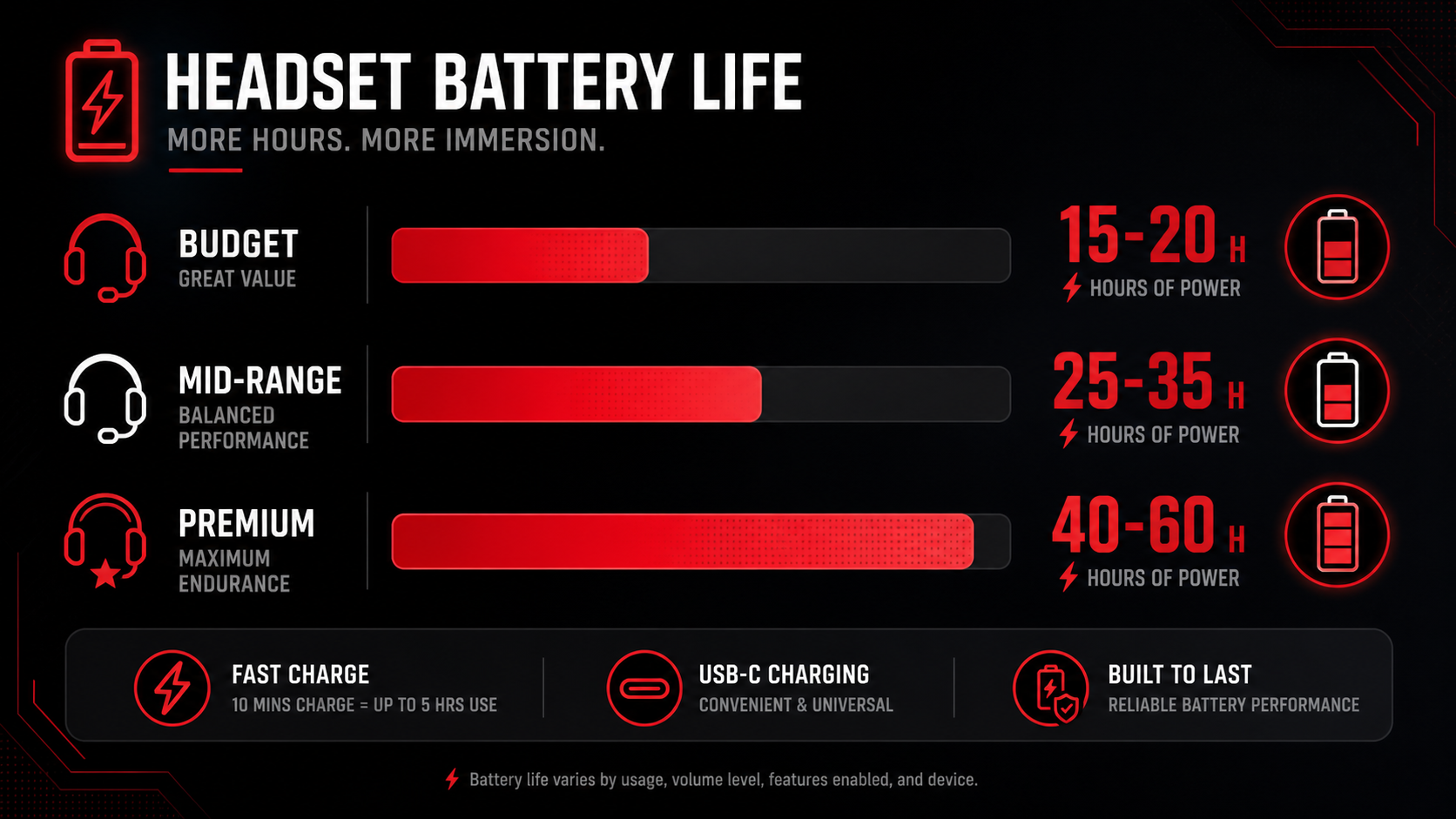
With 50-120 hours of battery life, you're charging your headset once every 1-3 weeks of regular gaming (3-4 hours daily). And with quick-charge, even if you forget — 15 minutes while you grab chai gives you another full session.
India-Specific Concern: Power Cuts
If you live in an area with frequent power cuts, a dead wireless headset is extra frustrating — you can't charge it when the power's out. Our recommendation: Always keep the USB-C or 3.5mm backup cable accessible. Most premium wireless headsets work as wired headsets when plugged in, even with zero battery. If you game on a laptop (which runs on its own battery during cuts), your wireless headset with a cable backup gives you the best of both worlds.
Pro tip for Indian gamers: Charge your headset overnight while you sleep. Even with a 22-hour battery life headset, daily overnight charging means you'll never run out mid-game. Set a reminder on your phone if needed — it becomes second nature within a week.
Durability & Longevity
This is an often-overlooked factor in the wired vs wireless debate:
Wired: Cable is the Weak Point
The #1 failure point for wired headsets is the cable — specifically where it meets the headset or the 3.5mm jack. Constant bending, pulling, and rolling over with your chair degrades the cable over time. Headsets with detachable cables solve this (you can replace just the cable for Rs 200-500), but cheap headsets with fixed cables often die within 12-18 months from cable failure alone.
Wireless: Battery Degradation
Lithium batteries degrade over hundreds of charge cycles. After 2-3 years of daily use, expect 20-30% battery capacity loss. A headset that lasted 60 hours new might last 40-45 hours after two years. The headset still works — you just charge more often. This is rarely a dealbreaker given how long modern batteries last.
Wireless: Dongle Loss
Lose the USB dongle and your headset is essentially a Bluetooth-only device (or useless, if it doesn't have Bluetooth fallback). Replacement dongles cost Rs 1,500-3,000 and aren't always available in India. Keep it in the headset's carrying case or permanently plugged into your PC.
Both: Ear Cushion Wear
In India's humid climate, ear cushions (especially leather/pleather) degrade faster — cracking and flaking within 12-18 months. This affects both wired and wireless equally. Look for headsets with replaceable ear cushions. Budget Rs 500-1,000 annually for replacement pads.
Longevity verdict: A quality wired headset with a detachable cable can last 4-5 years easily. A wireless headset will likely serve you well for 3-4 years before battery degradation becomes noticeable. Both are good investments at the right price point — but if you want a "buy it for life" option and don't mind cables, wired edges ahead slightly.
Pricing in India
Let's talk money. Here's what you can expect at each budget tier in India:
Under Rs 2,000 — Wired Only Territory
Entry-level gaming audio
At this price, wired is your only real option for gaming headsets. Any "wireless" headset under Rs 2,000 uses Bluetooth with unacceptable latency for gaming. Stick with wired options like the Cosmic Byte GS430 (Rs 800), Redgear Cosmo 7.1 (Rs 1,200), or HyperX Cloud Stinger Core (Rs 1,800). They offer decent audio for the price.
Rs 3,000 – 7,000 — The First Wireless Options
Budget wireless enters the chat
This is where budget 2.4GHz wireless options start appearing. The JBL Quantum 360 (Rs 7,500), Corsair HS55 Wireless (Rs 5,500), and Razer Barracuda X (Rs 6,500) offer genuine low-latency wireless. However, wired options at this price like the HyperX Cloud II (Rs 5,000) or SteelSeries Arctis 1 (Rs 4,000) still deliver better sound quality per rupee.
Rs 8,000 – 15,000 — Wireless Sweet Spot
Best value for wireless gaming
This is the sweet spot for wireless gaming headsets in India. The HyperX Cloud III Wireless (Rs 12,000), SteelSeries Arctis Nova 7 (Rs 14,000), and Razer BlackShark V2 Pro (Rs 15,000) deliver excellent audio, insane battery life, comfortable builds, and premium features. At this range, there's almost no reason to go wired unless you have a specific preference.
Rs 15,000+ — Endgame Wireless
Premium features, no compromises
The Logitech G Pro X 2 Lightspeed (Rs 18,000), SteelSeries Arctis Nova Pro Wireless (Rs 28,000), and Audeze Maxwell (Rs 25,000) represent the best wireless gaming audio money can buy. Features include hot-swappable batteries, hi-res audio certification, ANC, and dual-wireless connectivity. For most Indian gamers, the Rs 10,000-15,000 bracket offers 90% of the experience at half the price.
Key takeaway for Indian buyers: If your budget is under Rs 5,000, go wired — you'll get significantly better audio quality for the money. At Rs 7,000+, wireless becomes viable. At Rs 10,000+, wireless is the recommended choice for most gamers. Watch for Amazon and Flipkart sales during Diwali, Republic Day, and Prime Day for 20-40% discounts on premium wireless headsets.
Which Should You Choose?
After all the analysis, here's our straightforward recommendation based on your situation:
Choose Wired If...
- Your budget is under Rs 5,000 and you want the best audio per rupee
- You're an audio purist who wants zero compression and true analog signal
- You never leave your desk while gaming and cables don't bother you
- You hate charging things and want a "plug and forget" solution
- You use a dedicated sound card or external DAC/amp setup
- You want maximum longevity (no battery to degrade)
Choose Wireless (2.4GHz) If...
- Your budget is Rs 7,000+ and you value convenience
- You hate cable drag and want to move freely
- You multitask — walk around during loading screens, take calls, etc.
- You play competitive games and want latency-free wireless (2.4GHz delivers this)
- You use multiple devices (PC + PS5 + Switch + phone)
- You want a clean, cable-free desk setup
- You've had wired headsets die from cable failure before
And one clear rule: never use standard Bluetooth for competitive gaming. If your headset has both 2.4GHz and Bluetooth, always use the dongle for gaming and Bluetooth only for music/calls on your phone.
Frequently Asked Questions
Is wireless gaming headset good for competitive gaming?
What is the latency difference between wired and wireless headsets?
Should I use Bluetooth or 2.4GHz wireless for gaming?
How long do wireless gaming headsets last on a single charge?
Are wired headsets better quality than wireless?
What happens if my wireless headset dies mid-game?
The Bottom Line
TL;DR
In 2026, 2.4GHz wireless gaming headsets have effectively eliminated the latency argument. The 15-30ms delay is scientifically imperceptible to human ears. If someone tells you wireless headsets "have lag" — they're either using Bluetooth (which does) or repeating outdated information from 2019.
For most Indian gamers with a budget of Rs 8,000+, wireless is now the better choice. The convenience of no cables, the freedom to move around, the multi-device flexibility, and the 50-120 hour battery life make it an easy recommendation. Charge overnight, game all day.
If your budget is under Rs 5,000, wired still wins. You'll get significantly better audio quality and build for the money. No shame in cables — pro esports athletes still use wired headsets on stage (mainly out of habit and sponsor requirements, not because wireless is worse).
The golden rule: 2.4GHz dongle for gaming, Bluetooth for everything else. Never use standard Bluetooth for competitive play. And always keep a backup cable, because India's power situation means being prepared isn't paranoia — it's wisdom.
SOURCES & REFERENCES
Our recommendations are based on research, comparison, and analysis — we don’t physically test products. The technical claims on this page are backed by the standards bodies and published research below.
- 1.
Related Guides
Best Gaming Headsets Under Rs 2,000
Top budget wired picks for Indian gamers
Best Gaming Headsets Under Rs 5,000
Where wireless starts becoming viable
How to Choose a Gaming Headset
Drivers, comfort, mic quality — the full guide
Earbuds vs Headphones for Gaming
When earbuds actually make sense for gaming