Buying Guide · routers Routers

BEST GAMING WIFI ROUTERS UNDER
₹50,000 IN INDIA (2026)

If your Valorant ranked grind is plagued by random lag spikes every time someone in the house fires up a 4K stream, your router is the problem — not your ISP. A proper gaming router with dedicated QoS, multi-gig ports, and serious processing power can eliminate those ping spikes entirely. The Indian market in 2026 offers everything from WiFi 7 budget options at Rs.15,000 to ASUS ROG tri-band flagships at Rs.45,000.

By RageQuitters Team Updated May 10, 2026 8 routers tested Prices verified

We evaluated 8 gaming routers across four criteria: gaming performance (QoS, game acceleration, latency optimisation), speed and range (throughput, band count, coverage), build and hardware (processor, RAM, ports), and value for money. Whether you're running a wired esports setup or gaming on WiFi from across the house, there's a pick here for you.

ALL 8 ROUTERS COMPARED
Rank Routers WiFi StandardMax SpeedProcessorLAN PortsRAM Price
#1 Top Pick ASUS ROG Rapture GT-AX6000 WiFi 6 (802.11ax)6000 Mbps2.0 GHz Quad-CoreDual 2.5G + 4x Gigabit1 GB ₹31,499
#2 Best Premium ASUS ROG Rapture GT-AX11000 Pro WiFi 6 (802.11ax)11000 Mbps2.0 GHz Quad-Core (64-bit)10G + 2.5G + 4x Gigabit1 GB ₹44,999
#3 Best Budget Gaming TP-Link Archer GE400 WiFi 7 (802.11be)6500 MbpsQuad-Core2x 2.5G + 3x Gigabit512 MB (estimated) ₹14,999
#4 Best for Power Users GL.iNet GL-MT6000 (Flint 2) WiFi 6 (802.11ax)6000 MbpsMediaTek MT7986A Quad-Core2x 2.5G + 4x Gigabit1 GB DDR4 ₹23,115
#5 Best Value WiFi 7 TP-Link Archer BE400 WiFi 7 (802.11be)6500 MbpsQuad-Core2x 2.5G + 3x Gigabit512 MB (estimated) ₹16,999
#6 Best Nighthawk NETGEAR Nighthawk RS140 WiFi 7 (802.11be)5000 MbpsNot specified2.5G WAN + 3x Gigabit LANNot specified ₹28,600
#7 Best Entry WiFi 7 NETGEAR Nighthawk RS90 WiFi 7 (802.11be)3600 MbpsNot specified2.5G WAN + 4x Gigabit LANNot specified ₹19,213
#8 Best for Network Management Synology WRX560 WiFi 6 (802.11ax)3000 Mbps1.4 GHz Quad-Core1x 2.5G + 3x Gigabit512 MB ₹18,891

How We Rated These Products

Gaming routers rated on QoS effectiveness, throughput, hardware quality, and value relative to the under-Rs.50,000 Indian market.

Scored out of 10
Gaming Performance
40%

Dedicated QoS, game acceleration features, ping/latency optimisation, and traffic prioritisation effectiveness.

Speed & Range
35%

Maximum throughput, band count, WiFi standard, beamforming, antenna count, and real-world coverage.

Build & Hardware
15%

Processor speed/cores, RAM/flash, port quality and count, thermal design, and build reliability.

Value for Money
10%

Price vs. feature set relative to competitors at the same price point in India.

Detailed Reviews

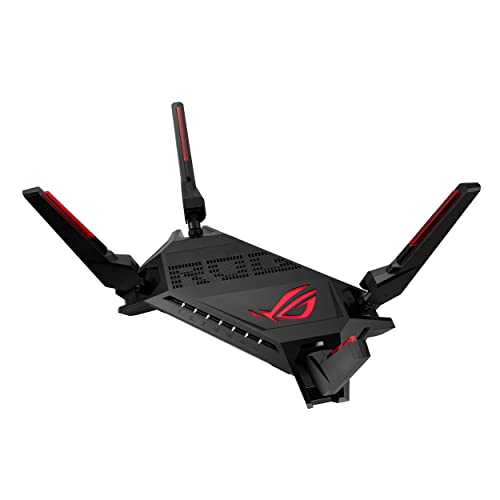
ASUS ROG Rapture GT-AX6000

ASUS ROG Rapture GT-AX6000

Top Pick

The ultimate WiFi 6 gaming router for Indian homes — unmatched QoS, dual 2.5G ports, and a flawless review record.

Our Rating

9.4

₹31,499

Check Price

Specifications

WiFi Standard WiFi 6 (802.11ax)
Max Speed 6000 Mbps (4804 + 1148)
Band Dual-Band
Processor 2.0 GHz Quad-Core
RAM 1 GB
LAN Ports Dual 2.5G + 4x Gigabit
Antennas 4 (internal)
Security WPA3, AiProtection Pro
Coverage 5000+ sq ft
USB USB 3.0
Mesh AiMesh Compatible

Pros

  • Triple-level game acceleration verified by Indian gamers to reduce packet loss and jitter
  • Dual 2.5G ports with flexible WAN/LAN config — ideal for NAS and multi-gig internet
  • 1GB RAM + 2.0GHz quad-core handles 30+ devices without lag
  • Subscription-free AiProtection Pro security (unlike TP-Link HomeShield Pro)
  • AiMesh compatible — use old ASUS routers as mesh nodes
  • 4.8-star rating with zero critical verified reviews

Cons

  • Rs.31,499 price puts it in premium territory
  • WiFi 6 only — no WiFi 7 future-proofing
  • Only dual-band (no dedicated backhaul band)
  • Web UI feels cluttered and image-heavy
  • Large footprint at 33.7 x 19.5 cm

Rating Breakdown

Gaming Performance 9.7
Speed & Range 9.3
Build & Hardware 9.5
Value for Money 8.8

Our Verdict

The GT-AX6000 is the gaming router Indian enthusiasts swear by. Its triple-level game acceleration genuinely reduces packet loss during Valorant ranked sessions, dual 2.5G ports handle both NAS and multi-gig internet beautifully, and the subscription-free security is a rare bonus. If you can stomach the price, this is the one to beat.

Best For Competitive gamers who want the best QoS and reliability money can buy under Rs.50,000
ASUS ROG Rapture GT-AX11000 Pro

ASUS ROG Rapture GT-AX11000 Pro

Best Premium

The no-compromise tri-band gaming fortress — 10G port, 11 Gbps speeds, and a dedicated gaming band.

Our Rating

9.5

₹44,999

Check Price

Specifications

WiFi Standard WiFi 6 (802.11ax)
Max Speed 11000 Mbps (4804 + 4804 + 1148)
Band Tri-Band
Processor 2.0 GHz Quad-Core (64-bit)
RAM 1 GB
LAN Ports 10G + 2.5G + 4x Gigabit
Antennas 8
Security WPA2/WPA3, AiProtection Pro
Coverage Extended (large homes)
USB USB 3.2 Gen 1
Mesh AiMesh Compatible

Pros

  • Tri-band with dedicated gaming band eliminates interference from other devices
  • 10G + 2.5G ports — future-proofed for years of multi-gig networking
  • 1GB RAM + 2.0GHz 64-bit quad-core handles massive device loads
  • AX11000 speeds (11 Gbps combined) — highest in any consumer router under Rs.50k
  • 8 antennas with RangeBoost Plus for extended whole-home coverage
  • AiMesh support for seamless mesh expansion

Cons

  • Rs.44,999 — the most expensive option, hard to justify for casual gamers
  • WiFi 6 only — no WiFi 7 at this premium price point
  • Some reliability concerns (failures reported within 1 year in US reviews)
  • ASUS removed DNS filtering in recent firmware, pushing paid AdGuard
  • Cluttered web interface with many niche features
  • Massive physical size — not for small desks

Rating Breakdown

Gaming Performance 9.7
Speed & Range 9.5
Build & Hardware 9.5
Value for Money 8.2

Our Verdict

The GT-AX11000 Pro is the most powerful gaming router under Rs.50,000 — period. Its dedicated tri-band gaming channel means your ranked match never competes with household streaming, and the 10G port is pure overkill in the best way. Only buy this if you're running a multi-device gaming household or a home server alongside your gaming rig.

Best For Hardcore gamers with multi-device households, home servers, or future-proofing needs
GL.iNet GL-MT6000 (Flint 2)

GL.iNet GL-MT6000 (Flint 2)

Best for Power Users

The power user's dream — OpenWrt flexibility, 900Mbps VPN, and 1GB RAM in a sleek package.

Our Rating

9.1

₹23,115

Check Price

Specifications

WiFi Standard WiFi 6 (802.11ax)
Max Speed 6000 Mbps (4804 + 1148)
Band Dual-Band
Processor MediaTek MT7986A Quad-Core
RAM 1 GB DDR4
Storage 8 GB eMMC
LAN Ports 2x 2.5G + 4x Gigabit
Security WPA3, OpenWrt-based
USB USB 3.0
VPN WireGuard (900Mbps) + OpenVPN (190Mbps)
OS OpenWrt/Linux

Pros

  • OpenWrt gives complete network control — custom QoS, firewall rules, plugins
  • WireGuard VPN at 900Mbps — fastest VPN throughput in this roundup
  • 1GB DDR4 RAM + 8GB eMMC storage — most storage in class
  • Dual 2.5G + 4x Gigabit ports — excellent wired connectivity
  • AdGuard Home built-in for network-wide ad blocking
  • 4.7★ with 2,576 reviews — battle-tested globally

Cons

  • No gaming-specific UI or one-tap game mode — requires manual config
  • Primarily global product — limited Indian sales/support presence
  • Internal antennas — may not match external-antenna routers in range
  • OpenWrt learning curve not suitable for beginners
  • No official Indian warranty information listed

Rating Breakdown

Gaming Performance 9.0
Speed & Range 9.1
Build & Hardware 9.3
Value for Money 9.1

Our Verdict

The Flint 2 is for gamers who want complete network control. Its OpenWrt base enables custom SQM/CAKE QoS that arguably eliminates bufferbloat better than proprietary solutions, and the 900Mbps WireGuard VPN is unmatched. Not for beginners, but if you know your way around a terminal, this is your router.

Best For Tech-savvy gamers who want OpenWrt flexibility, VPN performance, and full network control
NETGEAR Nighthawk RS140

NETGEAR Nighthawk RS140

Best Nighthawk

NETGEAR's WiFi 7 Nighthawk — fast and compact, but light on gaming features.

Our Rating

8.9

₹28,600

Check Price

Specifications

WiFi Standard WiFi 7 (802.11be)
Max Speed 5000 Mbps
Band Dual-Band
LAN Ports 2.5G WAN + 3x Gigabit LAN
Antennas Internal
Security WPA3, NETGEAR Armor (trial)
Coverage 2250 sq ft / 80 devices

Pros

  • WiFi 7 BE5000 — fastest Nighthawk WiFi 7 under Rs.30,000
  • 2.5G internet port for multi-gig ISP plans
  • Automatic firmware updates — set and forget security
  • Compact sleek design with internal antennas
  • Covers 2,250 sqft with 80 device capacity
  • Established Nighthawk brand with good global track record

Cons

  • Only 3 Gigabit LAN ports — limiting for wired gaming setups
  • No dedicated gaming acceleration or gaming QoS
  • NETGEAR Armor security requires paid subscription after 30-day trial
  • Rs.28,600 is expensive for the port count and feature set
  • No USB port for network storage
  • Made for USA — may have limited India-specific support

Rating Breakdown

Gaming Performance 8.6
Speed & Range 9.3
Build & Hardware 8.8
Value for Money 8.4

Our Verdict

The RS140 brings Nighthawk reliability and WiFi 7 BE5000 speeds in a sleek, compact package. But at Rs.28,600 with only 3 LAN ports and no gaming-specific QoS, it's a tough sell against the feature-packed ASUS alternatives. Best for Nighthawk loyalists who prioritise simplicity over gaming features.

Best For Users who want a simple, reliable WiFi 7 router from a trusted brand without gaming complexity
NETGEAR Nighthawk RS90

NETGEAR Nighthawk RS90

Best Entry WiFi 7

Entry-level WiFi 7 from NETGEAR — affordable but basic.

Our Rating

8.6

₹19,213

Check Price

Specifications

WiFi Standard WiFi 7 (802.11be)
Max Speed 3600 Mbps
Band Dual-Band
LAN Ports 2.5G WAN + 4x Gigabit LAN
Antennas Internal
Security WPA3, NETGEAR Armor (trial)
Coverage 2000 sq ft / 50 devices
Weight 848 g

Pros

  • WiFi 7 at under Rs.20,000 — most affordable WiFi 7 option
  • 2.5G internet port for multi-gig ISP plans
  • 976 reviews provide extensive reliability data
  • Compact sleek design with small footprint
  • 4x Gigabit LAN ports (one more than RS140)
  • Automatic firmware updates and built-in security

Cons

  • BE3600 speeds — slowest WiFi 7 router in this roundup
  • Some users report 5GHz band disconnections
  • Setup app can be frustrating (multiple attempts needed)
  • No USB port for network storage
  • NETGEAR Armor requires paid subscription after trial
  • Made for USA — limited India-specific support

Rating Breakdown

Gaming Performance 8.4
Speed & Range 8.8
Build & Hardware 8.6
Value for Money 8.8

Our Verdict

The RS90 gets you into WiFi 7 at the lowest price point in this roundup. The 2.5G WAN port is a nice touch for multi-gig ISP plans, but BE3600 speeds and zero gaming features make it better suited as a general-purpose upgrade than a dedicated gaming weapon. Good for casual gamers who want modern tech cheap.

Best For Casual gamers upgrading to WiFi 7 on a budget who don't need dedicated gaming features
Synology WRX560

Synology WRX560

Best for Network Management

The network administrator's choice — enterprise-grade VLAN isolation and SRM OS in a home router.

Our Rating

8.6

₹18,891

Check Price

Specifications

WiFi Standard WiFi 6 (802.11ax)
Max Speed 3000 Mbps (2400 + 600)
Band Dual-Band
Processor 1.4 GHz Quad-Core
RAM 512 MB
LAN Ports 1x 2.5G + 3x Gigabit
Security WPA3, VLAN segmentation, Threat Prevention
USB USB 3.2 Gen 1
Mesh Synology Mesh compatible
OS Synology Router Manager (SRM)

Pros

  • Synology Router Manager (SRM) — best router OS for network management
  • VLAN segmentation — isolate gaming, IoT, and work networks completely
  • 2.5G Ethernet port for NAS or multi-gig internet
  • Threat Prevention and intrusion detection built-in (no subscription)
  • Multiple SSID support with per-SSID policies
  • Synology mesh compatible for expansion

Cons

  • AX3000 speeds — significantly slower than competitors at this price
  • No gaming-specific features or gaming UI
  • Only 512MB RAM — less headroom for heavy traffic
  • Internal antennas limit range flexibility
  • Only 2-year warranty (vs 3 years for TP-Link/ASUS)
  • Niche product — limited gaming community feedback

Rating Breakdown

Gaming Performance 8.4
Speed & Range 8.6
Build & Hardware 9.1
Value for Money 8.4

Our Verdict

The WRX560 isn't a traditional gaming router, but its VLAN segmentation lets you completely isolate gaming traffic from IoT and work devices — something no other router here can do natively. For gamers who also manage smart homes or work-from-home setups, the SRM OS is unmatched in granular control.

Best For Network-savvy gamers who want VLAN isolation and enterprise-grade traffic management at home

OUR VERDICT — BEST BY USE CASE

Best Overall
ASUS ROG Rapture GT-AX6000
Dual 2.5G ports + triple-level game acceleration + 4.8★ rating = the complete package at Rs.31,499
Best Premium
ASUS ROG Rapture GT-AX11000 Pro
Tri-band with dedicated gaming band and 10G port — overkill in the best way for serious setups
Best Budget Gaming
TP-Link Archer GE400
WiFi 7 + WTFast + dual 2.5G at Rs.14,999 — unbeatable value for money
Best for Power Users
GL.iNet GL-MT6000 (Flint 2)
OpenWrt + 900Mbps VPN + 8GB storage — total network control for the technically inclined

Buying Guide

WiFi 6 vs WiFi 6E vs WiFi 7: Which Do You Need for Gaming?

WiFi 7 (802.11be) offers Multi-Link Operation (MLO) which simultaneously uses multiple bands to reduce latency — a genuine gaming advantage. WiFi 6E adds a 6GHz band but device support in India is limited and reviewers report it often doesn't activate. WiFi 6 remains excellent for gaming with mature drivers and wide device support. For future-proofing, WiFi 7 with 2.5G ports is the sweet spot in 2026.

Why 2.5G Ports Matter for Gaming

If you have a gigabit or faster internet plan, a 2.5G WAN port ensures your router isn't the bottleneck. For wired gaming PCs, a 2.5G LAN port delivers faster local network speeds (important for NAS access, game downloads, and LAN parties). Most gaming motherboards now include 2.5G Ethernet, so your router should match.

Gaming QoS: Marketing vs Reality

ASUS's triple-level game acceleration and TP-Link's WTFast GPN are the only solutions with verified Indian user feedback confirming reduced ping/packet loss. Generic QoS (traffic prioritisation) helps when multiple devices share bandwidth, but dedicated gaming acceleration optimises the path to game servers specifically. If you game competitively, prioritise routers with purpose-built gaming QoS.

How Much RAM Does a Gaming Router Need?

512MB handles basic routing for 20-30 devices. 1GB is ideal for gaming routers handling 30+ devices with VPN, QoS, and security features running simultaneously. The ASUS routers and GL.iNet MT6000 with 1GB RAM provide noticeably smoother performance under heavy multi-device loads compared to 512MB alternatives.

Subscription-Free vs Subscription-Based Security

ASUS AiProtection Pro (powered by Trend Micro) is completely free with no subscription. TP-Link HomeShield Pro and NETGEAR Armor both require paid subscriptions for advanced features. If ongoing costs matter, ASUS offers the best security value proposition. The trade-off: ASUS shares network data with Trend Micro for this 'free' protection.

Single Router vs Mesh for Gaming

For gaming, a single powerful router placed centrally outperforms mesh systems in latency. Mesh adds a hop between nodes, introducing 1-5ms additional latency. If your gaming setup is within range of the router (same/adjacent room), stick with a powerful single unit. Only consider mesh if you game in rooms far from the router with no option to relocate it.

Frequently Asked Questions

Is WiFi 7 worth it for gaming in India in 2026?

Yes, if your router has 2.5G ports and Multi-Link Operation (MLO). MLO reduces latency by using multiple bands simultaneously. The TP-Link GE400 at Rs.14,999 makes WiFi 7 gaming affordable. However, you won't see dramatic speed improvements unless you have a multi-gig internet plan.

Do I need a gaming router if I only play on mobile?

If you experience lag while others use the network, yes. Gaming routers with QoS prioritise your device's traffic. ASUS's Mobile Game Mode specifically optimises for mobile gaming with one tap. Budget option: TP-Link GE400's game acceleration also works for mobile.

ASUS RT-AX86U Pro vs ASUS ROG GT-AX6000 — which should I buy?

GT-AX6000 if budget allows (Rs.31,499). It has dual 2.5G ports, better QoS, and a 4.8★ rating vs 4.5★. RT-AX86U Pro (Rs.22,399) is the better value — same 1GB RAM and gaming features, just single 2.5G and slightly lower speeds.

Why are NETGEAR routers showing 'Made for USA only'?

These are US-market products sold on Amazon India by importers. They work fine in India (WiFi frequencies are compatible) but lack official Indian warranty. TP-Link and ASUS offer India-specific models with local warranty and support.

Can I use OpenWrt routers like GL.iNet MT6000 for gaming?

Absolutely. OpenWrt supports SQM (Smart Queue Management) with CAKE algorithm which is arguably the best QoS for gaming — it eliminates bufferbloat better than proprietary solutions. The trade-off: no one-click game mode; you need to configure it manually.

How important is the number of antennas for gaming?

More antennas help with MU-MIMO (serving multiple devices simultaneously) and range, but don't directly reduce gaming latency. A 3-antenna router in the same room as your gaming PC will outperform an 8-antenna router two rooms away. Placement matters more than antenna count.

Should I connect my gaming PC via WiFi or Ethernet?

Always Ethernet for competitive gaming. Even the best WiFi 7 router adds 1-3ms latency vs wired. Use the router's 2.5G LAN port with a CAT6 cable for the lowest possible latency. WiFi is fine for casual gaming and mobile.

Do these routers work with Jio Fiber / Airtel Xstream / ACT Fibernet?

Yes, all routers in this list work with any Indian ISP. Connect your ISP's ONT/modem to the router's WAN port via Ethernet cable. You may need to set PPPoE credentials or bridge mode on your ISP modem. Indian reviewers confirm compatibility with ACT 400Mbps and Jio gigabit plans.

We may earn a commission via Amazon.in affiliate links. Prices shown are indicative — check the retailer for current rates. This doesn't affect our reviews.